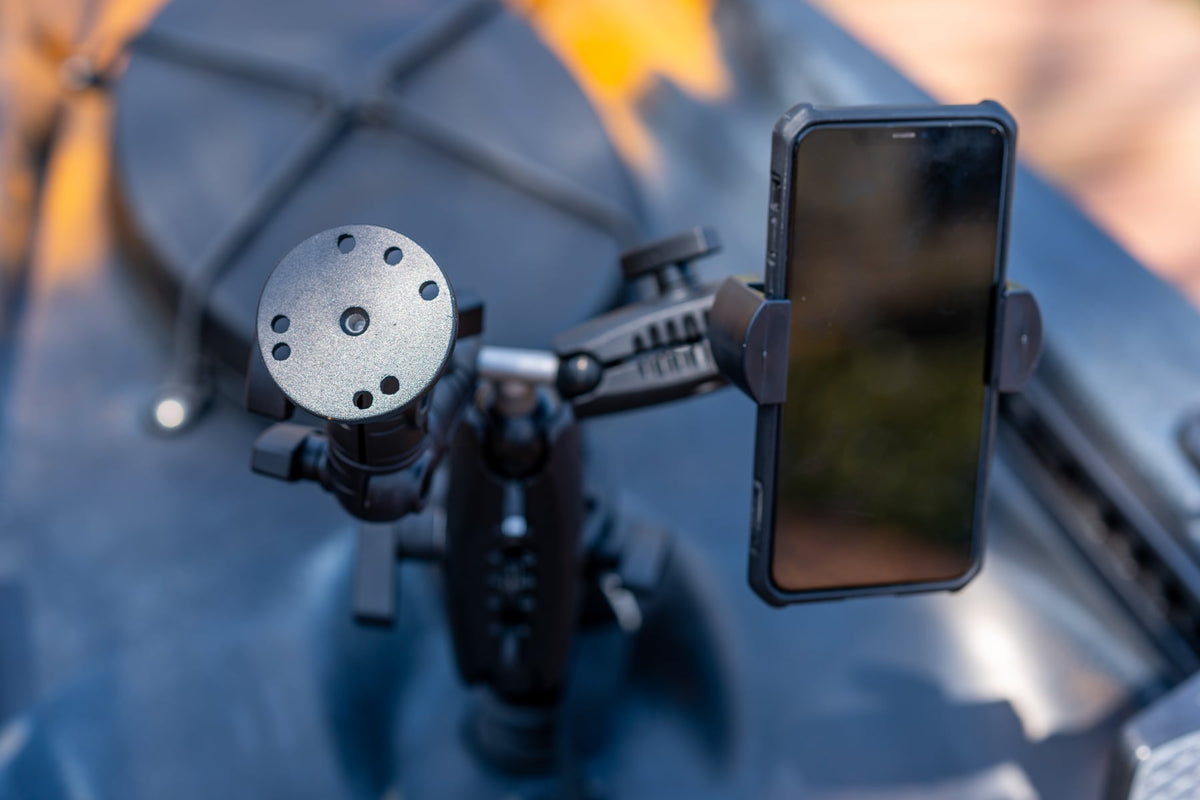
Kayak Fish Finder Mount Setup: A Complete Guide to Secure, Removable Electronics Mounting
You just spent a few hundred dollars on a Garmin Striker or a Humminbird Helix. You unbox it, hold it up to your kayak, and then reality hits: where exactly does this thing go? And how do you keep it from rattling itself to death the first time you hit some chop?

It's a common moment for kayak anglers, and it's where a lot of people make their first real mistake. They grab whatever generic mount looks close enough, zip-tie a few cables, and hope for the best. A few trips later, they're dealing with a loose screen, a terrible viewing angle, or worse, a fish finder that took a swim.
Your kayak fish finder mount setup deserves the same thoughtfulness as the electronics themselves. The right mounting system keeps vibration in check, holds your screen at a readable angle even in rough water, and gives you a removable kayak electronics mount you can pull off in seconds for transport or security. Get this part right from the start and everything else about your time on the water gets better.
This guide walks through every decision you'll need to make: choosing the right base type and ball size, picking device-specific plates, and adding a second mount for your phone.
Choosing the Best Kayak Fish Finder Mount: What to Look For
Picking the best kayak fish finder mount comes down to a handful of criteria that separate gear you can trust from gear you'll replace by next season.
Material durability should be at the top of your list. Plastic mounts degrade fast in UV exposure and saltwater environments. Look for powder-coated steel, aluminum, or high-grade composite construction that resists corrosion season after season. iBOLT builds its mounts from exactly these industrial-grade materials because they're engineered for demanding environments, not repurposed from generic consumer products.
Mounting base type matters, too. Track rail mounts, drill bases, and clamp-style bases each have strengths depending on your kayak's layout. Adjustability is another big factor: 360-degree rotation and tilt let you angle your screen away from glare without repositioning the entire unit. Weight capacity needs to match your fish finder's size, and a removable kayak electronics mount design means you can pull your gear off quickly at the ramp instead of leaving expensive electronics exposed overnight.
The iBOLT Universal Marine & Electronics Mounting Plate is a solid foundation piece to start with. Made from powder-coated steel and compatible with industry-standard ball sizes, it gives you a purpose-built connection point between your fish finder and whatever base setup fits your kayak.
Kayak Track Rail Fish Finder Mounts vs. Drill Base Mounts
You've got your fish finder picked out, your kayak is rigged and ready, and now you're staring at the hull trying to figure out how to actually attach everything. This is the decision that shapes your entire kayak fish finder mount setup, so it's worth understanding what each approach offers.
Track rail mounts clamp directly onto the Scotty or RAM-compatible accessory tracks that come pre-installed on most modern fishing kayaks. The biggest advantage here is flexibility. You can slide your fish finder along the rail, reposition it in seconds, and remove it completely when you're done for the day. No holes, no commitment. If you like to swap configurations between trips, a kayak track rail fish finder mount like the iBOLT Universal Marine Fish Finder IncrediBOLT Clamp / Handlebar / Rail Mount is a strong pick.
Drill base mounts use the AMPS hole pattern to create a permanent, rock-solid anchor point. These are ideal for dedicated setups on Jon boats or kayaks where you want absolutely zero movement. The iBOLT 25mm Universal Marine Electronic Fish Finder to AMPS Mount delivers that locked-in stability with industry-standard 25mm ball compatibility.
Both options use industry-standard 25mm and 38mm ball sizes, so you can mix and match components across your setup as your needs evolve.
YakAttack CellBlok vs AMPS Plate: Which System Is More Versatile?
If you've spent any time browsing kayak fishing forums, you've probably seen the YakAttack CellBlok recommended for mounting phones and small devices. It's a solid product for what it does. But here's the catch: it's designed specifically for phones, and it locks you into YakAttack's proprietary mounting ecosystem. That means if you want to swap your phone holder for a Garmin Striker or a larger display down the road, you're essentially starting over with new hardware.
This is where the AMPS plate standard pulls ahead. AMPS is a universal 4-hole mounting pattern used across marine electronics, fish finders, phones, tablets, and GPS units. When you build your kayak fish finder mount setup around the AMPS pattern, you're choosing flexibility over brand lock-in. Mount a fish finder today, swap in a phone cradle tomorrow, add a tablet next season. Same base, same arms, no new hardware required.
iBOLT's AMPS plate fish finder mounting options are compatible with industry-standard 25mm (B size) and 38mm (C size) ball mounts. The 25mm Fish Finder Mounting Plate and 38mm Fish Finder Mounting Plate both work with RAM arms, iBOLT arms, and other standard components. Even the 25mm Diamond AMPS Adapter Plate at just $6.95 lets you connect practically any AMPS-compatible device to your existing 25mm ball mount system.
When comparing YakAttack CellBlok vs AMPS plate versatility, the answer comes down to whether you want a single-purpose holder or a foundation that grows with your gear.
Garmin Striker Kayak Mount: Purpose-Built Options for Popular Fish Finders
You picked up a Garmin Striker 4 because it does exactly what you need on the water. But then you go looking for a Garmin Striker kayak mount and realize the options are either flimsy universal trays or expensive proprietary brackets that don't fit your kayak's rail diameter. Sound familiar?
The Striker series uses a standard AMPS hole pattern, which means you can mount it directly to purpose-built AMPS plates without any adapters or workarounds. iBOLT makes three Striker-specific rail mount options, each designed for a different kayak fish finder mount setup.
For anglers who frequently adjust their viewing angle while paddling or trolling, the Garmin Striker 4 IncrediBOLT 360 Clamp Mount gives you full 360-degree rotation with a single hand. If you prefer a simpler, lighter profile, the Garmin Striker 4 Handlebar/Rail Mount keeps things clean and compact. Need extra reach to position your screen further from the rail? The Garmin Striker 4 Dual Arm Rail Mount adds a second arm segment for more adjustability.
All three feature composite and aluminum construction with powder coating for corrosion resistance, and they clamp onto kayak track rail fish finder mount setups and standard tubular rails alike. No drilling required.
Don't Forget Your Phone: Mounting a Second Device on Your Kayak
Your fish finder handles sonar, while your phone is pulling double duty with navigation apps, weather radar, tide charts, and fishing log software. The problem? Most kayaks have limited rail space, and your best removable kayak electronics mount is already taken by the fish finder. You need a second mounting point that won't crowd your cockpit.
The iBOLT Moto-Vise Heavy Duty Phone Handlebar/Rail Mount clamps directly to your kayak's rails and holds your phone securely at $42.95. Need full rotational adjustability to switch between portrait and landscape? The iBOLT Moto-Vise IncrediBOLT 360 Heavy Duty Phone Clamp adds 360-degree articulation for $72.95.
Because the best kayak fish finder mount setup accounts for every device you rely on out there, planning for a phone mount from the start saves you from running out of rail space later.
Putting It All Together: Your Setup Checklist
You've done the research. Now it's time to build your kayak electronics mounting system with confidence. Here's a quick checklist before your first paddle:
- Survey your kayak's mounting points. Look for existing track rails, flat deck surfaces suitable for drill bases, and any rails or tubes that accept clamp mounts.
- Choose the right ball size. Go with 25mm (1 inch) for lighter units like a Garmin Striker kayak mount, or step up to 38mm (1.5 inch) for larger, heavier displays.
- Pick your base type. Drill bases offer permanent stability; clamp mounts give you a removable kayak electronics mount you can swap between vessels.
- Select your device plate. Match it to your specific fish finder's bolt pattern or go with a universal plate for flexibility.
- Dry-test everything at home. Assemble the full configuration, check your viewing angles, and tighten all joints before hitting the water.
With iBOLT's 300+ modular parts and cross-compatibility with industry-standard ball sizes, you can mix and match components to build the exact configuration your kayak demands. Every iBOLT order ships within 24 business hours and is backed by a 2-year warranty, so you can get your setup dialed in quickly and trust it for seasons to come.

Frequently Asked Questions
Q: What size ball mount do I need for a kayak fish finder?
A: For smaller fish finders like the Garmin Striker 4, a 25mm (1 inch, also called B size) ball mount provides plenty of holding strength. If you're running a larger display like a 7-inch or 9-inch unit, step up to a 38mm (1.5 inch, also called C size) ball mount for better stability and load capacity.
Q: Can I use an iBOLT fish finder mount with RAM arms and accessories?
A: Yes. iBOLT mounts use industry-standard 25mm and 38mm ball sizes, which are cross-compatible with RAM and other brands that follow the same standard. You can mix and match arms, bases, and device plates across manufacturers.
Q: Do I need to drill holes in my kayak to mount a fish finder?
A: Not necessarily. Rail clamp mounts attach directly to your kayak's existing track rails or tubular rails without any drilling. Drill base mounts are only needed if you want a permanent, fixed mounting location on a flat deck surface.
Q: Is the YakAttack CellBlok compatible with fish finders?
A: The YakAttack CellBlok is designed primarily for phones and small devices, not fish finders. If you want a system that works with both phones and fish finders, building around the AMPS plate standard gives you more flexibility to swap devices without replacing your entire mount setup.
Find Your Setup
Your kayak fish finder mount setup doesn't need to be complicated, but it does need to be intentional. The right combination of base, arm, and device plate keeps your electronics secure, visible, and easy to remove at the end of the day. Whether you're running a Garmin Striker on a track rail clamp or building a multi-device cockpit with a drill base and phone mount, the key is choosing components built for the water and designed to work together.
Check out the full iBOLT marine and fish finder mount lineup to find the right pieces for your kayak.


Leave a comment
This site is protected by hCaptcha and the hCaptcha Privacy Policy and Terms of Service apply.