AMPS VESA Ball Mount Sizes: Complete Guide to Device Mounting Standards
Picture this: you've just invested in a premium tablet for your warehouse operations, but when you go to mount it on your forklift, nothing lines up. The mounting holes don't match, the ball sizes are wrong, and you're stuck with an expensive device that can't be properly secured where you need it most. This frustration highlights exactly why understanding AMPS VESA ball mount sizes matters for anyone working with professional mounting systems.

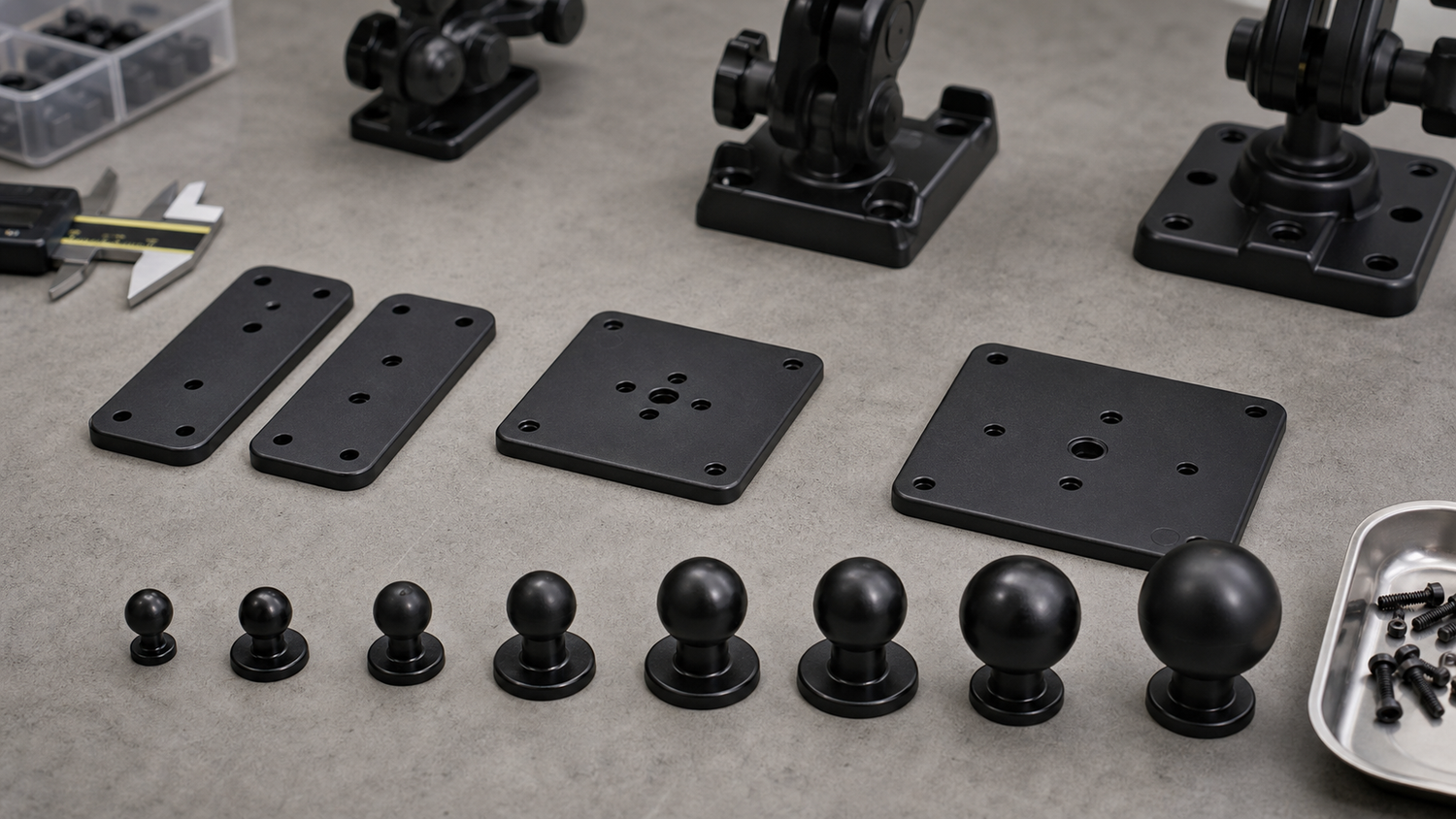
Mounting plates, ball sizes, and hardware arranged for compatibility planning.
If you've ever stood in a warehouse holding a tablet that won't mount properly, or tried to install a GPS unit only to discover incompatible ball sizes, you know how critical proper mounting standards are. The good news? Once you understand the relationship between AMPS patterns, VESA configurations, and industry-standard ball sizes, building reliable mounting solutions becomes straightforward.
Understanding AMPS and VESA Standards: The Foundation of Professional Mounting
In the world of device mounting, two key standards dominate the landscape: AMPS (Automotive Mount Pattern Standard) and VESA (Video Electronics Standards Association). While these might sound like technical jargon, they're actually your roadmap to ensuring any device can mount securely to any compatible system.
AMPS focuses primarily on automotive and industrial applications, featuring the familiar 4-hole rectangular pattern you'll find on most vehicle-specific mounts and rugged device holders. Walk into any professional fleet operation, warehouse, or commercial vehicle, and you'll spot the same mounting pattern again and again: four precisely spaced holes arranged in a 30.5mm x 38.1mm rectangle.
This standardization creates a universal language between devices and mounts, whether you're installing a tablet in a delivery truck, mounting a GPS unit on construction equipment, or setting up a barcode scanner in a warehouse.
VESA, on the other hand, was originally designed for monitors and displays, using square hole patterns like 75x75mm or 100x100mm configurations. When you're setting up monitors in a warehouse or mounting displays on forklifts, these VESA patterns ensure your display connects properly to your mounting system. The 75x75 pattern typically supports lighter displays up to 15 pounds, while 100x100 can handle heavier monitors up to 35 pounds.
The real magic happens when these mounting standards work together with industry-standard ball sizes: 17mm, 20mm, 25mm (B-size), and 38mm (C-size). These ball joint systems provide the articulation and adjustability that make professional mounting solutions so versatile.
The AMPS Advantage: Universal 4-Hole Compatibility
What makes AMPS particularly valuable is its scalability with different ball mount sizes. The same AMPS pattern works reliably with 17mm balls for lightweight GPS units, 25mm balls for tablets and smartphones, 38mm balls for heavy-duty applications, and even larger configurations for industrial monitors. This standardization means you can upgrade devices without completely rebuilding your mounting infrastructure.
The iBOLT Industry Standard 17mm AMPS Plate exemplifies this compatibility, working with Garmin devices, iBOLT phone holders, and other 17mm industry-standard equipment. For applications requiring additional stability, the iBOLT 4 Hole AMPS Pattern Metal Backing Plate provides the foundation strength needed for demanding commercial environments.
For situations where you need to bridge different standards, the iBOLT AMPS to VESA 75/100 Plate offers a perfect solution, converting between AMPS and VESA patterns while maintaining the security and adjustability your application demands.
Decoding Ball Mount Sizes: From GPS Units to Heavy-Duty Monitors
Understanding ball mount sizes is crucial for selecting the right mounting solution for your devices. The three most common ball sizes each serve specific applications and device types in professional and industrial environments.
17mm Ball Mounts represent the smallest standard size, primarily used for GPS devices, smartphones, and lightweight accessories. Originally popularized by Garmin GPS systems, this size has become the go-to choice for navigation devices in vehicles. The iBOLT 17mm to 17mm Composite Ball Adapter provides reliable connectivity for extending reach or adding articulation points to your mounting system.
20mm Ball Mounts bridge the gap between lightweight and heavy-duty applications. This mid-range size works well for tablets, dash cameras, and medium-weight devices that need more stability than 17mm can provide. The iBOLT 20mm Metal AMPS Adapter Plate offers robust aluminum construction for demanding commercial environments.
25mm (1-inch) Ball Mounts serve as the industry workhorse, handling tablets, monitors, and heavy devices in warehouse, fleet, and marine applications. This size provides the strength needed for larger screens and high-vibration environments. The iBOLT 25mm 1 inch Composite Extension Ball Adapter allows you to extend your mounting arm while maintaining full compatibility with existing systems.
Each ball size maintains cross-compatibility within its standard, meaning any 25mm socket will accept any 25mm ball, regardless of manufacturer. This standardization ensures your mounting investments remain flexible as your device needs evolve.
VESA Mounting: When Displays Need Professional-Grade Support
For warehouse applications with monitors and displays, understanding VESA patterns becomes critical. This is where AMPS VESA ball mount sizes work together effectively: you need the right ball size to support your display's weight and provide stable positioning.
For warehouse applications, the iBOLT VESA 75x75 / 100x100 Monitor Pillar Mount with 38mm (1.5-inch) Ball Joint delivers the strength needed for industrial environments. The larger 38mm ball joint provides superior weight capacity and vibration resistance compared to standard 25mm systems.
If you're integrating VESA displays with existing 25mm mounting arms, the iBOLT Metal VESA 75 / VESA 100 to 25mm Ball / 1-inch Adapter bridges the gap perfectly. This aluminum adapter converts any VESA 75x75 or 100x100 display to work with industry-standard 25mm ball mounts, maintaining compatibility across your mounting system while ensuring a rock-solid connection.
Cross-Platform Compatibility: Working with Existing Systems
When you've invested in existing mounting systems but need to expand your setup or replace components, finding compatible parts shouldn't mean starting from scratch. The key to cross-platform compatibility lies in adhering to industry-standard ball sizes.
iBOLT systems use the same specifications as other major mounting manufacturers, ensuring perfect fitment across brands. Our composite 3.75-inch double socket arm provides an excellent example of this compatibility. Built with heavy-duty composite construction and rubber-coated ball joints, it works effectively with other industry-standard systems while offering iBOLT's signature durability.
For applications requiring maximum strength, the aluminum 2.75-inch double socket arm delivers premium metal construction that maintains perfect compatibility with industry-standard mounting systems. This cross-platform approach gives you the freedom to choose the best component for each application without compatibility concerns.
Matching Mount Size to Application: A Practical Guide
The key to successful mounting lies in matching the right ball size to your specific application. For lightweight devices like smartphones and small GPS units, 17mm balls provide adequate support while maintaining a compact profile.
Medium-duty applications benefit from 25mm (1-inch) systems, which strike the perfect balance between strength and versatility. This size handles most tablets, larger smartphones, and moderate-weight accessories. When you need extended reach or multiple adjustment points, the iBOLT 25mm to 25mm Metal Extension Ball Adapter provides additional flexibility while maintaining system integrity.
Heavy-duty applications demand 38mm (1.5-inch) mounting systems, which handle monitors, rugged tablets, and equipment requiring maximum stability in high-vibration environments like forklifts or marine applications.
When building custom solutions, our Build Your Own Mount configurator helps you select compatible components that match your specific AMPS mounting pattern and ball mount requirements.
Installation Best Practices: Ensuring Long-Term Reliability
Getting your AMPS VESA ball mount sizes right is just the beginning. Professional installation ensures your mounting system delivers years of reliable service, whether you're mounting tablets in warehouse vehicles or setting up point-of-sale displays.
Start with proper surface preparation. Clean mounting surfaces thoroughly and verify structural integrity before drilling. For AMPS pattern installations, use the included backing plates to distribute load evenly. When working with different ball sizes, always verify compatibility before tightening connections.
Security is crucial in commercial environments. Consider iBOLT Security Hardware to replace standard knobs with tamper-resistant bolts, especially for public-facing installations.
Regular maintenance extends mount life significantly. Check ball joint tightness monthly and inspect for wear, particularly in high-vibration applications like forklifts. Proper torque prevents over-tightening that can crack composite components or strip threads in metal assemblies.
Product Options


Frequently Asked Questions
Q: What's the difference between AMPS and VESA mounting patterns?
A: AMPS uses a 4-hole rectangular pattern (30.5mm x 38.1mm) primarily for automotive and industrial devices, while VESA uses square patterns (75x75mm or 100x100mm) designed for monitors and displays. Both can work with industry-standard ball mounts for complete mounting solutions.
Q: Can I mix different ball mount sizes in the same mounting system?
A: Ball mount sizes must match between the ball and socket for proper fit. However, you can use adapters to convert between sizes. For example, you can adapt a 17mm device to work with a 25mm mounting arm using appropriate conversion hardware.
Q: How much weight can different ball mount sizes support?
A: 17mm balls typically support lightweight devices up to 2 pounds, 25mm (1-inch) balls handle devices up to 10-15 pounds, and 38mm (1.5-inch) balls support heavy-duty applications up to 30+ pounds. Always check manufacturer specifications for exact weight limits.
Q: Are iBOLT mounts compatible with other industry-standard mounting systems?
A: Yes, iBOLT mounts use industry-standard ball sizes and AMPS/VESA patterns, ensuring compatibility with other major mounting manufacturers. This cross-compatibility protects your investment and provides flexibility when expanding or upgrading your mounting setup.
Q: What tools do I need for AMPS pattern installation?
A: Basic AMPS installations require a drill with appropriate bits, screwdrivers, and the mounting hardware included with your mount. For vehicle installations, you may need additional tools depending on your specific mounting location and surface material.
Q: How do I determine which VESA pattern my monitor uses?
A: Check your monitor's manual or measure the distance between mounting holes on the back of your display. The two most common patterns are 75x75mm (approximately 3 inches) and 100x100mm (approximately 4 inches) between hole centers.
Understanding AMPS VESA ball mount sizes transforms mounting challenges into straightforward solutions. With the right combination of mounting patterns and ball sizes, you can create professional-grade installations that keep your devices secure and accessible. Whether you're outfitting a single workstation or building mounting solutions for an entire fleet, these industry standards ensure compatibility and reliability across your entire operation.
Explore our selection of mounting arms and adapters to find the perfect components for your specific application, or check out our complete mounting systems for ready-to-install solutions that meet your exact requirements.

Leave a comment
This site is protected by hCaptcha and the hCaptcha Privacy Policy and Terms of Service apply.