Complete Guide to Forklift Tablet Scanner Mounts: Improve Warehouse Productivity with Industrial Mounting Solutions
Picture this: it's 6 AM on a Monday morning, and your warehouse shift is just starting. An operator climbs onto their forklift, ready to tackle the day's inventory moves, when they notice their tablet hanging loose from its mount. The device wobbles dangerously with every vibration from the engine, and the screen shows hairline cracks from last week's incident when it slipped and hit the overhead guard. Sound familiar?

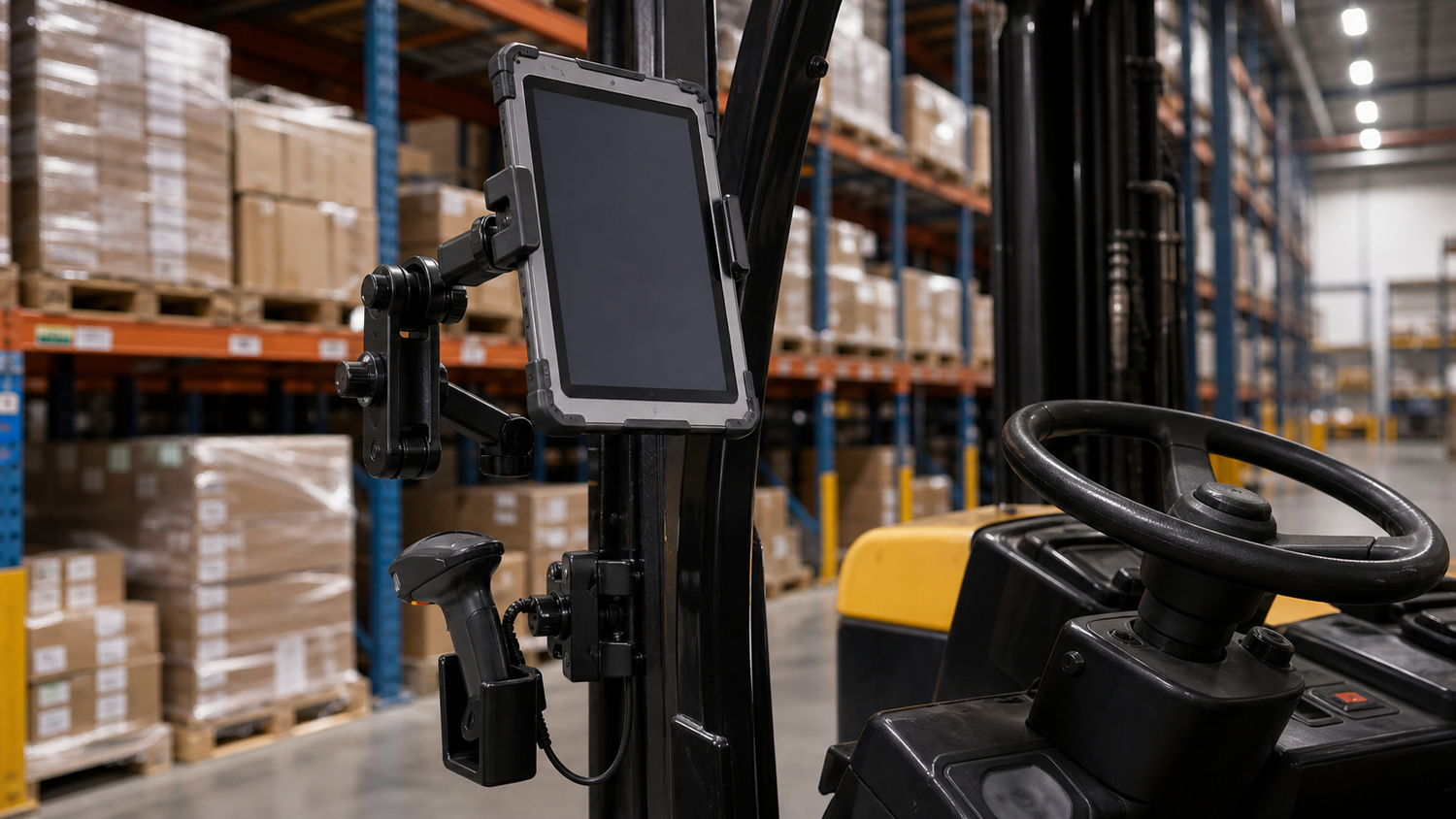
Forklift-mounted tablet and scanner holder setup for warehouse workflows.
If you're managing warehouse operations, you've likely experienced the frustration of consumer-grade mounts failing in industrial environments. When productivity depends on reliable access to inventory management systems and scanning devices, a proper forklift tablet scanner mount isn't just convenient—it's essential for maintaining smooth operations and protecting your technology investment.
This comprehensive guide walks through everything you need to know about selecting, installing, and optimizing forklift mounting solutions for your warehouse environment. From understanding the critical differences between industrial and consumer mounts to choosing the right configuration for your specific operations, we'll help you make informed decisions that increase productivity while protecting your valuable devices.
Why Your Warehouse Needs Professional Forklift Tablet Scanner Mounts
The harsh realities of warehouse environments create unique challenges that consumer-grade mounting solutions simply can't handle. Constant vibration from forklifts, temperature fluctuations, dust exposure, and the occasional bump into racking systems destroy standard mounting hardware within weeks. Meanwhile, your operators waste precious seconds fumbling with loose devices when they should be focused on inventory accuracy and safety.
Professional forklift tablet scanner mounts change everything. Purpose-built for industrial environments, these mounting systems use heavy-gauge steel construction and powder-coated finishes that stand up to daily abuse. They feature industry-standard compatibility with 25mm and 38mm ball sizes, ensuring your investment works with existing equipment and future upgrades.
The iBOLT Dock'n Lock BizMount Forklift Locking Tablet 38mm Mount represents this industrial-grade approach, featuring secure locking mechanisms that prevent theft while maintaining quick access for operators. For magnetic mounting solutions, the iBOLT TabDock MagDock 360 Magnetic Tablet Mount offers strong 88mm magnetic base technology designed specifically for forklift applications.
The cost of device damage extends far beyond replacement expenses. Consider the hidden costs: operator downtime while searching for backup devices, lost data from damaged equipment, and the safety risks of distracted operators struggling with unstable mounts. Professional mounting solutions eliminate these productivity killers while providing the reliability your warehouse operations demand.
Essential Features of Industrial Forklift Tablet Mounts
When selecting a warehouse tablet mount for demanding environments, specific features separate professional-grade solutions from consumer alternatives. Understanding these distinctions ensures you choose mounting systems that deliver long-term value and reliable performance.
Vibration resistance stands as the most critical feature. Warehouse vehicles generate continuous vibration that can loosen standard mounts and damage devices. Industrial-grade mounts like the iBOLT VESA 75x75 / 100x100 Monitor Pillar Mount with 38mm (1.5-inch) Ball Joint use heavy-gauge steel construction and oversized ball joints to absorb shock and maintain secure positioning throughout demanding work cycles.
Material construction directly impacts longevity. Professional mounting systems utilize aluminum and powder-coated steel components rather than plastic alternatives that crack under stress. The 38mm ball size provides superior weight distribution compared to smaller 25mm connections, making it ideal for tablets and monitors that see heavy daily use.
Mounting versatility ensures compatibility with various forklift configurations. The iBOLT VESA 75x75 / 100x100 Monitor Pillar Mount with 57mm (2.25-inch) Ball Joint offers the largest ball size available, supporting the heaviest devices while providing maximum adjustability for optimal viewing angles during operation.
Industry-standard compatibility with AMPS and VESA patterns ensures your investment works with current and future devices without requiring complete mount replacement. This modular approach allows you to upgrade individual components as technology evolves, protecting your mounting infrastructure investment.
Forklift Cage Tablet Holders vs. Pillar Mount Systems
Choosing between mounting locations significantly impacts both accessibility and device protection. Each configuration offers distinct advantages depending on your forklift design and operational workflow.
Cage Mount Systems
Overhead guard cage mounts position tablets within the protective frame structure, keeping devices away from load operations while remaining easily accessible. The Overhead Guard Metal Forklift Bracket features heavy-gauge steel construction with industry-standard AMPS pattern compatibility, making it ideal for forklifts with substantial overhead guards. This forklift cage tablet holder configuration works particularly well in high-reach applications where pillar space is limited or when operators frequently handle tall loads that might interfere with pillar-mounted devices.
Pillar Mount Solutions
Pillar mounting systems attach directly to the forklift's vertical support posts, offering maximum adjustability and positioning flexibility. The Metal Forklift Pillar Bracket provides a solid foundation for tablets and scanners, featuring powder-coated aluminum construction that withstands warehouse conditions. Pillar mounts excel in environments requiring frequent tablet repositioning or when operators need to quickly swing devices out of the way during loading operations.
The choice between cage and pillar mounting often comes down to forklift usage patterns. High-reach operations typically benefit from cage mounts that stay clear of vertical load movements, while general warehouse work often favors pillar mounts that provide better operator ergonomics and device accessibility.
Integrating Barcode Scanner Holders with Tablet Mounting Systems
Efficient warehouse operations require effective integration between scanning devices and data entry systems. When operators must search for scattered equipment, productivity suffers and error rates increase. The solution lies in coordinated dual-device setups that position both tablets and scanners within easy reach.
The iBOLT XL Forklift Barcode Scanner Holder 38mm Mount pairs perfectly with iBOLT's tablet mounting systems thanks to the modular 38mm ball system that maintains consistent positioning strength across both devices. This scanner holder for forklift applications features quick-release functionality while providing secure retention during normal operations.
For comprehensive integration, the Forklift and Warehouse Vehicle Pillar Bracket Mount with Barcode Scanner Holder provides a complete solution. This bracket combines a forklift barcode scanner mount with AMPS mounting capability, allowing you to add your preferred tablet holder while keeping the scanner positioned exactly where operators expect it.
Effective integration requires consistent workflow patterns. When devices are positioned predictably, operators develop muscle memory that eliminates fumbling and searching. Consider operator handedness, typical scanning angles, and the relationship between scanning tasks and data entry when planning your dual-device configuration.
Magnetic vs. Mechanical Mounting Solutions for Warehouse Vehicles
The choice between magnetic convenience and mechanical security depends on your operational priorities and environmental conditions. Understanding the strengths of each mounting style helps match the right solution to your specific workflow requirements.
Magnetic mounts offer unbeatable convenience for operations requiring frequent device removal or repositioning. The iBOLT TabDock MagDock 360 Magnetic Tablet Mount uses six powerful magnets in its 88mm base to secure tablets firmly while allowing instant removal for inspections or shift changes. This warehouse tablet mount configuration works exceptionally well for operations where devices frequently move between forklifts and office environments.
For monitors and screens requiring magnetic mounting, the iBOLT VESA triMag Magnetic Monitor Mount provides similar magnetic holding power with VESA 75x75 and 100x100 compatibility. This solution maintains the convenience of magnetic attachment while supporting larger displays typically used in inventory management systems.
However, magnetic mounting requires clean metal surfaces and performs best in controlled environments. For high-vibration operations, extreme temperatures, or maximum security applications, mechanical solutions with bolted connections and physical locks remain the preferred choice. The decision ultimately balances operational flexibility against maximum device protection.
Ball Joint Standards and Compatibility in Industrial Mounting
Understanding industry-standard ball joint sizing ensures your mounting investment provides long-term compatibility and upgrade flexibility. Industrial mounting systems rely on standardized ball sizes that maintain compatibility across manufacturers and applications, protecting your equipment investment as needs evolve.
The most common sizes in warehouse environments are 25mm (1-inch/B size) and 38mm (1.5-inch/C size) ball joints. The 25mm standard works well for lighter devices like smartphones and smaller tablets, while 38mm joints handle heavier loads including tablets and monitors. For the most demanding applications, 57mm (2.25-inch) balls provide maximum strength for large displays and multi-device setups.
Ball joint compatibility matters because it allows you to mix and match bases, arms, and holders from different manufacturers. iBOLT's modular system follows these industry standards, so components integrate easily with existing equipment while providing upgrade paths for future technology changes.
This standardization also future-proofs your investment, letting you upgrade individual components rather than replacing entire mounting systems as your warehouse needs evolve. When you select mounting hardware based on industry standards, you ensure compatibility with the full range of devices and accessories your operation might require.
Installation Best Practices and Safety Compliance
Proper installation of forklift tablet scanner mounts requires careful attention to both functionality and warehouse safety regulations. OSHA compliance begins with smart mounting location choices: devices must never obstruct operator visibility or interfere with safety systems like overhead guards or ROPS structures.
Before installation, thoroughly inspect your forklift's structural integrity around mounting points. The Metal Forklift Pillar Bracket offers four pre-drilled holes for secure attachment to vertical pillars, distributing stress evenly across the mounting surface. Similarly, the Overhead Guard Metal Forklift Bracket distributes weight across the overhead structure to prevent stress concentration points.
Key installation practices include using manufacturer-specified torque settings, checking all connections during pre-shift inspections, and ensuring cables don't create entanglement hazards. Position tablets within the operator's natural reach zone without requiring unsafe postures or movement patterns. Always verify that emergency exits remain unobstructed and that mounted devices won't become projectiles during sudden stops or impacts.
Regular maintenance schedules should include inspecting mounting hardware for wear, verifying device security, and confirming that vibration hasn't gradually loosened connections. Following these forklift safety protocols protects both operators and equipment while maintaining compliance with warehouse safety standards.
Choosing the Right Mount Configuration for Your Operation
Selecting the ideal mounting configuration requires careful evaluation of your specific workflow needs, device requirements, and operational constraints. The right setup dramatically improves productivity while ensuring long-term durability in demanding warehouse environments.
For operations requiring maximum security and theft deterrence, the iBOLT Dock'n Lock Forklift Locking Tablet 38mm Mount offers solid locking mechanisms with the superior strength of 38mm ball joints. This configuration works exceptionally well for high-traffic facilities where devices need protection from both theft and accidental damage.
Operations seeking reliable performance at accessible price points can achieve excellent results with the iBOLT VESA 75x75 / 100x100 Monitor Pillar Mount with 38mm Ball Joint, which provides industrial-grade mounting while maintaining compatibility with standard VESA monitor configurations.
For comprehensive scanning workflows, consider pairing any tablet mount with the iBOLT XL Forklift Barcode Scanner Holder 38mm Mount. This dual-device mounting configuration keeps both scanning and data entry tools within easy reach, reducing operator movement and increasing efficiency throughout the work cycle.
Factor in your forklift's pillar dimensions, operator height preferences, and typical load configurations when making final selections. The optimal mounting configuration should feel intuitive to operators while providing secure device protection throughout demanding warehouse operations.
Product Options

iBOLT Phone Dock’n Lock Dual POS Stand – Secure Dual-Device Mount for Point of Sale Systems - $115.00


Frequently Asked Questions
Q: What's the difference between 25mm and 38mm ball joint mounts for forklifts?
A: The 38mm (1.5-inch) ball joint provides superior strength and stability compared to 25mm connections, making it ideal for heavier tablets and monitors in high-vibration warehouse environments. While 25mm works for lighter devices, 38mm offers better long-term reliability for demanding applications.
Q: Can I use magnetic mounts on all types of forklifts?
A: Magnetic mounts work best on forklifts with clean, flat metal surfaces and perform optimally in controlled environments. For high-vibration operations, extreme temperatures, or maximum security requirements, mechanical mounting systems with bolted connections provide more reliable device retention.
Q: How do I know if my forklift mount is OSHA compliant?
A: OSHA-compliant installations ensure devices don't obstruct operator visibility, interfere with safety systems, or create entanglement hazards with cables. Mounts should position devices within natural reach zones and maintain clear emergency exits while using proper mounting hardware torque specifications.
Q: What mounting pattern should I choose for my warehouse tablets?
A: Most industrial tablets use AMPS mounting patterns (75x75mm hole spacing), while monitors typically use VESA 75x75 or 100x100 patterns. Check your device specifications before selecting mounting hardware to ensure compatibility with your equipment.
Q: How often should I inspect forklift-mounted devices and hardware?
A: Include mounted devices in daily pre-shift inspections, checking for loose connections, cable wear, and device security. Perform more thorough monthly inspections of mounting hardware torque and structural integrity to prevent equipment failure and ensure ongoing safety compliance.
Q: Can I mount both a tablet and barcode scanner on the same forklift?
A: Yes, dual-device setups using coordinated mounting systems keep both tablets and scanners within easy operator reach. Look for modular mounting solutions with consistent ball joint sizing to ensure both devices maintain proper positioning and stability during operation.
Ready to upgrade your warehouse operations with professional-grade mounting solutions? Explore our complete selection of forklift tablet scanner mounts and find the perfect configuration for your specific needs. From basic pillar mounts to comprehensive dual-device setups, iBOLT offers the industrial-grade mounting solutions your warehouse demands.

Leave a comment
This site is protected by hCaptcha and the hCaptcha Privacy Policy and Terms of Service apply.