Last Updated: March 2026
Warehouse management systems, inventory apps, and real-time picking software have made tablets essential equipment on forklifts. But mounting a tablet to a forklift is not the same as sticking a phone holder on your car dashboard. Forklifts vibrate constantly, operate in dusty or cold environments, and put serious stress on any mounting hardware. A weak mount means a broken tablet, lost productivity, and potential safety hazards.
This guide covers everything you need to know about mounting a tablet to a forklift in 2026: the right hardware, step-by-step installation, and how to choose between the major options on the market.
What Makes Forklift Mounting Different
Before you buy anything, it helps to understand why standard tablet mounts fail on forklifts. There are three main challenges:
- Vibration: Forklifts generate constant, high-frequency vibration from the engine, hydraulics, and uneven warehouse floors. Suction cups fail within hours. Friction-based clamps loosen within days. You need a mechanically secured connection.
- Impact and shock: Forklifts bump into things. Pallets shift, loads jostle, and operators occasionally clip a rack. Your mount needs to absorb impact without releasing the tablet or cracking at the joint.
- Environmental exposure: Depending on your facility, your forklift tablet may face extreme cold (freezer warehouses), dust (lumber yards, construction), moisture, or direct sunlight. The mount hardware needs to tolerate all of it without degrading.
This is why iBOLT engineered a dedicated forklift mounting line rather than simply adapting consumer mounts. The hardware uses industrial-grade reinforced composites and steel, with 38mm ball joints specifically sized for heavy-duty applications.
iBOLT Forklift Mount Options
iBOLT currently offers several forklift-specific mounts. Here is what each one does and where it fits best:
Dock'n Lock BizMount Forklift Mount ($110.00)
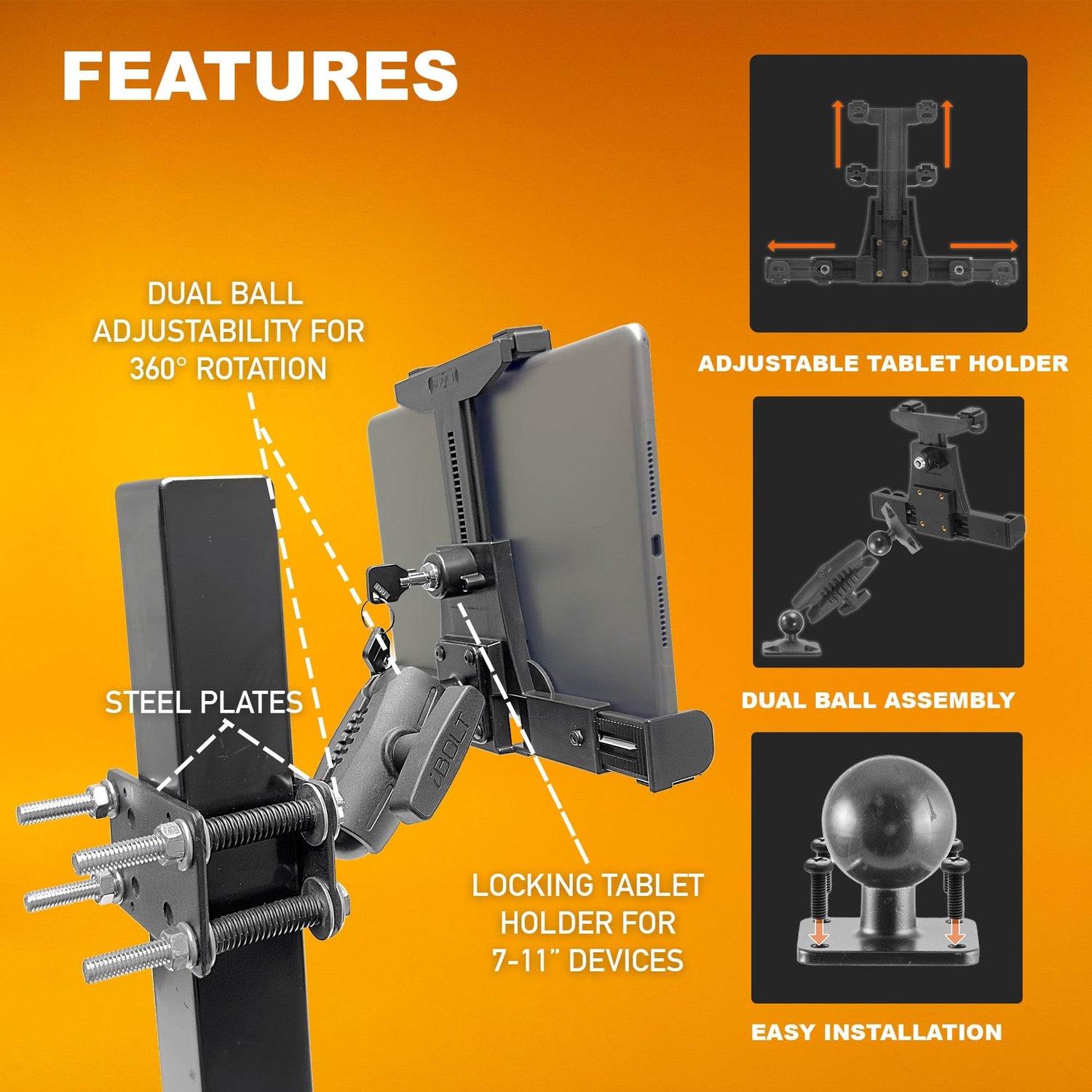
The Dock'n Lock BizMount is the core forklift solution. It uses a 38mm ball and clamp system to attach to forklift pillars, roll cages, or crossbars. The locking tablet holder keeps the device secure even during heavy operation, and the ball joint allows you to adjust the viewing angle for the operator's seated position.

Best for: Standard sit-down counterbalance forklifts where the operator needs a tablet on the pillar or overhead guard.
MagDock 360 Forklift Mount ($76.95)
The MagDock 360 uses a magnetic tablet holder combined with the same heavy-duty forklift base. The magnetic system allows faster tablet removal and replacement, which is useful in operations where tablets are shared between forklifts and office use, or where operators need to carry the tablet during loading dock tasks.

Best for: Operations where the tablet frequently needs to be removed and reattached throughout the shift.
LockPro FlexPro Seat Rail Mount ($159.95)
The LockPro FlexPro attaches to the forklift's seat rail rather than the pillar. This is a strong option for reach trucks and order pickers where pillar mounting is impractical, or for operators who prefer the tablet at a lower, more accessible position. The locking mechanism adds theft prevention for facilities with multiple operators or open access.

Best for: Reach trucks, order pickers, or any forklift where seat-rail mounting is preferred over pillar mounting.
XL Barcode Scanner Holder ($79.95)
Not a tablet mount on its own, but a critical add-on. The XL Barcode Scanner Holder uses the same 38mm mounting system as the forklift tablet mounts, so you can add a barcode scanner holder right next to the tablet on the same pillar or roll cage. Because iBOLT uses a modular system, both devices share the same base hardware and mounting points.

Best for: Warehouses running WMS software that requires frequent barcode scanning alongside the tablet interface.
Step-by-Step Installation: Pillar Mount
Here is how to install the Dock'n Lock BizMount on a standard forklift pillar. The process is similar for the MagDock 360 since they share the same base system.
Tools needed:
- Adjustable wrench or 13mm socket wrench
- Clean rag (to wipe down mounting surface)
- Measuring tape (optional, for positioning)
Step 1: Choose your mounting location
Sit in the operator seat and identify where you want the tablet. The most common position is on the left pillar, roughly at chest height when seated. Make sure the location does not obstruct your view of the forks or the path ahead. OSHA guidelines require clear forward visibility, so avoid mounting directly in the operator's line of sight.
Step 2: Attach the clamp base
Open the 38mm pillar clamp and position it around the forklift pillar or crossbar. The clamp is designed to fit round and square tubing from approximately 1 inch to 2.5 inches in diameter. Tighten the clamp bolts by hand first, positioning the mount exactly where you want it. Then use your wrench to secure the bolts firmly. The mount should not rotate or shift when you apply pressure with your hand.
Step 3: Attach the ball arm
Slide the 38mm ball arm onto the clamp's ball stud. Tighten the arm's compression knob until the joint is firm but still adjustable. You will fine-tune the angle in the next step.
Step 4: Attach the tablet holder
Secure the TabDock or LockPro tablet holder to the other end of the ball arm. Place your tablet in the holder and adjust the spring-loaded grips to fit snugly. For LockPro models, engage the lock and test it with the key.
Step 5: Adjust the viewing angle
Sit in the operator seat and adjust the ball joint so the screen faces you at a comfortable reading angle. Once positioned, tighten the compression knob fully. The 38mm ball provides strong clamping force, enough to hold the tablet steady through normal forklift vibration and movement.
Step 6: Test under operation
Run the forklift through its normal operating cycle: drive forward and reverse, raise and lower the forks, make turns. Check that the tablet stays in position and the screen remains readable. If there is any drift, tighten the compression knob further or reposition the clamp.
iBOLT vs. RAM Mounts for Forklifts
RAM Mounts is the other major name in industrial tablet mounting, so a comparison is inevitable. Here is how they stack up for forklift applications:
| Feature | iBOLT | RAM Mounts |
|---|---|---|
| Forklift-specific products | Yes (dedicated line) | Yes (adapted from general industrial) |
| Ball sizes for heavy-duty use | 38mm (C size), purpose-built for industrial | 38.1mm (1.5" / C size) |
| Modular parts system | 300+ interchangeable parts | Extensive catalog |
| Locking tablet holder | Yes (LockPro line, included) | Available (often sold separately) |
| Barcode scanner add-on | Yes, same 38mm system | Available separately |
| Magnetic quick-release option | Yes (MagDock 360) | Not standard for forklift line |
| Forklift pillar clamp + tablet (complete) | $110.00 (Dock'n Lock BizMount) | $120 - $180+ (varies by configuration) |
Both brands produce quality industrial hardware. RAM has been in the market longer and has a larger overall product catalog. iBOLT's advantage for forklift use specifically is the purpose-built product line, the magnetic quick-release option (MagDock 360), and the integrated barcode scanner holder that shares the same mounting hardware. The pricing is also generally more competitive for complete forklift kits.
Why Modularity Matters on the Warehouse Floor
Here is a scenario that plays out in warehouses all the time: you mount tablets on your forklifts, everything works great for a year, and then your company switches from 8-inch tablets to 10-inch tablets (or from iPads to Samsung Galaxy Tabs, or from consumer tablets to rugged devices). With a non-modular mount, you replace every mount on every forklift.
With iBOLT's modular system, you replace only the tablet holder component. The clamp base, ball arm, and hardware all stay in place. You order the new holder, snap it on, and you are done. Across a fleet of 10 or 20 forklifts, that difference adds up fast. The same principle applies if you want to add a barcode scanner holder later, or switch from a pillar clamp to a seat rail base. Individual components swap in and out without replacing the whole assembly.
Tablet Recommendations for Forklift Use
While this guide focuses on the mount hardware, a quick note on tablets: for forklift use, we strongly recommend either a rugged tablet (like the Samsung Galaxy Tab Active series) or a standard tablet inside a protective case. The iBOLT forklift holders accommodate tablets from 7 to 10 inches with or without cases. If your warehouse operates below freezing, make sure your tablet is rated for cold temperatures, as standard consumer tablets can malfunction below 32 degrees F.
Frequently Asked Questions
Will a forklift tablet mount void my forklift warranty?
Clamp-based mounts like the iBOLT Dock'n Lock BizMount do not require drilling or permanent modification to the forklift. They clamp onto existing pillars and crossbars, so they should not affect your forklift warranty. Always check with your forklift dealer if you have concerns about specific models.
Can the mount handle the vibration from a propane or diesel forklift?
Yes. The 38mm ball joint system is specifically designed for high-vibration industrial environments. The compression clamp on the ball joint is strong enough to hold position through the constant vibration of internal combustion forklifts. Electric forklifts produce less vibration, so performance is even better on those.
What if my forklift pillar is too thick for the clamp?
The standard forklift clamp fits tubing from approximately 1 inch to 2.5 inches. If your forklift has a larger pillar (common on some heavy-duty models), contact iBOLT's support team. Because the system is modular, they can often recommend an alternative base that fits your specific forklift model.
Can I mount both a tablet and a barcode scanner on the same forklift?
Yes. The XL Barcode Scanner Holder ($79.95) uses the same 38mm mounting system. You can mount it on the same pillar as your tablet, either using a second clamp or an adapter arm. This keeps both devices within easy reach of the operator.
Is the magnetic mount strong enough for forklift use?
The MagDock 360 uses industrial-strength magnets rated for heavy-duty use. It holds securely during normal forklift operation including driving, turning, and raising/lowering forks. However, if your operation involves unusually rough terrain or extreme impacts, the Dock'n Lock BizMount with its mechanical locking holder provides an extra level of security.
How long does installation take?
Most operators complete the installation in 10 to 15 minutes per forklift with basic hand tools. No drilling is required for pillar-clamp mounts. If you are outfitting a fleet, a single maintenance technician can typically equip 10 to 15 forklifts in a half day.


Leave a comment
This site is protected by hCaptcha and the hCaptcha Privacy Policy and Terms of Service apply.