Multi-Tablet Mounts for Busy Workstations and Dispatch Desks
Problem proposition: When a counter or dispatch desk runs multiple tablets for delivery apps, POS, and order management, loose stands create clutter and missed alerts; iBOLT multi-tablet mounts consolidate every screen into one organized, stable workstation.
Featured product links: iBOLT Quad Tablet Tower TabDock™ Stand, iBOLT Tablet Tower- Dock’n Lock POS Locking Drill Base Mount - with 3 Tablet Holders, iBOLT TabDock POS Tablet Stand
Multi-Tablet Mounts for Busy Workstations and Dispatch Desks
If your counter is running DoorDash on one tablet, Uber Eats on another, a POS system on a third, and somehow a fourth device for order management, you already know the problem. Loose stands tip over. Cables tangle across the prep area. A notification fires on the screen that got pushed to the back corner, and someone misses a pickup. The issue is not the number of tablets. The issue is that each device is sitting in its own unstable stand with no real system holding the workstation together.
A purpose-built multiple tablet mount solves this by anchoring every screen in one fixed location, at the right height, with enough spacing for staff to read and tap each one without shuffling hardware around. Here is how to match the right tablet holder to your specific setup.
Why Single-Stand Setups Break Down at Scale
One tablet on a single stand works fine. Two tablets on two separate stands starts to get crowded. Three or four tablets on individual stands turns a counter into an obstacle course. The real failure points are predictable: screens face different directions, charging cables run across work surfaces, there is no consistent viewing angle for staff, and the footprint of four separate bases eats counter space that should be used for actual work.
Multi-device workstations also tend to mix hardware. A restaurant dispatch desk might have an iPad for one delivery platform, a Samsung tablet for another, a Fire tablet provided by a third service, and a dedicated POS screen. A good multiple tablet holder needs to accommodate that variation in device size rather than forcing you to standardize on one brand.
Four Tablets, One Footprint: The Quad Tower Option
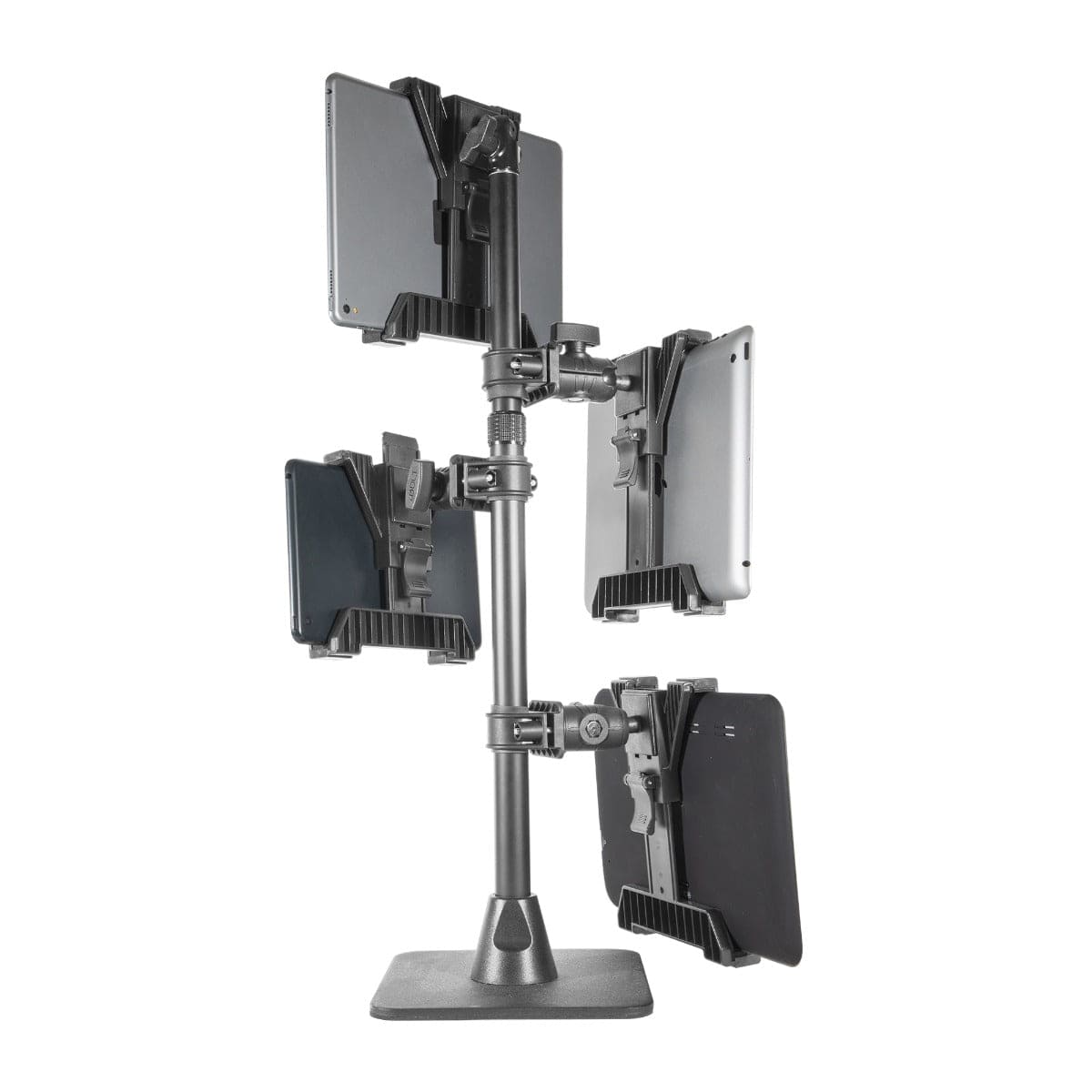
For operations running four tablets simultaneously, the iBOLT Quad Tablet Tower TabDock™ Stand is the most direct solution. It holds four devices in a single vertical tower structure, which means four screens occupy roughly the footprint of one stand. That matters on a busy counter where every inch of surface is spoken for.
The heavy-duty construction is designed for repeated tapping, which is the real durability test in a delivery or order management environment. Staff are not gently swiping once an hour. They are confirming orders, adjusting tickets, and dismissing alerts dozens of times per shift. The TabDock™ cradle system keeps each device locked in position through that kind of sustained use.

iBOLT Quad Tablet Tower TabDock™ Stand - $149.95
This stand is particularly well suited to delivery dispatch desks, multi-platform restaurant setups, and any operation where four apps need to be monitored at the same time without spreading hardware across the counter.
Three Tablets with Security Built In
If your workstation runs three tablets and device security is a priority, the iBOLT Tablet Tower Dock'n Lock POS Locking Drill Base Mount adds a layer of protection that a standard stand cannot offer. The locking cradles secure each device individually, and the base drills into the counter surface, which eliminates the possibility of the entire unit being moved or removed.
The Dock'n Lock is built for 7 to 10 inch tablets and supports adjustable viewing angles per device, so you can angle each screen toward the staff position that uses it most. For restaurants running a POS, a delivery platform, and a kitchen display or reservation system simultaneously, this three-tablet configuration covers the most common workstation layout without overbuilding.

iBOLT Tablet Tower- Dock’n Lock POS Locking Drill Base Mount - with 3 Tablet Holders - $199.95
The drill-base installation also makes this the right call for permanent installations where the mount needs to stay in place through shift changes, cleaning, and the general chaos of a busy service environment.
Single-Station Anchor for Counters and Kiosks
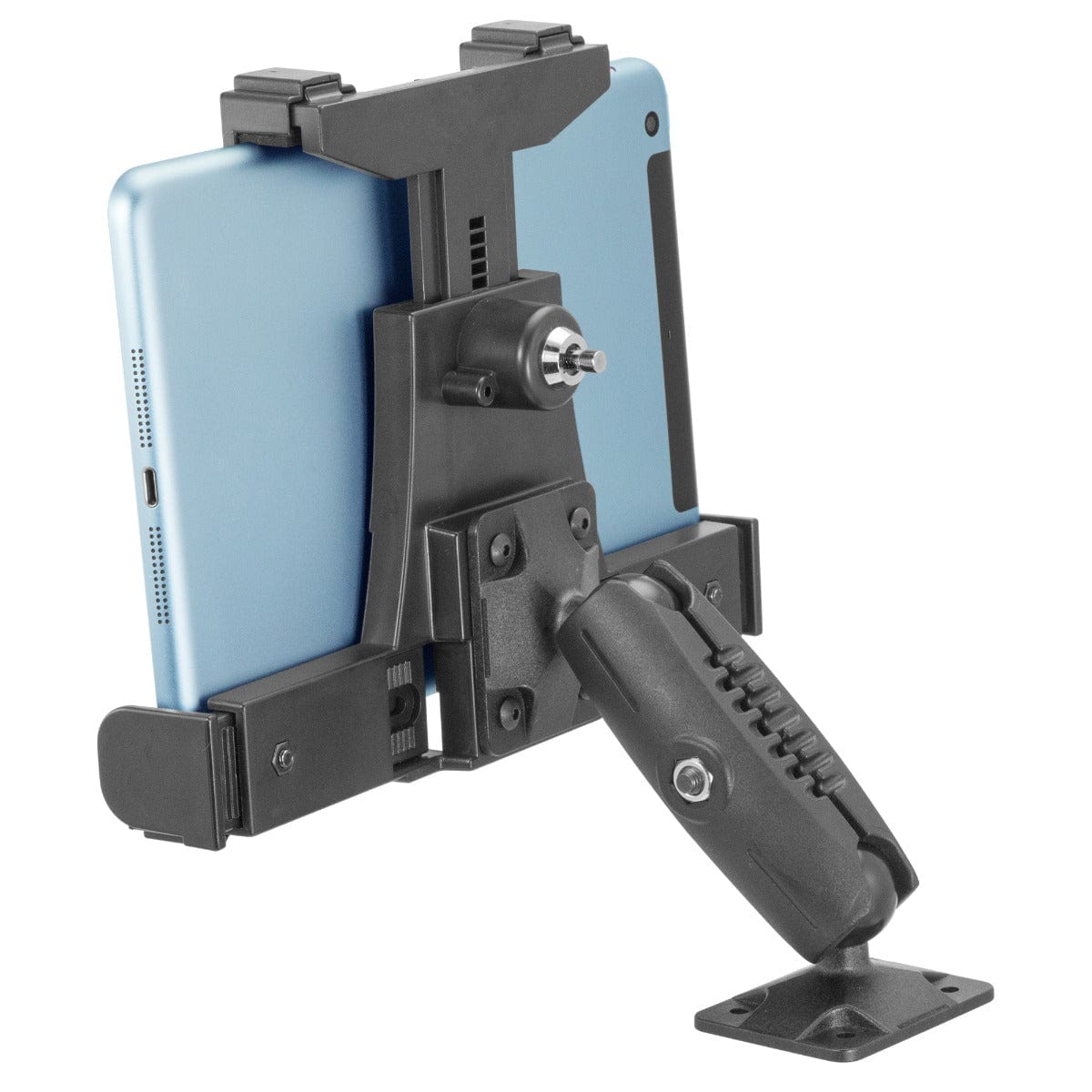
Not every workstation needs four tablets. Sometimes the problem is simpler: one tablet at a checkout counter or kiosk that keeps getting knocked around, repositioned by customers, or pulled off its stand. The iBOLT TabDock POS Tablet Stand addresses that with a weighted L-bracket base that stays put on its own, plus four mounting holes if you want to bolt it down permanently.
The adjustable dual ball joint lets you set the exact viewing angle for your counter height and staff position, and the TabDock holder accommodates 7 to 10 inch tablets. For a single-device POS station, payment kiosk, or order confirmation screen, this is the stable, professional-grade tablet ipad holder that does not require a tower configuration.

iBOLT TabDock POS Tablet Stand - $79.95
It also works as the anchor point for a staged rollout. Start with one TabDock POS stand, confirm the counter position works for your workflow, then add the Quad Tower or Dock'n Lock when you are ready to expand to a full multi-tablet workstation.
What to Confirm Before You Order
Before selecting a multiple tablet mount, work through these practical constraints specific to your counter or dispatch desk:
-
Device sizes: Confirm each tablet falls within the 7 to 10 inch range the cradles support. Measure your devices rather than relying on the listed screen size, since cases add width.
-
Counter surface: Drill-base mounts like the Dock'n Lock require a surface you can permanently modify. Weighted bases like the TabDock POS stand work on surfaces where drilling is not an option.
-
Staff reach: In a tower configuration, the top cradle sits higher than a flat stand. Confirm your staff can comfortably tap the top screen without straining, especially in a fast-paced service environment.
-
Cable routing: Plan your charging cable paths before installation. Multi-tablet setups multiply the cable count, and routing cables away from the work surface before mounting is much easier than managing them after.
-
Footprint vs. screen count: The Quad Tower minimizes counter footprint for four devices. If you only need two or three tablets, the Dock'n Lock gives you security and adjustability without the full tower height.
The Workstation Standard for Device-Heavy Operations
The difference between a counter with four loose tablets and a counter with a properly mounted tablet workstation is not just visual. Staff move faster when every screen is in a known position. Alerts get caught because no device is hidden behind another. Devices stay charged because cables are routed cleanly rather than tangled across the surface. And the whole setup survives a busy shift without someone having to straighten stands between orders.
iBOLT builds these mounts for the environments where tablets actually get used hard: restaurant dispatch, retail checkout, delivery coordination, and logistics counters. The Quad Tower, the Dock'n Lock, and the TabDock POS stand each solve a specific version of the multi-tablet organization problem. Match the mount to your device count, your surface, and your security requirements, and the workstation runs the way it should.
Frequently Asked Questions
Can these mounts hold tablets from different brands in the same station?
Yes. The TabDock cradle system is designed for 7 to 10 inch tablets regardless of brand, so you can mix iPads, Samsung tablets, and Fire tablets in the same tower as long as each device falls within that size range.
Do I need to drill into the counter to use the Quad Tower or Dock'n Lock?
The Dock'n Lock is designed as a drill-base mount for permanent installation. The Quad Tower and TabDock POS stand use weighted bases that sit on the counter surface without drilling, though the TabDock POS base includes holes for optional permanent mounting.
What is the difference between the Quad Tower and the Dock'n Lock for a restaurant setup?
The Quad Tower holds four tablets in a vertical tower with a smaller counter footprint. The Dock'n Lock holds three tablets with individual locking cradles and a drill-base for permanent, theft-deterrent installation. If security and permanence are the priority, the Dock'n Lock is the stronger fit. If you need four devices and flexibility, the Quad Tower is the better choice.
How do I manage charging cables in a multi-tablet mount setup?
Route cables before final installation. Run each charging cable through or behind the mount structure before locking devices into their cradles. Planning the cable path at installation time keeps the work surface clear and prevents cables from interfering with tapping or device removal.

Leave a comment
This site is protected by hCaptcha and the hCaptcha Privacy Policy and Terms of Service apply.