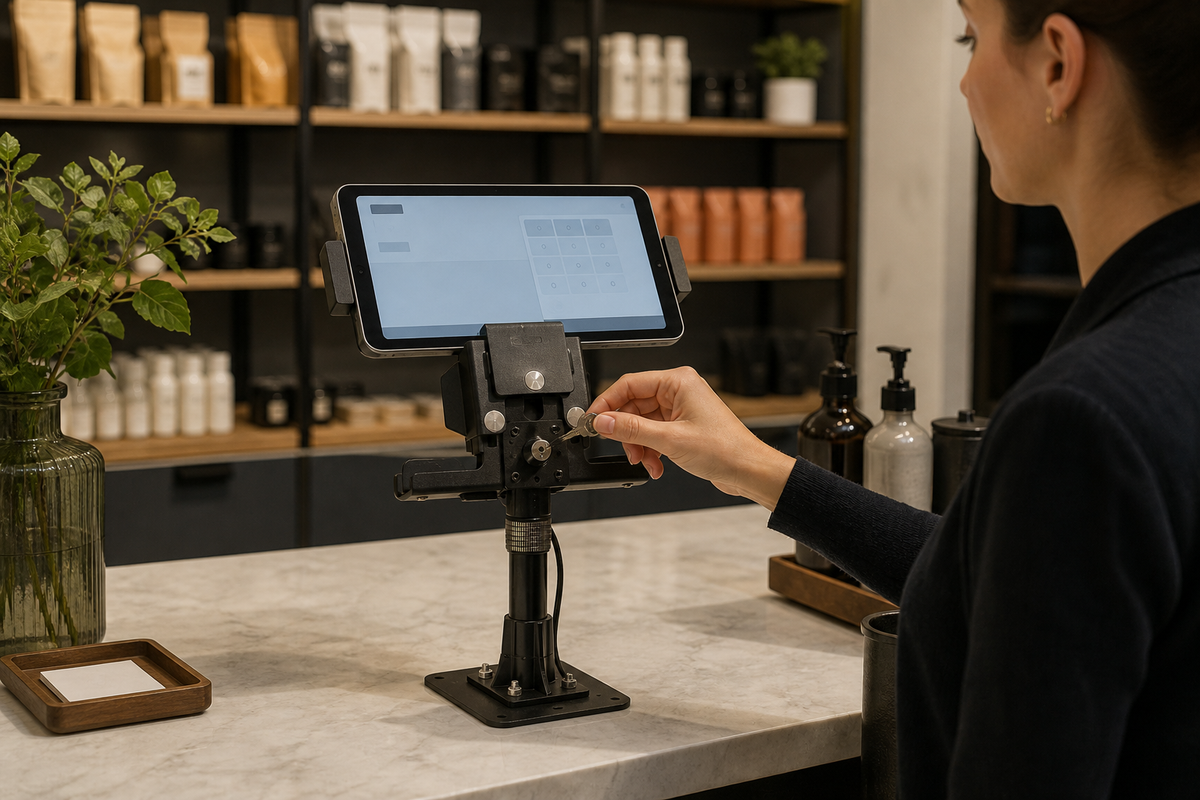

A fixed locking tablet stand at a customer-facing counter. Editorial B-roll based on the actual iBOLT LockPro POS stand. Use official product photos below for definitive product details.
A retail tablet can serve as a self-check-in screen, product catalog, loyalty signup station, appointment terminal, or point-of-sale display. Those roles place a valuable device within easy reach of customers. The same accessibility that makes the kiosk useful can make quick, unauthorized removal easier when the counter is briefly unattended.
A secure tablet mount for retail kiosk use should create a defined home for the device and require deliberate removal. The right setup combines a keyed holder, a base attached to a suitable surface, tamper-resistant adjustment hardware, controlled keys, and software protection. No one part carries the whole security plan.
Secure Tablet Mounts for Retail Kiosks Need Two Layers
Look at the kiosk from the tablet outward. Can the tablet lift from the holder without a key? Can the arm be loosened by hand? Can the holder be separated from the pole? Can the base be unscrewed from above? Can the entire counter insert be carried away?
That review usually produces four practical requirements:
- The holder must fit the actual tablet and case without leaving an easy release path.
- Adjustment points should use security hardware when customers can reach them.
- The base should attach to a surface that can support the fasteners and expected load.
- Authorized employees need a simple way to unlock the device for maintenance without sharing keys broadly.
A locking holder can deter a casual walk-off. A tamper-resistant tablet mount can also remove hand-adjustable release points. Neither can promise that a determined person with tools will fail. Pair the hardware with device enrollment, screen lock, application restrictions, asset labels, inventory records, and store closing procedures.
Choose a Metal Locking Stand for a Fixed Kiosk
The iBOLT LockPro Drill Base Locking Tablet Stand is designed for a fixed point-of-purchase position. SKU IBRT-34717 uses an aluminum locking holder for 7 to 10 inch tablets, an adjustable pole, 360 degree positioning, and a drill-down base. Security hardware is part of the assembly so the kiosk does not depend on hand-tightened knobs.

iBOLT LockPro Drill Base Locking Tablet Stand, SKU IBRT-34717 - $139.95
The tall stand can position a screen for an employee, customer, or alternating workflow. Before installation, confirm the chosen height and rotation do not let the tablet strike merchandise, a payment terminal, or the counter edge. Inspect the underside of the counter, choose suitable backing hardware, and keep removal access available to authorized maintenance staff.
For a lower-profile counter, the iBOLT Dock'n Lock POS Tablet Stand provides a keyed holder, short 3.75 inch adjustable arm, 25 mm B Size connections, and a weighted L-bracket base with four bolt-down holes. SKU IBRT-34719 is $99.95 and fits 7 to 10 inch tablets. It gives a retailer the option to pilot the position as a weighted stand before approving a fixed counter installation.
Protect the Cable and the Customer Experience
A loose cable can undermine both security and usability. Route power below or behind the counter where possible, protect the connector from sideways pull, and leave only the service loop needed for approved movement. Do not wrap a charging cable around the mount as a substitute for strain relief.
The screen should be accessible without encouraging customers to grip and pull the holder. Test the kiosk with people of different heights and with any accessibility requirements that apply to the store. Confirm that the locking hardware does not cover the device camera, card reader connection, side buttons, or charging port.
Avoid presenting the mount as a data-security device. The kiosk software should still restrict app access, remove stored credentials where possible, lock after inactivity, and allow remote disablement. Physical control keeps the tablet at the station; software control protects what the tablet can reach.
Run an Opening and Closing Check
Make the kiosk part of the same routine as the register and alarm. At opening, verify that the tablet serial number matches the station record, the holder is locked, the screen and cable are undamaged, and the base has no movement. At closing, check that the assigned key is returned and the device is charging in its approved position.
If a tablet must be removed, record the reason, employee, time, and expected return. Keep a spare key in a controlled location, not taped under the counter. When staff turnover occurs, reconcile the keys just as the store would reconcile door keys or access cards.
The existing iBOLT LockPro overview for warehouses and retail compares the broader product family. This guide concentrates on the retail kiosk removal path and daily controls.
Frequently Asked Questions
Is a locking retail tablet stand theft-proof?
No. It can deter fast, tool-free removal and improve accountability, but it cannot guarantee that a device will never be stolen or damaged.
Should a retail kiosk use a weighted base or a drill base?
A weighted base supports easy placement and testing. A properly approved drill base is harder to carry away. Choose after reviewing the counter material, underside access, customer reach, maintenance needs, and lease restrictions.
Will the LockPro POS stand fit an iPad in a case?
The current product page lists 7 to 10 inch tablet compatibility. Measure the device with its case and charging connector and compare the dimensions before ordering.
Can one key be shared across every store employee?
That is usually difficult to audit. Assign numbered keys to specific roles, store the spare securely, and document device removal.
Does the mount replace kiosk-mode software or mobile device management?
No. Physical locking and software controls address different risks. Use both when the tablet is customer-facing. Explore the iBOLT retail mounting collection to compare fixed, low-profile, and multi-device kiosk configurations.


Leave a comment
This site is protected by hCaptcha and the hCaptcha Privacy Policy and Terms of Service apply.