How to Choose the Right Mount: Weight, Surface, and Compatibility
Problem proposition: Buyers waste money on mounts that fail because they guessed on ball size, hole pattern, or clamp capacity, so this article gives them a four-part framework covering device weight, surface type, cable access, and future reconfiguration to get the right system the first time.
Featured product links: iBOLT Moto-Vise™ IncrediBOLT™ Heavy Duty Phone Clamp / Handlebar / Rail Mount, iBOLT™ Dock'n Lock Bizmount™ AMPS- Heavy Duty Industrial Composite Locking drill base Mount for all 7" - 10" tablets, iBOLT AMPS to VESA 75/100 Plate
Most mounting mistakes happen before anyone opens a box. A buyer picks a phone holder with clamp that looks right in the product photo, installs it, and discovers the arm is too short, the ball size is wrong, or the base pattern does not match the surface. The fix is not finding a "better" mount. The fix is asking four questions before you buy: How heavy is the device? What surface am I attaching to? Do I need cable access? And will this setup need to change later?
Work through those four questions and the right system becomes obvious. Here is how to do it.
Start With Device Weight, Not Device Size
Screen size is the wrong starting point. A 10-inch tablet in a rugged case can weigh twice as much as a bare 10-inch tablet, and that weight difference determines which ball size and arm rating you actually need.
Ball mounts follow a loose weight hierarchy that most buyers never see explained clearly. A 17mm ball is common on Garmin-style GPS holders and lightweight phone clips. A 25mm or 1-inch B-size ball handles most phone and mid-weight tablet setups. A 38mm or 1.5-inch C-size ball is the right call for heavier tablets, industrial handhelds, and anything that will live on a forklift or vibrating vehicle surface. If you are not sure which size your existing arm uses, measure the ball diameter rather than guessing from a photo.
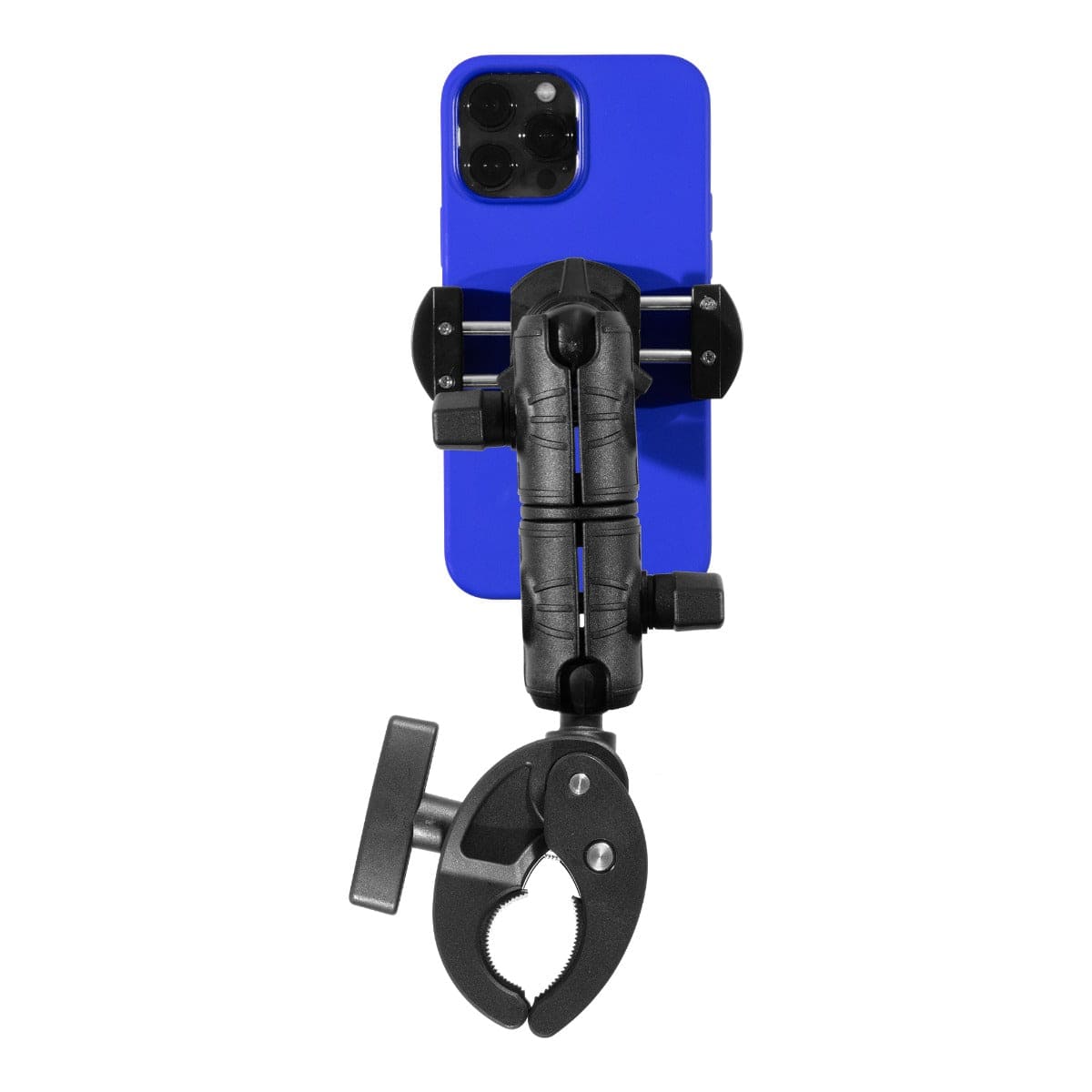
The same logic applies to clamp-style phone holders. A spring-loaded grip that works fine for a bare iPhone will not hold a large Android phone in a protective case through a full day of off-road use. For that kind of demand, the iBOLT Moto-Vise™ IncrediBOLT™ Heavy Duty Phone Clamp is built specifically for handlebar and rail mounting in active outdoor environments, with a spring-loaded grip designed to hold through vibration, water exposure, and the kind of movement that standard consumer mounts cannot handle.

iBOLT Moto-Vise™ IncrediBOLT™ Heavy Duty Phone Clamp / Handlebar / Rail Mount - $64.95
Match the Base to the Surface, Not the Other Way Around
The mounting base is where most compatibility problems start. There are three common patterns buyers encounter: the 4-hole AMPS pattern, VESA 75x75mm, and VESA 100x100mm. They look similar in photos because all three use four holes, but the hole spacing is completely different and they are not interchangeable without an adapter.
The AMPS pattern uses a rectangular four-hole layout with spacing roughly 30mm by 38mm. It is the standard for vehicle dash mounts, fleet hardware, and most industrial mounting arms. VESA MIS-D uses square patterns at 75x75mm or 100x100mm and is common on monitors, kiosks, and display hardware. If you are building a mixed system, measure the actual hole spacing on both the device side and the surface side before ordering anything.
For fixed installations on walls, desks, carts, or vehicle dashboards where the tablet needs to stay put and stay secure, a drill-base tablet mount with a locking system is the right approach. The iBOLT Dock'n Lock Bizmount™ AMPS Heavy Duty Industrial Composite Locking Drill Base Mount handles tablets from 7 to 10 inches, uses dual 1-inch ball joints for 360-degree adjustability, and includes a tamper-resistant locking system with keys and tamper-proof hex bolts. That combination makes it the right call for retail kiosks, fleet vehicles, and any environment where unauthorized removal is a real concern.
Watch: iBOLT Dock'n Lock BizMount AMPS (IBBZ-33993)
See the cradle adjustment, keyed tablet retention, and assembly of the 25 mm BizMount arm and AMPS drill base.
Watch the short vertical demo (35 seconds)

Solve the Pattern Mismatch With the Right Adapter
You will eventually run into a situation where the arm you already own uses one pattern and the device or surface uses another. This is where an AMPS adapter earns its place in the system.
The iBOLT AMPS to VESA 75/100 Plate bridges VESA 75 and VESA 100 devices to industry-standard 4-hole AMPS mounts. It is built from powder-coated aluminum, which matters in vehicle and industrial environments where a plastic adapter will flex under load. If you are connecting a VESA-compatible monitor or display to an existing AMPS arm in a workstation or kiosk setup, this plate removes the need to replace the entire arm or base.
Adapters like this one also matter when you are planning a system that needs to grow. Buying a quality AMPS arm now and using an adapter to connect today's device means you can swap the device holder later without touching the base installation.

iBOLT AMPS to VESA 75/100 Plate - $14.95
Think About Cable Access Before You Finalize the Position
A mount that looks perfect in a static position can become a problem the first time you need to charge the device or connect a peripheral. Cable routing is one of the most overlooked parts of a mounting decision, and it is much easier to solve during planning than after installation.
Ask where the charging port sits when the device is in the holder. If the port faces the wall or the mounting surface, you need either a right-angle cable, a holder with a cable pass-through, or a different mounting orientation. Ball-and-socket arms help here because you can rotate the device to a position where the port is accessible without repositioning the entire base.
For tablet mounts in fixed locations, also consider whether the cable needs to be hidden for a clean kiosk appearance or accessible for frequent swaps. A locking drill-base mount with a fixed cable route looks professional in a retail environment. A quick-release holder on an articulating arm is better when staff need to remove and recharge the tablet at the end of a shift.
Plan for Reconfiguration From the Start
Devices change. Vehicles get reassigned. Workstations move. A mounting system that cannot adapt to those changes becomes a sunk cost. The way to avoid that is to buy into a modular system where the base, arm, and holder are separate components that can be mixed and matched.
Industry-standard patterns like AMPS and VESA exist specifically to make this possible. When every component in your system uses a recognized pattern, you can replace the holder when you upgrade the device, add an extension arm when the position needs to change, or move the entire arm to a new surface without replacing the base. That is the practical value of standardized mounting interfaces, and it is why understanding AMPS versus VESA before you buy matters more than any single product specification.
Frequently Asked Questions
What is the difference between an AMPS pattern and a VESA pattern?
Both use four holes, but the spacing is different. AMPS uses a rectangular layout roughly 30mm by 38mm, common in vehicle and industrial mounts. VESA MIS-D uses square layouts at 75x75mm or 100x100mm, common on monitors and display hardware. Measure your hole spacing before assuming compatibility.
Which ball size do I need for a tablet mount?
Most phone and mid-weight tablet setups work with a 25mm or 1-inch B-size ball. Heavier tablets, industrial handhelds, and vehicle applications often need a 38mm or 1.5-inch C-size ball for adequate holding strength under vibration and movement.
Can I connect a VESA device to an AMPS arm?
Yes, with the right adapter. The iBOLT AMPS to VESA 75/100 Plate connects VESA 75 and VESA 100 devices to standard 4-hole AMPS arms without replacing the arm or base.
When do I need a locking tablet mount instead of a standard holder?
Use a locking mount in any environment where theft, unauthorized removal, or accidental dislodging is a concern: retail kiosks, fleet vehicles, warehouses, and public-facing installations. The iBOLT Dock'n Lock Bizmount™ uses tamper-proof hardware and a keyed locking system for exactly these situations.
How do I know if a phone clamp will hold my device securely in rough conditions?
Look for a spring-loaded grip rated for the weight of your device in its case, and check that the mount is designed for the specific surface you are attaching to. The iBOLT Moto-Vise™ IncrediBOLT™ is built for handlebar and rail use in active outdoor environments where standard consumer mounts fail.

Leave a comment
This site is protected by hCaptcha and the hCaptcha Privacy Policy and Terms of Service apply.