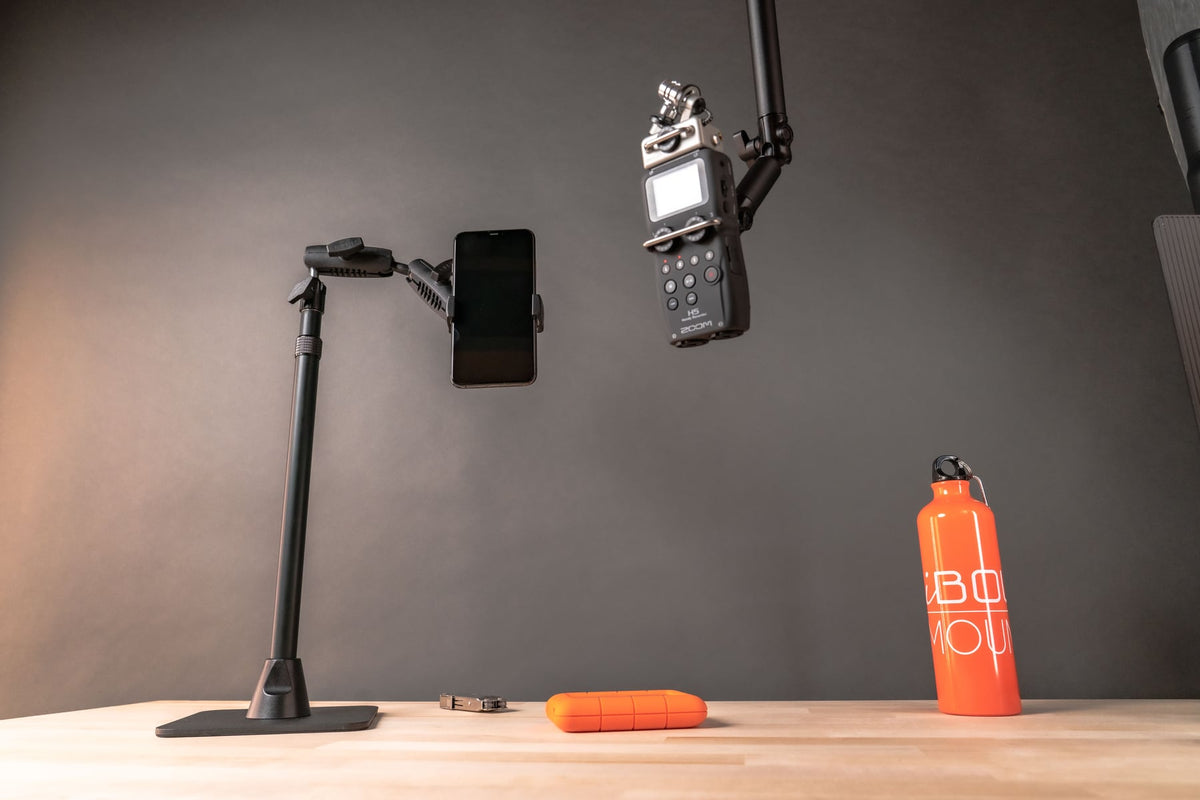
Best Multi-Camera Desk Mount for Live Streaming: How to Build a Pro Setup With Your Phone
Picture this: you're halfway through a live cooking tutorial, your hands are covered in flour, and you need to switch from a front-facing shot to an overhead view of your cutting board. So you stop, wipe your hands, reposition your phone, and hope your audience hasn't already clicked away. Sound familiar?

For years, multi-angle setups were reserved for creators who could invest in multiple DSLR cameras, dedicated tripods, and expensive rigging systems. But that's changed. Phone cameras have caught up in a big way, and most creators now shoot primarily on their smartphones. The missing piece isn't better hardware in your pocket. It's better hardware on your desk.
Finding the best multi-camera desk mount for live streaming means you can lock in two or three angles at once and switch between them without ever breaking your flow. A proper multi camera phone mount for live streaming turns a clunky, start-and-stop production into something that actually looks and feels professional.
iBOLT built its reputation engineering industrial-grade mounts for warehouses, forklifts, and commercial fleets. The Stream-Cast line brings that same heavy-duty build quality and modular design philosophy to your desk. Let's walk through how to make it happen.
What to Look for in a Multi-Camera Desk Mount
Before you start adding gear, it helps to know what separates a mount that works from one that slowly tilts your phone toward your keyboard three minutes into a stream. Your choice of camera arm for a livestream desk matters more than most creators realize, so keep these criteria front of mind.
Stability under load. Phones in thick cases, ring lights, and small action cameras all add weight. Flimsy plastic joints will sag over time, especially during longer sessions. Look for heavy-gauge steel or aluminum construction that holds position hour after hour.
Adjustability and repeatability. You need to hit the same angles every session without fiddling. Ball joints with solid clamp tension let you lock in a position and trust it stays there.
Modularity. Your setup will evolve. A mount system with interchangeable parts (iBOLT's catalog includes over 300) means you can add a second phone, swap in a tablet, or extend an arm without replacing everything. If you're not sure which parts fit your workflow, iBOLT's Mount Configurator tool can help you find the right combination.
Build quality that matches the work. Industrial-grade materials aren't just for warehouses. A purpose-built mount designed for real holding power will outlast and outperform a generic phone holder every single time.
The Two Phone Streaming Setup: Dual Mounts That Actually Work
You have two phones. One captures your face, the other shoots straight down on your workspace. Simple concept, right? But if you've ever tried balancing two separate tripods on the same desk, you know how fast things get crowded and unstable. A proper two phone streaming setup consolidates both devices onto a single base or bar, keeping your desk clean and your angles consistent.
Option 1: The Weighted Stand Approach. The iBOLT Stream-Cast Dual sPro2 Phone Stand holds two phones on one heavy metal base. That weighted foundation is critical; it keeps both devices locked in position even when you're adjusting angles mid-stream. No clamps, no drilling. Just set it on your desk and go.
Option 2: The Tripod Slider Bar. If you already own a tripod, the 3 Camera Slide Bar with Phone Holder adds a 10.5 inch aluminum bar with multiple ¼" 20 camera screw positions. Mount two phones plus a light or microphone, all from a single tripod head. This is ideal for multi camera phone mount live streaming setups where vertical space matters more than desk real estate.
Overhead and Adjustable Arms: The Camera Arm for Your Livestream Desk
If you've ever balanced your phone on a stack of cookbooks to film a top-down video, you already know the problem. A dedicated camera arm for your livestream desk eliminates all of that, giving you a repeatable overhead angle session after session.
Clamp-style arms attach directly to the edge of your desk. The Stream-Cast Clamp Adjustable Overhead Phone Mount is purpose-built for this. Its adjustable arm lets you position your phone directly above your workspace for cooking demos, crafting tutorials, or unboxing videos.
Freestanding weighted-base stands work when your desk edge isn't accessible. The iBOLT Stream-Cast IncrediBOLT Stand Adjustable Overhead Phone Mount sits on any flat surface with a heavy metal base that keeps your phone locked in place. No clamping required.
Both mounts hold your phone at the exact same angle every session, and that visual consistency builds trust with your audience. When you're choosing the best multi-camera desk mount for live streaming, having a reliable overhead angle opens up content possibilities that a single front-facing camera simply can't replicate.
Product Demo Video Mounts and Maximum Flexibility
For e-commerce sellers and reviewers who rely on product demo videos, shaky footage kills credibility fast. A dedicated product demo video mount holds your camera steady at close range while freeing both hands to handle and demonstrate items.
If you film at a dedicated station, the iBOLT ¼ 20" Camera Screw IncrediBOLT 360 AMPS w/ 6" Multi-Angle Arm gives you a permanent, rock-solid camera arm. Its drill-base AMPS pattern locks to your tabletop, and the 6-inch multi-angle arm lets you dial in precise overhead or angled shots without any drift.
For creators who need to change angles and configurations frequently, the iBOLT Stream-Cast Creator Custom Mount Kit offers over 60 configuration variations. Swap between overhead, front-facing, and angled setups in minutes. Mount your phone and a secondary camera simultaneously, or add a light. When every product you demo has a different shape, that kind of flexibility matters.
Mixing Phones, Tablets, and Cameras on One Rig
Here's where iBOLT's modular system really shines. Maybe your ideal setup is a phone for your main shot, a tablet running a teleprompter or displaying live chat, and a GoPro capturing a wide B-roll angle. That's three different device types, and they can all live on one tripod.
The 3 Camera Phone & Tablet Slide Bar gives you exactly that flexibility. Its 10.5 inch aluminum bar includes three ¼" 20 camera screw attachment points plus both a phone holder and a tablet holder. Mount your phone center frame, slide a tablet to one side, and use the remaining camera screw for an action camera with a ¼" 20 Camera Screw to GoPro Adapter.
Because iBOLT works with industry-standard ball sizes (17mm, 20mm, 25mm, and 38mm), you can also integrate parts from gear you already own into your multi camera phone mount live streaming rig without starting from scratch.
Picking the Right Mount: A Quick Comparison
With so many options in the Stream-Cast lineup, here's a quick breakdown to match the right mount to your scenario.
Single phone, desk streaming: The Stream-Cast sPro2 Phone Stand gives you a stable weighted base and adjustable arm for front-facing shots. Great for online classes and video calls, too.
Two phone streaming setup: The Stream-Cast Dual sPro2 Phone Stand holds two devices on one base, perfect for multi-angle streams.
Overhead filming: The Stream-Cast Clamp Adjustable Overhead Mount clamps to your desk edge and positions your phone directly above your workspace.
Mixed-device rigs: The Stream-Cast Creator Kit includes over 60 possible configurations for combining phones, tablets, cameras, and lights.
Every mount listed here is built from heavy-gauge steel and aluminum with powder coating, and they all ship within 24 business hours with a 2-year warranty.


Frequently Asked Questions
Q: Can I use two phones as cameras for live streaming at the same time?
A: Yes, and it's one of the most practical ways to get a multi-angle live stream without dedicated cameras. Apps like Switcher Studio and OBS with phone-based camera inputs let you route multiple phone feeds into one stream. The key is having a stable mount for each device so your angles stay locked in while you focus on your content.
Q: What's the best way to get an overhead camera angle for live streaming on a desk?
A: A clamp-on arm or a freestanding weighted-base stand will give you a steady, repeatable top-down angle. Clamp-style mounts attach directly to your desk edge, while freestanding options work on any flat surface. Both are far better than DIY solutions like stacking books, which shift mid-stream and ruin your shot.
Q: Do I need a special mount to hold a phone and a tablet at the same time?
A: You'll want a slide bar specifically designed for multiple device types. The iBOLT 3 Camera Phone & Tablet Slide Bar includes both a phone holder and a tablet holder on a single 10.5 inch aluminum bar, plus an extra ¼" 20 camera screw for a third device. This keeps everything on one tripod instead of cluttering your desk with separate stands.
Q: Are iBOLT mounts compatible with RAM and other mounting accessories?
A: iBOLT mounts are compatible with industry-standard ball sizes (17mm, 20mm, 25mm/B size, and 38mm/C size), which means they work with many RAM components and other third-party accessories. If you already have gear from another brand, you can often integrate iBOLT parts into your existing setup without replacing everything.
Ready to Build Your Streaming Setup?
Finding the best multi-camera desk mount for live streaming doesn't have to be complicated. Whether you're running a dual-phone setup for IRL streams, building out a full overhead rig for tutorials, or setting up a dedicated station for product demos, iBOLT's Stream-Cast lineup was purpose-built for creators who need mounts that hold steady, stay consistent, and grow with their setup. Every order ships within 24 business hours and is backed by a 2-year warranty.
Explore the full Stream-Cast collection and see which setup works best for your desk.

Leave a comment
This site is protected by hCaptcha and the hCaptcha Privacy Policy and Terms of Service apply.