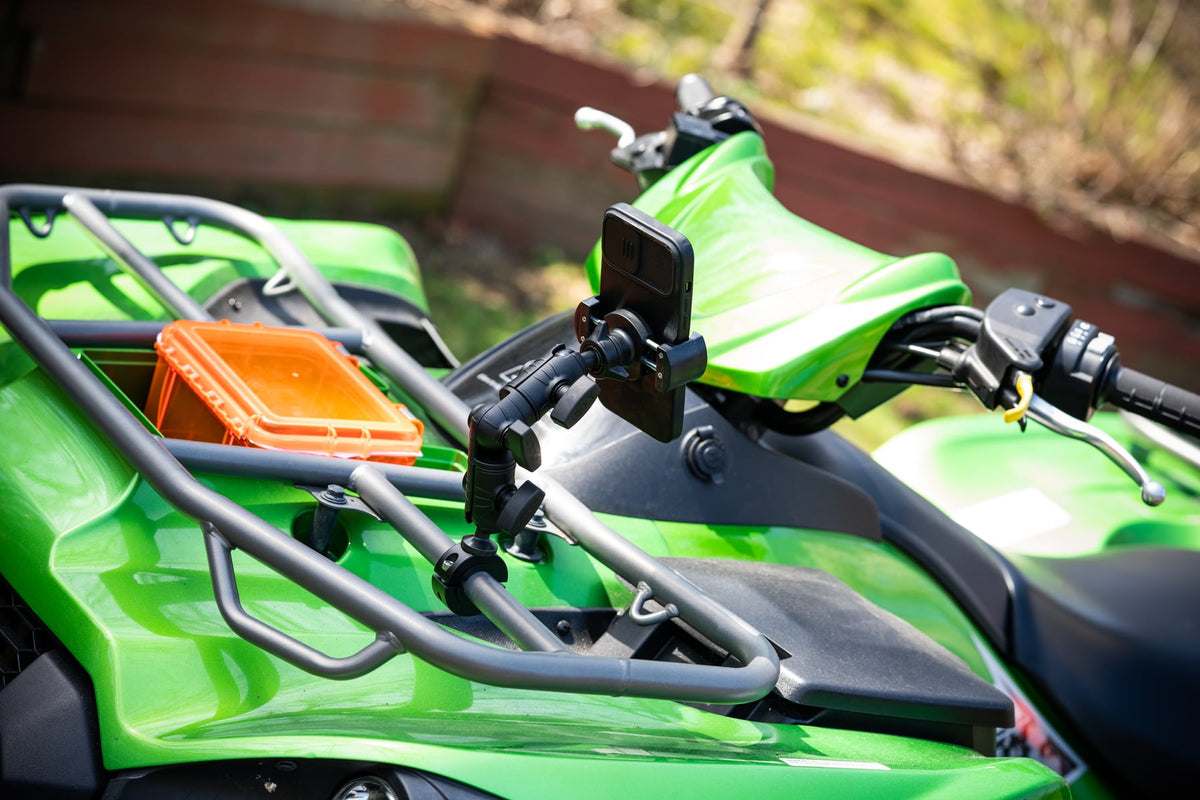
Trail navigation in a Jeep Wrangler puts phone mounts through tests that highway driving never does. Rock crawling, steep descents, and washboard roads create vibration patterns that shake loose mounts right off their bases. Add a heavy-duty case, frequent map checking, and the need to actually see the screen through dust and glare, and you need mounting hardware built for punishment.

The right mount for Jeep trail use starts with retention that won't fail when you hit the rough stuff. Trail riders typically run larger phones with protective cases, need charging access during long runs, and want the device positioned where passenger and driver can both reference navigation without blocking critical controls.
Trail Environment Requirements
Off-road phone mounting faces challenges that parking lot testing never reveals. Trail vibration comes from multiple directions simultaneously - engine shake, tire bounce, frame flex, and steering input all combine to stress mount connections. Device weight increases significantly with rugged cases, and the mount must hold securely while allowing quick access for route changes or emergency calls.
Dashboard space in Wranglers varies by year and trim level. Some installations work better with rail-mount systems that clamp to existing bars or posts. Others need AMPS-compatible bases that bolt to flat surfaces. The mounting location affects cable routing, passenger access, and whether the screen stays visible when the sun hits it directly.

iBOLT Moto-Vise™ IncrediBOLT™ 360 Heavy Duty Phone Clamp / Handlebar / Rail Mount - $72.95
iBOLT's modular approach works well here because trail setups often require custom solutions. The holder that grips your cased phone securely might need a different base than what works for the mounting location you actually have available.
Mounting Location Assessment
Start by identifying where the phone actually needs to live in your Wrangler. Dashboard mounting works for navigation reference but may block air vents or controls. Roll bar mounting keeps the device away from airbag zones but requires measuring bar diameter and confirming the mount won't interfere with soft top operation.
The iBOLT Moto-Vise™ IncrediBOLT™ 360 Heavy Duty Phone Clamp / Handlebar / Rail Mount handles round mounting points from 0.5 to 1.25 inches in diameter. This covers most Wrangler roll bars, grab handles, and aftermarket light bars. The 360-degree rotation lets you position the screen optimally regardless of the clamp orientation.

For dashboard installations where drilling is acceptable, the iBOLT™ xProDock™ Bizmount™ Amps provides a more permanent solution. The AMPS-pattern base distributes stress across four mounting points, and the holder accommodates phones up to 6.9 inches with cases up to 0.6 inches thick.
No-Drill Installation Options
Not every Wrangler owner wants to drill holes in their dashboard or can modify a leased vehicle. The iBOLT™ xProDock™ NFC Bizmount™ - Phone Holder/Mount with Heavy Duty Suction Cup Base and 1.5m USB-C Cable uses a heavy-duty suction cup that works on smooth windshield or dashboard surfaces.
The suction base requires a clean, non-textured surface at least 4 inches in diameter. Test the suction strength before heading out on trails - the mount should hold firmly when you try to twist or pull the phone holder. The included 1.5-meter USB-C cable handles charging without creating cable management problems.

iBOLT™ xProDock™ NFC Bizmount™ - Phone Holder/Mount with Heavy Duty Suction Cup Base and 1.5m USB-C Cable - $39.95
Suction mounts work best for day trips or temporary installations. For extended trail use or commercial applications, mechanical attachment provides more reliable retention under sustained vibration.
Device and Case Compatibility
Measure your phone with its trail case installed before selecting a holder. Rugged cases like OtterBox Defender or LifeProof add significant bulk, and some cases have protruding corners or belt clips that interfere with mount jaws.
All three iBOLT options mentioned accommodate most phones with cases, but verify the exact dimensions. The holders grip devices from the sides, so screen protectors and front-facing cameras remain accessible. Port access varies by case design - some thick cases may require cable adapters or right-angle connectors for charging.
Consider how often you'll remove the phone from the mount. Trail photography, camp setup, or sharing navigation with other vehicles requires quick release mechanisms that work with gloves on.
Installation Verification Steps
Before finalizing any mount installation, test the setup with your actual device and case combination. The phone should lock securely without excessive force and release easily when needed. Check that volume buttons, power switches, and charging ports remain accessible.
Verify the screen angle works for both driver and passenger viewing. Trail navigation often requires passenger input for route decisions or hazard spotting. The mount should allow screen rotation without tools and hold the selected position under vibration.
Cable routing matters more in trail vehicles than street cars. Charging cables that cross the shifter, parking brake, or door handles create safety hazards. Plan the cable path before tightening any permanent hardware.
Frequently Asked Questions
Which iBOLT mount works best for Jeep Wrangler trail navigation?
The iBOLT Moto-Vise™ IncrediBOLT™ 360 Heavy Duty Phone Clamp handles most Wrangler installations because it clamps to existing roll bars or grab handles without drilling. For permanent dashboard mounting, the xProDock™ Bizmount™ Amps provides stronger retention.
Do these mounts work with thick rugged cases?
Yes, but measure your cased phone first. The iBOLT holders accommodate cases up to 0.6 inches thick, which covers most trail-worthy protection. Some cases with belt clips or extreme bulk may require case-specific verification.
Can I move the mount between different vehicles?
The clamp and suction-based mounts move easily between vehicles. The drill-base AMPS mount requires permanent installation but provides the strongest retention for dedicated trail rigs.
How do I prevent vibration from loosening the mount?
Use thread locker on threaded connections and check tightness periodically. The mechanical clamp systems resist vibration better than friction-based holders. Avoid over-tightening, which can crack plastic components or damage mounting surfaces.

Leave a comment
This site is protected by hCaptcha and the hCaptcha Privacy Policy and Terms of Service apply.