
Utility truck crews face a specific tablet mounting challenge: the device needs to survive rough roads, dirty conditions, and multiple users while staying accessible for work orders, GPS navigation, and crew communication. Unlike office or consumer setups, utility fleet tablets can't rely on lightweight stands or temporary solutions.

The right mounting system for utility crews must handle vibration, allow quick device removal when needed, and work consistently across different truck models in the fleet. Most importantly, it should mount where the crew actually needs the tablet, not just where a generic mount happens to fit.
What utility crews need from tablet mounts
Field service tablets typically run work order software, mapping applications, and communication tools that crews access throughout their shift. The mounting location needs to keep the screen visible without blocking controls or creating safety hazards. Many utility trucks have limited flat mounting surfaces, so the base attachment method becomes critical.
Fleet managers also need consistency. When multiple trucks use the same mounting system, replacement parts are simpler to stock, installation procedures can be standardized, and crews don't need retraining when switching vehicles. This is where modular mounting systems like iBOLT's TabDock series provide real advantages over single-purpose consumer mounts.

Drill-base mounting for permanent installations
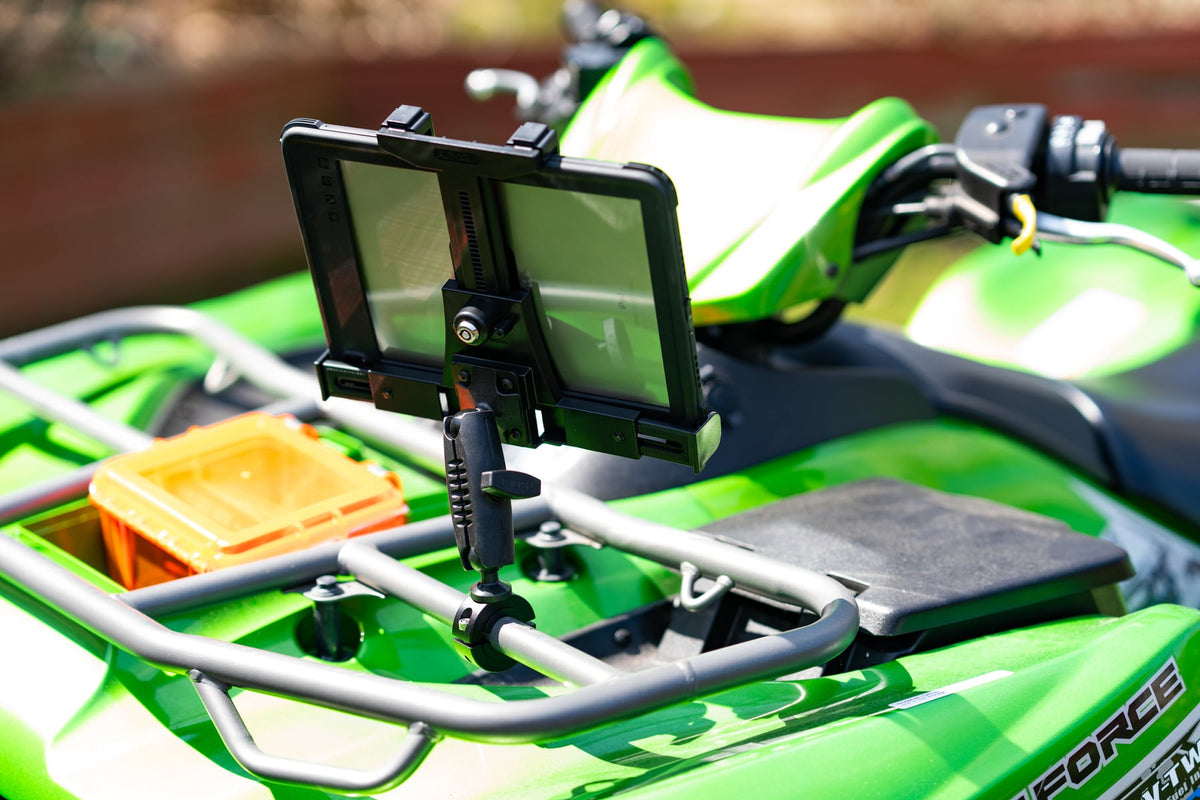
The iBOLT™ TabDock™ Bizmount™ AMPs works best when you have a suitable flat mounting surface and want a permanent installation. This system uses a drill-base attachment with AMPS-pattern compatibility, making it suitable for fleet standardization.
Watch: TabDock BizMount AMPS setup (IBBZ-33921)
See the standard TabDock BizMount AMPS unboxing, 4-prong connection, arm and cradle adjustments. Full demo, short version, captions and transcript.
Explore TabDock BizMount AMPS · Full video guide and transcript
This is the standard IBBZ-33921 TabDock, not the XL variant. The narration’s “7 to 11 inches” is not a universal fit guarantee: compare device and case dimensions with the current product listing. Tablet is not included.
Read the video transcript
Narration, with product spellings and punctuation normalized.
0:00 Let's unbox the iBOLT TabDock BizMount AMPS heavy-duty tablet mount.
0:05 Inside, everything comes wrapped up securely,
0:08 including an instruction guide, mounting hardware, and extra support feet.
0:12 First up is the spring-loaded TabDock cradle,
0:15 paired with the heavy-duty BizMount arm.
0:18 The side adjustment knob gives you a full 360-degree rotation,
0:22 so you can lock in the exact viewing angle.
0:26 The four-prong pattern on the back
0:28 makes it super easy to detach or swap out components on the fly,
0:32 while the drill base plate gives you a rock-solid foundation
0:36 for vehicle consoles or dashboards.
0:40 The cradle features top and bottom spring expansion,
0:43 with customizable support feet to fit tablets
0:46 7 to 11 inches, even with the heavy-duty cases attached.
0:50 That completes the setup.
0:51 For more information and mounting accessories, check out iBOLT online.
0:54 Thanks for watching.
Watch the short vertical demo
On-screen text transcript
On-screen text in this music-backed short; no spoken narration detected.
0:00 [Music] iBOLT TabDock BizMount Tablet Drill Base Mount
0:03 Unscrew the knob
0:05 Attach ball mount
0:07 Tighten knob
0:08 Lock in plate
0:09 Adjust tablet mount
0:16 iBOLT Mounts
Before choosing this option, verify that your mounting surface can handle the drilling pattern and that the tablet position won't interfere with existing controls or the driver's view. The drill-base approach provides maximum stability for tablets that stay mounted during rough driving conditions, but it's not easily reversible if fleet requirements change.
Adjustable AMPS mounting for varied installations
The iBOLT TabDock™ IncrediBOLT™ 360 AMPS Tablet Mount offers more positioning flexibility while maintaining the AMPS mounting standard. The 360-degree rotation capability helps accommodate different crew heights and viewing angles, which matters when the same truck is used by multiple operators.
This mount works well when you need the stability of an AMPS-pattern base but require more adjustment options than a fixed drill-base system provides. The additional articulation points do add complexity, so consider whether your crews need the extra adjustability or would prefer a simpler fixed position.

Console wedge mounting for no-drill installations
The iBOLT TabDock™ IncrediBOLT™ 360 Wedge fits between console and seat gaps without requiring permanent modifications to the vehicle. This approach works when fleet policy prohibits drilling, when trucks are leased, or when the mounting system needs to move between vehicles.
The wedge design depends on having a compatible console configuration, so measure the gap dimensions before ordering. While this mount avoids permanent installation, it may not provide the same vibration resistance as drill-base systems in extremely rough driving conditions.

iBOLT TabDock™ IncrediBOLT™ 360 Wedge - Heavy Duty Vehicle Console Seat Gap Mount for All 7" - 10" Tablets - $56.00
Installation considerations for utility fleets
Start by identifying where the tablet actually needs to be positioned for your crew's workflow. Work order tablets often need quick access but don't require constant viewing like navigation devices. Communication tablets might need to stay visible but shouldn't distract from driving tasks.
Cable routing becomes important for tablets that charge during operation. Plan the power cable path before finalizing the mount position to avoid interference with controls, pedals, or seat adjustment. Some utility trucks have existing 12V outlets in convenient locations, while others may require additional wiring.
Consider removal frequency as well. Tablets that go home with crews each night need different mounting hardware than devices that stay with the vehicle. Quick-release mechanisms add convenience but may reduce security in shared vehicle situations.
Frequently Asked Questions
Which iBOLT mount works best for utility truck tablets?
The iBOLT™ TabDock™ Bizmount™ AMPs provides the most stable platform for permanent installations where drilling is acceptable. For no-drill installations, consider the wedge mount if your console configuration is compatible.
Can these mounts handle vibration from rough roads?
iBOLT's TabDock series is designed for commercial vehicle use and includes vibration-resistant features. Drill-base installations typically provide the best vibration resistance, while wedge mounts depend more on proper fit and tightening.
Do I need to remove tablets when the truck is parked?
This depends on your fleet security policy and the tablet's value. iBOLT mounts can accommodate both quick-release holders for daily removal and more secure retention for tablets that stay with the vehicle.
Will these mounts work with rugged tablet cases?
iBOLT TabDock holders accommodate tablets with protective cases, but measure your specific device and case combination to verify fit. The adjustable retention arms can handle various case thicknesses within the specified size range.
Can I use the same mounting system across different truck models?
AMPS-pattern mounts provide good standardization potential, but base attachment methods may vary between truck models. The modular design allows you to use the same holders with different base types as needed across your fleet.


Leave a comment
This site is protected by hCaptcha and the hCaptcha Privacy Policy and Terms of Service apply.