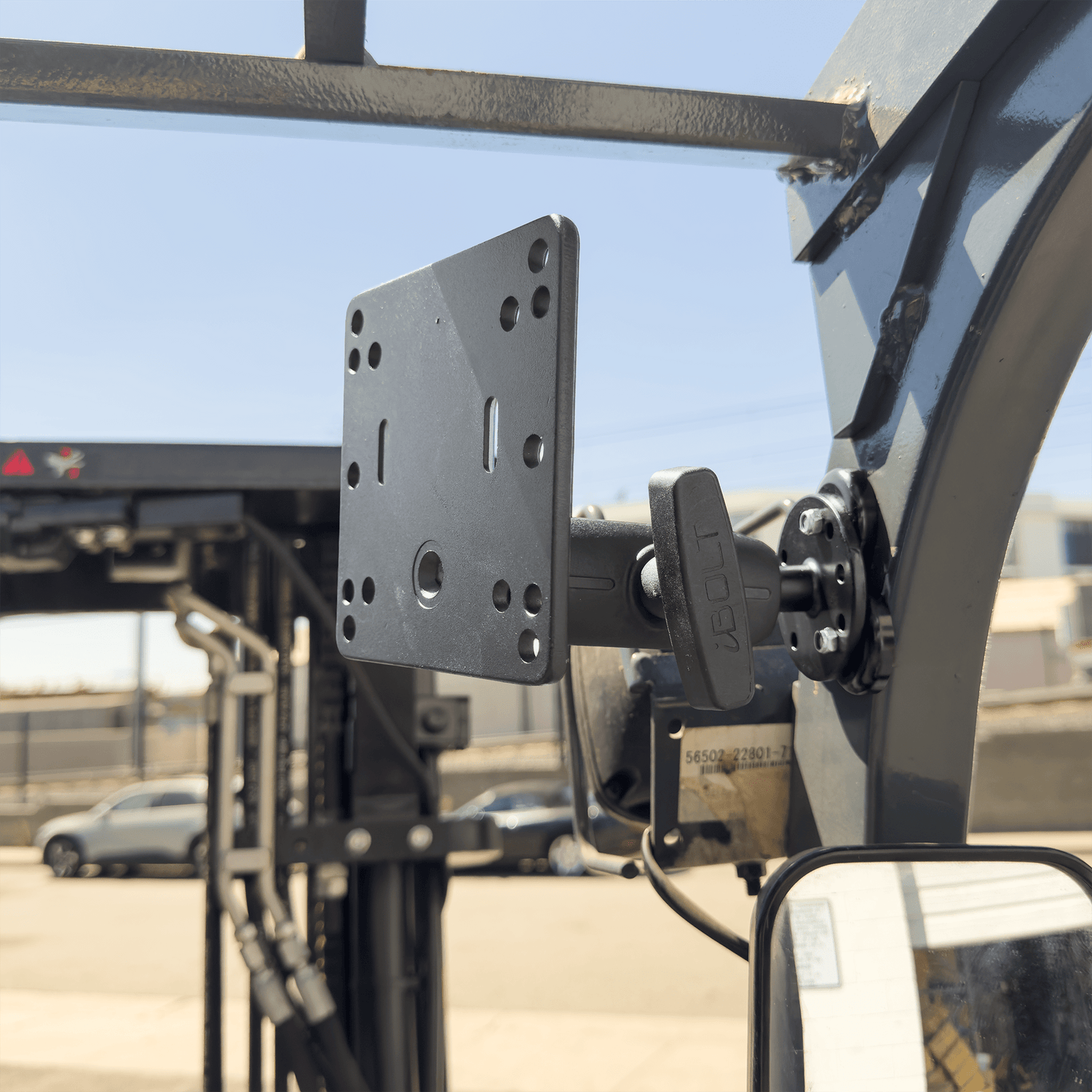
Warehouse managers installing displays on forklifts face a specific challenge: the monitor needs to stay readable and accessible while the vehicle moves, vibrates, and gets operated by different people across multiple shifts. A consumer desk arm won't survive this environment, and a poorly chosen industrial mount can drift into the operator's sightline or shake loose during normal use.
The right VESA monitor mount for forklift applications must handle constant vibration, frequent operator adjustments, and the reality that these displays often run inventory management software, picking applications, or safety systems that can't afford downtime.
What Makes Forklift Monitor Mounting Different
Forklift displays operate in conditions that would destroy typical office mounting hardware. The mount experiences constant vibration from the engine, hydraulics, and movement across warehouse floors. Operators adjust the screen position throughout their shifts, and the display needs to stay stable whether the forklift is stationary, lifting, or navigating tight aisles.
VESA 75x75 and 100x100 mounting patterns are common on industrial displays, but the mounting hardware needs to be built for this environment. Standard ball joints can work loose, lightweight arms can't handle the vibration, and magnetic mounts need serious holding power to stay positioned.

iBOLT VESA 75x75 / 100x100 Monitor Pillar Mount with 38mm (1.5-inch) Ball Joint - $109.95
Cable management becomes critical in forklift installs. Power and data cables must route cleanly without interfering with controls, hydraulic lines, or the operator's movement. A mount that forces cables across the operator's workspace or into moving parts creates safety issues and maintenance problems.
Pillar Mount vs Magnetic Mount: Which Fits Your Setup
The iBOLT VESA 75x75 / 100x100 Monitor Pillar Mount with 38mm Ball Joint works when you have a solid mounting pillar or post on the forklift. This mount clamps directly to round or square posts and provides the rigid connection needed for displays that get adjusted frequently. The 38mm ball joint offers smooth positioning while maintaining holding strength under vibration.
The iBOLT VESA 100x100 triMag Magnetic Monitor Mount suits installations where you need to position the display on a flat metal surface like the forklift's overhead guard or side panel. The triMag system uses three powerful magnets to create a stable base that can be repositioned when needed but won't slide during operation.

For mixed installations that combine displays with barcode scanners or other AMPS-compatible devices, the iBOLT AMPS to VESA 75/100 Plate adapter lets you integrate VESA displays into existing AMPS mounting systems. This approach works well for fleet standardization where you want consistent mounting hardware across different device types.
Installation Planning for Warehouse Environments
Before ordering any mount, measure your display with its protective case or industrial housing installed. Many warehouse displays use ruggedized cases that add significant bulk and weight compared to the bare monitor specifications. The mount needs to handle the total assembly, not just the display panel.
Identify the exact mounting location on your forklift. Overhead guard posts, side pillars, and dashboard areas each require different mounting approaches. The display should be visible from the operator's normal working position without blocking critical sight lines for load handling or navigation.
Consider operator workflow. If multiple people use the same forklift, the mount needs to allow quick position adjustments without tools. If the display is part of a fixed workstation setup, prioritize stability over adjustment range.

Cable routing deserves careful planning. Power cables, USB connections, and network cables need protected paths that won't interfere with forklift operation. Some installations benefit from cable management arms or protective conduit, especially in environments with frequent load changes or tight maneuvering.
Fleet Standardization and Maintenance Considerations
Large warehouse operations benefit from standardizing on one mounting system across their forklift fleet. This simplifies maintenance, reduces spare parts inventory, and makes it easier to move displays between vehicles when needed. iBOLT's modular approach lets you use the same base hardware with different holder configurations as your display requirements change.
Plan for cleaning and maintenance access. Warehouse environments generate dust, and displays need regular cleaning to stay readable. The mount should allow the display to tilt or rotate for cleaning without requiring complete removal. Consider how maintenance staff will access cable connections and mounting hardware during routine service.
Document your installation approach for consistency across multiple vehicles. Record mounting locations, cable routing paths, and any vehicle-specific modifications needed. This documentation becomes valuable when adding new forklifts to the fleet or training maintenance staff.
Comparing iBOLT Against Industrial Mounting Alternatives
RAM Mounts, Havis, and Gamber-Johnson offer competing forklift mounting solutions. These brands focus on heavy-duty applications and may be appropriate for some installations. iBOLT differentiates itself through modular design, standard mounting patterns, and the ability to mix components for custom solutions.
Generic VESA arms designed for office use typically fail in forklift applications due to inadequate vibration resistance and insufficient adjustment range. Industrial-grade mounting hardware costs more initially but avoids the downtime and safety issues that come from mount failures during operation.
When evaluating options, consider total cost of ownership including installation time, maintenance requirements, and replacement part availability. A mount that's difficult to service or requires special tools for adjustments creates ongoing operational costs.
Frequently Asked Questions
Which iBOLT mount works best for standard forklift displays?
The iBOLT VESA 75x75 / 100x100 Monitor Pillar Mount handles most forklift installations where you have a suitable mounting post. For installations requiring magnetic attachment, the triMag Magnetic Monitor Mount provides the holding strength needed for industrial environments.
How do I verify my display is compatible with VESA mounting?
Check the back of your display for four threaded holes arranged in a square pattern. VESA 75x75 has holes spaced 75mm apart, while VESA 100x100 uses 100mm spacing. Measure the hole spacing and confirm the thread size before ordering mounting hardware.
Can these mounts handle displays with protective cases?
Yes, but you must account for the additional weight and bulk when selecting mounting hardware. Measure and weigh your display with its protective case installed, and verify that the case doesn't interfere with VESA mounting hole access.
What's the weight limit for forklift display mounts?
Weight limits vary by specific mount design and installation method. Check the product specifications for your chosen mount and ensure your display assembly stays within the rated capacity. Include cables, protective cases, and any attached accessories in your weight calculation.

Leave a comment
This site is protected by hCaptcha and the hCaptcha Privacy Policy and Terms of Service apply.