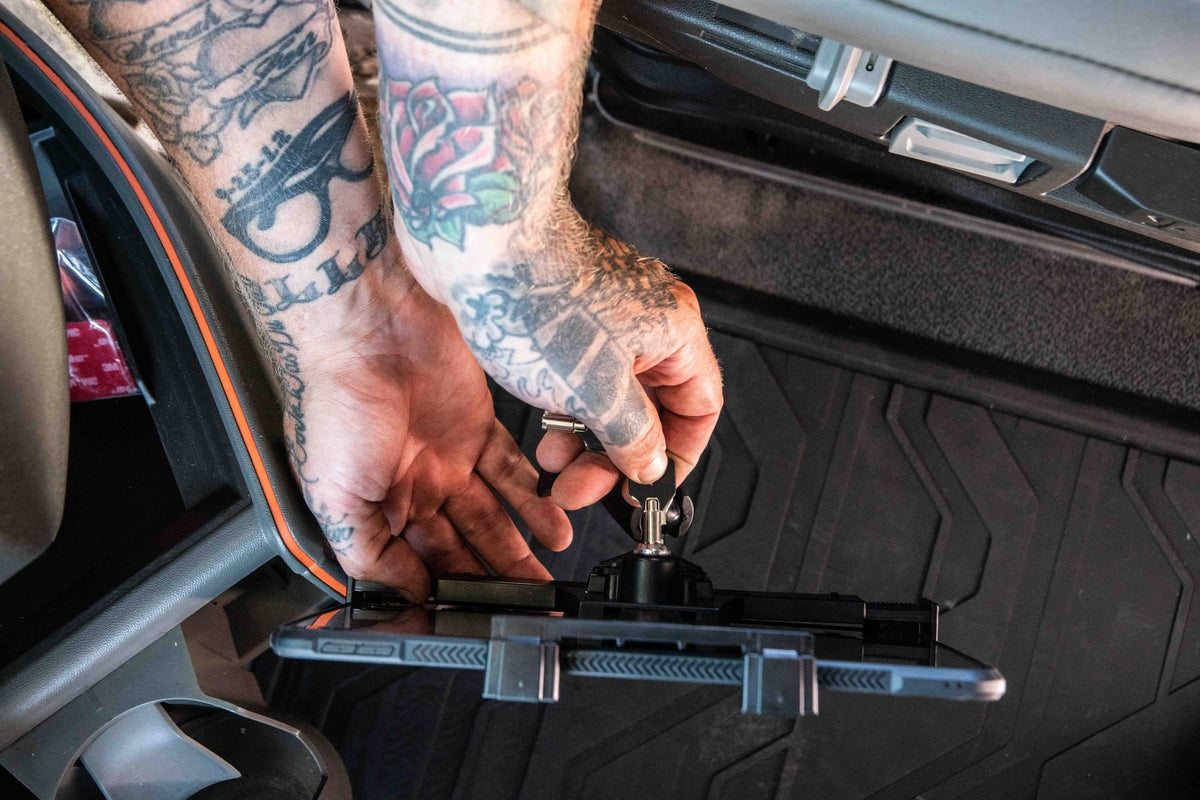
The ELD mandate turned the tablet into a permanent fixture in the cab. It is no longer just a screen for turn-by-turn directions. For most drivers it now handles hours of service logging, pre-trip and post-trip inspections, dispatch messages, proof of delivery, route changes, and fleet communication throughout the shift. When that tablet is loose on the passenger seat or sliding around the dash, it stops being a convenience and starts being a safety and compliance problem.

A properly mounted ELD tablet gives the driver a consistent, glanceable position that does not block the windshield, gauges, controls, airbags, or mirrors. Just as important, it gives the fleet a repeatable installation standard, so every truck or van in the fleet has the same setup instead of a mix of suction cups, zip ties, and improvised brackets that each driver interprets differently.
What a compliant ELD mount actually needs to do
An ELD tablet needs to be visible at a glance and reachable when the vehicle is parked or safely stopped. Drivers should never have to hold the device, dig around the cab to find it, or wrestle a loose charging cable while trying to log a status change. The mount also has to survive real working conditions: cab vibration on rough routes, heat buildup on the dash, long shift cycles, tablets swapped between drivers, and devices running in protective cases that add bulk.
This means the mounting arm, cradle, and base all matter as much as the tablet itself. A cradle that is too small for a cased device will pop loose on rough roads. An arm that flexes under vibration will drift out of the driver's sightline within a week. A base that was never rated for the vehicle's mounting point will loosen over time and turn into a warranty claim.
Choosing the right base: seat rail, AMPS, and drill-base options
The correct base depends on the vehicle, not just the tablet. Seat rail mounts attach to the existing rail hardware under or beside the driver or passenger seat, which makes them a strong fit when the tablet needs to sit near the center console within easy reach and without permanent drilling into the dash or floor.
AMPS drill-base mounts are the standard choice for permanent fleet installations. Because AMPS is a widely used hole pattern, a drill-base mount gives the fleet a fixed, vehicle-specific installation point that will not shift, rotate, or work itself loose the way a suction or clamp mount can over months of use. For fleets standardizing across many vehicles, this predictability is usually worth the one-time install effort.
Suction mounts can work for short-term or trial setups, but before standardizing on suction across a fleet, test it against real conditions: dashboard texture, direct sun heat that can soften adhesive or suction seals, and how often the mount needs to be reseated during a shift. What holds well in a demo vehicle in a cool warehouse does not always hold the same way after a summer in a truck cab.
Seat rail mounts for trucks and vans

iBOLT LockPro FlexPro Heavy Duty Locking Tablet Seat Rail Mount
$159.95 | Fleet ELD Tablet Mount
The iBOLT LockPro FlexPro locking tablet seat rail mount is a strong fit when the tablet should sit near the driver without attaching to the windshield. The locking holder helps shared fleets keep the assigned tablet in place, and the seat rail position can reduce dashboard clutter.
Seat rail installs still need careful placement. The tablet should not interfere with seat movement, passenger space, shifting, cup holders, or emergency controls. Test the viewing angle from the actual driving position before final tightening.
AMPS drill-base mounts for fixed installs

iBOLT TabDock IncrediBOLT AMPS 4.25 Inch Drill Base
$54.95 | Tablet AMPS Drill Base Mount
For fleets that want a more permanent setup, the iBOLT TabDock IncrediBOLT AMPS 4.25 inch drill-base mount gives installers a known AMPS mounting pattern and an adjustable arm. AMPS is useful because it connects to many vehicle brackets, adapter plates, and modular iBOLT parts.
AMPS mounts work well when a fleet wants the same tablet placement across similar vehicles. They are also a good choice for service vans, utility trucks, dispatch desks, and warehouse carts where a fixed screen position is useful.
Lower-profile ELD mounting

iBOLT TabDock FlexPro Seat Rail Tablet ELD Mount
$34.95 | Fleet ELD Tablet Mount
The iBOLT TabDock FlexPro seat rail tablet ELD mount is useful when the install needs a practical seat rail position with a simpler tablet holder. It can help fleets avoid windshield clutter while keeping the tablet close enough for parked interactions.
Fleet install checklist
- Confirm the tablet size with its protective case installed.
- Choose the base type by vehicle ownership, not just preference.
- Keep the tablet visible without blocking the road, gauges, controls, or airbags.
- Plan charging cable routing before drilling or tightening the mount.
- Use locking holders when tablets stay in shared vehicles.
- Document the standard setup so replacement parts are easy to order.
Related iBOLT Mounting Options
iBOLT LockPro FlexPro Heavy Duty Locking Tablet Seat Rail Mount
A practical option for cab, fleet, and mobile work setups where visibility and reach matter.
iBOLT TabDock™ IncrediBOLT™ AMPS w/ 4.25” Dual Socket Arm Drill Base
A practical option for cab, fleet, and mobile work setups where visibility and reach matter.

iBOLT™ TabDock™ Flexpro - Heavy Duty Floor Mount for All 7" - 10" Tablets
A practical option for cab, fleet, and mobile work setups where visibility and reach matter.

iBOLT™ LockPro™ Metal Locking Tablet Drill Base Mount
A practical option for cab, fleet, and mobile work setups where visibility and reach matter.
Frequently Asked Questions
Does the ELD mandate require a specific tablet mount?
The mandate does not require one specific mount brand or style, but fleets still need a secure and practical tablet position for safe use and consistent operation.
The iBOLT LockPro FlexPro locking tablet seat rail mount attaches directly to the seat rail hardware already in the vehicle, positioning the tablet within reach of the driver without permanent modification. The locking cradle is worth noting for fleets specifically, since it addresses one of the most common complaints with shared vehicles: tablets that get grabbed off the mount between drivers or routes. View Product
For fleets that prefer a permanent drill-base install, the iBOLT TabDock IncrediBOLT AMPS 4.25 inch drill-base mount uses a fixed AMPS pattern base with a dual-socket arm, giving installers flexibility on arm length and tablet angle while keeping the base itself rock solid. View Product
The iBOLT TabDock FlexPro seat rail tablet ELD mount combines a seat rail base with a gooseneck arm, which is useful in cabs where the driver needs more reach adjustment to clear the wheel, shifter, or a mounted radio without blocking any of them. View Product
Security and cable management for shared fleet vehicles
Fleet tablets get handled by more people than a personal device: dispatchers, mechanics, and multiple drivers across shifts. A locking cradle reduces the chance of a tablet walking off with a driver at shift change, and it keeps the device tied to the vehicle it is assigned to, which matters for fleets tracking hardware by unit number.
Cable routing deserves its own planning pass. A charging cable that dangles loose across the dash will get caught on knees, shifters, or door panels within days. Route the cable along the seat rail or gooseneck arm itself where possible, and secure any slack with a clip or tie point so it does not become a distraction or a snag hazard during a stop.
What to verify before you buy
Before ordering mounts for a single vehicle or an entire fleet, confirm the following:
- Tablet size and case: Measure the tablet with its protective case installed, since case dimensions are what the cradle actually needs to grip, not the bare tablet spec sheet.
- Mounting point: Check whether the vehicle has usable seat rail hardware, an existing AMPS bracket, or a dash surface suitable for a drill-base install. Not every cab layout supports every base type.
- Vibration exposure: Long-haul routes and rough terrain put more stress on arms and cradles than city delivery routes. Choose a heavier-duty arm for vehicles that see consistent vibration.
- Charging needs: Decide whether the tablet needs a powered cradle or just a cable pass-through, and plan the cable path before installation, not after.
- Removal frequency: If drivers need to remove the tablet often, a quick-release cradle saves time. If the tablet stays in the vehicle permanently, a locking cradle protects it better.
- Fleet standardization: If you are outfitting multiple vehicles, confirm the same mount and base combination works across your vehicle mix before ordering in volume.
What is the best ELD tablet mount for a semi truck?
Seat rail and AMPS drill-base mounts are the most common choices for semi trucks. The right pick depends on the cab layout, tablet size and case, how far the driver needs to reach the screen, and whether the fleet wants a permanent or removable install.
Should ELD tablets be mounted on the windshield?
Only if local regulations and the mount placement allow a position that does not obstruct the driver's view. Many fleets avoid windshield mounts for this reason and instead standardize on seat rail, AMPS, or dash bracket installs that keep the sightline clear.
Why use a locking tablet holder for fleet vehicles?
A locking holder helps protect shared tablets from being removed at shift change, reduces the chance of accidental drops, and keeps each device tied to its assigned vehicle, which simplifies hardware tracking across a fleet.
Can the same mount support ELD, dispatch, and navigation apps?
Yes. The mount only holds the tablet in place. The tablet itself can run ELD logging, dispatch messaging, route navigation, inspection checklists, and any other app the fleet uses, all from the same mounted position.
Does the mount need to support a tablet in a protective case?
In most fleet settings, yes. Measure the tablet with its case on before choosing a cradle size, since a cradle sized for a bare tablet will not securely hold the same device once a case is added.
Is a drill-base or seat rail mount better for a permanent fleet install?
Drill-base AMPS mounts tend to hold up best for permanent, fleet-wide installs since they attach directly to the vehicle structure. Seat rail mounts are a strong option when drilling is not preferred or when the vehicle already has usable rail hardware.
For most fleets, the mount is not an accessory, it is part of the ELD system itself. Standardizing the tablet, cradle, base, and cable path across every vehicle means less downtime, fewer improvised fixes in the field, and a setup that every driver can use the same way from day one.

Leave a comment
This site is protected by hCaptcha and the hCaptcha Privacy Policy and Terms of Service apply.