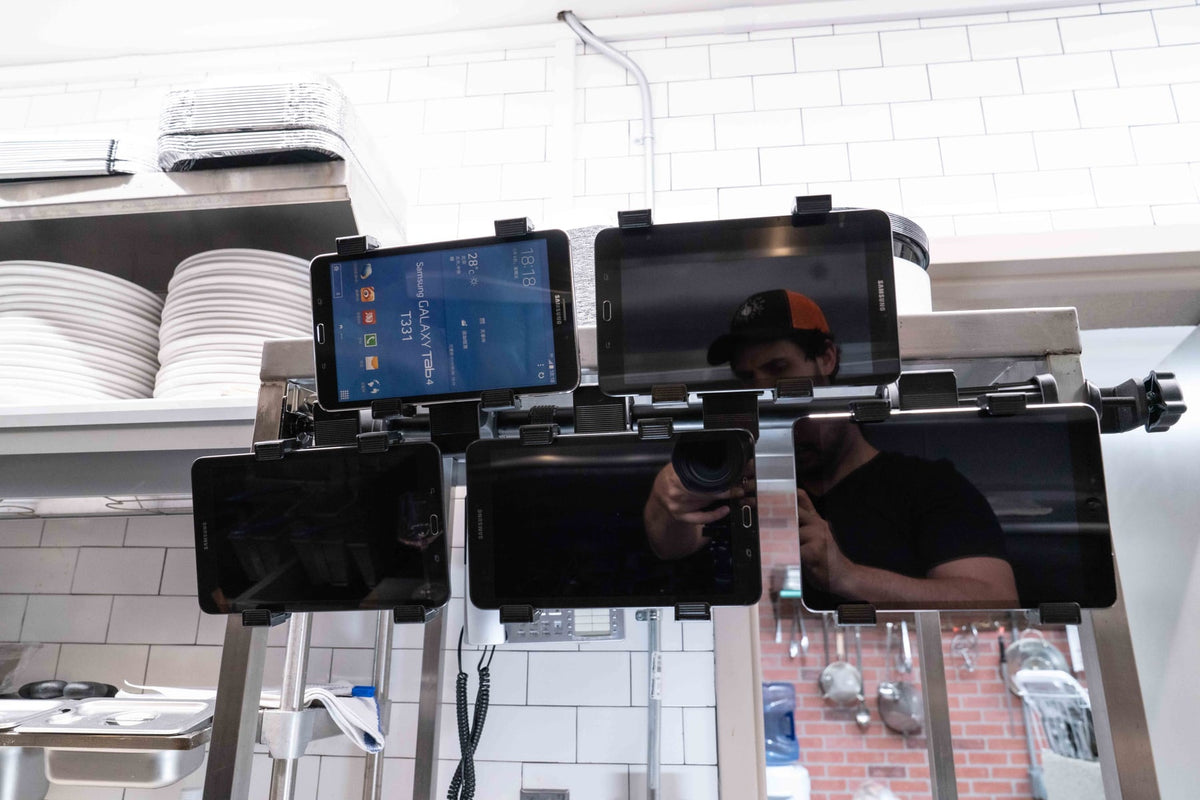
Most restaurant tablet problems do not start with the tablet. They start with the station. One screen is for DoorDash, another is for Uber Eats, another is for Grubhub, and the POS tablet is wedged somewhere between the receipt printer and the expo marker. During a slow hour, that setup looks manageable. During the dinner rush, it turns into missed orders, tangled charging cables, greasy screens, and staff shouting "whose tablet is that" over the fryer.

A better multi-tablet setup gives every screen a fixed, predictable place. The goal is not to make the counter look cleaner for photos. The goal is faster order recognition, cleaner separation between delivery platforms, protected hardware, and charging that does not depend on whoever grabbed the last open outlet.
Start with the workflow, not the device count
Before shopping for a multi-tablet stand, map the jobs each screen actually does. A quick-service counter may only need a POS tablet and one delivery tablet. A ghost kitchen running four or five delivery platforms needs all of them visible at once, side by side. A full-service restaurant may need a pickup station near the expo line and a separate tablet near the host stand.
The right restaurant tablet mount sits at the exact point in the workflow where staff make decisions. If tablets accept incoming orders, they need to be visible to whoever is watching tickets, not tucked behind a monitor. If they coordinate pickup, they belong near bags and labels, not across the kitchen. If they handle payment, placement and security matter more than screen count.
Skipping this step is the most common reason restaurants buy a stand, then buy a second one three months later because the first one solved the wrong problem.
Counter clamp or wall mount: match the base to the space
Once the workflow is clear, the next decision is the surface. Counter space in most kitchens is contested. Prep areas, POS terminals, printers, and bump bars are already competing for the same few feet, and a stand that has to be moved for cleaning or rearranged during a shift change will eventually get knocked over or unplugged.
A clamp-style multi-tablet stand works well when the counter is shallow, the layout might change, or drilling into a surface is not an option, common in leased spaces or rented commercial kitchens. A wall-mounted tablet station works better when counter real estate is genuinely limited or when tablets need to sit at a consistent eye level for staff who are standing, not reaching down.
Neither option is automatically better. The mistake is choosing based on what looks tidiest in a photo instead of what matches the counter depth, wall access, and how often the station needs to move.
What to verify before buying a multi-tablet stand
A few details separate a station that holds up through service from one that becomes a maintenance headache within a month:
- Tablet size range. Confirm the holder fits the actual tablet width and thickness, including the case. Most kitchens run a mix of iPads and Android tablets, and cases add real bulk that a snug holder will not accommodate.
- Number of tablets versus counter length. A 3-tablet tower and a 5-tablet tower have different footprints. Measure the counter or wall space before assuming the larger unit fits.
- Clamp depth for counter mounts. Check the clamp's minimum and maximum surface thickness against the actual counter edge, especially on stainless prep tables with rolled edges.
- Mounting hardware for wall units. Confirm the wall material can support the mount and the combined weight of the tablets before drilling.
- Charging access. Verify each holder allows a charging cable to stay connected while the tablet sits in place, not just when it is removed.
- Removal frequency. If tablets come out often for cleaning, charging elsewhere, or end-of-shift storage, a simple friction-fit holder is faster. If tablets stay mounted long-term or face customers, a locking holder is worth the extra step.
None of this takes long to check, but skipping it is how restaurants end up with a stand that holds the tablet but not the case, or a wall mount that blocks a cable from reaching the outlet.
Give delivery apps one station instead of five
Multiple single-tablet stands eat up more counter space than most restaurants expect, and they tend to migrate during cleaning, shift changes, and rush periods. A dedicated multi-tablet station keeps every delivery platform in one footprint and gives the team a single place to check when an order alert sounds, instead of scanning three separate corners of the counter.
The iBOLT Tablet Tower POS Clamp Mount with 3 Tablet Holders is built for exactly this setup, holding three tablets in a compact clamp base for counters running DoorDash, Uber Eats, and Grubhub side by side. Kitchens juggling more platforms, or running a shared order-and-payment station, can step up to the 5-tablet clamp mount, which keeps the same clamp-and-counter approach at a larger scale.
Watch: iBOLT TabDock POS Clamp Mount with 3 Tablet Holders (IBRT-34700)
Watch the standard three-holder TabDock station being assembled, including the pole connections and adjustable tablet holders.
View iBOLT TabDock POS Clamp Mount with 3 Tablet Holders (IBRT-34700)

iBOLT Tablet Tower POS Clamp Mount with 3 Tablet Holders
$79.95 | Restaurant Multi-Tablet Clamp Mount
The iBOLT Tablet Tower POS Clamp Mount with 3 Tablet Holders is a strong starting point for restaurants running three delivery apps or a delivery plus POS mix. For higher-volume operations, the 5-tablet clamp mount gives more room without spreading devices across the counter.

iBOLT Tablet Tower POS Clamp Mount with 5 Tablet Holders
$99.95 | Restaurant Multi-Tablet Clamp Mount
Move tablets to the wall when counter space is gone
If the counter is already packed with bags, labels, printers, payment hardware, and prep tools, a wall-mounted tablet station may be cleaner. Wall placement keeps tablets at eye level, helps route charging cables away from food prep areas, and makes the station feel like part of the kitchen instead of a temporary pile of devices.

iBOLT Tablet Tower POS Wall Mount with 4 Tablet Holders
$134.95 | Restaurant Multi-Tablet Wall Mount
The iBOLT Tablet Tower POS Wall Mount with 4 Tablet Holders is built for restaurants that want the tablets visible but off the work surface. It works especially well near pickup shelves, expo lines, or back-of-house order stations, as long as the wall location is away from heat and splash zones.
Plan charging, cleaning, and tablet ownership
A restaurant tablet station should be easy to clean around, easy to charge, and easy to understand during shift changes. Label the holder positions if each tablet belongs to a platform. Keep cables routed behind the station or along the wall. Do not place tablets where staff have to reach across hot equipment or wet counters.
For customer-facing tablets, add locking holders or a fixed drill-base stand. For back-of-house delivery app tablets, visibility and organization usually matter first. If devices are shared across shifts or left unattended, security should move higher on the list.
Recommended setup by restaurant type
- Small takeout counter: one POS tablet plus one delivery tablet on separate secure stands.
- Full-service restaurant: a 3-tablet tower for delivery apps plus a separate POS stand at checkout.
- Ghost kitchen: a 4 or 5-tablet station where all delivery platforms stay visible.
- Food truck: a compact clamp, suction, or locking stand that can be removed or secured at close.
- High-volume pickup area: a wall-mounted tablet station close to bags, shelves, and labels.
Related iBOLT Mounting Options
iBOLT™ Tablet Tower- TabDock™ POS Clamp Mount - with 3 Tablet Holders
Helpful for organizing tablets used for orders, delivery apps, and point-of-sale workflows.
iBOLT™ Tablet Tower- TabDock™ POS Clamp Mount - with 5 Tablet Holders
Helpful for organizing tablets used for orders, delivery apps, and point-of-sale workflows.
iBOLT Tablet Tower- TabDock™ POS Wall Mount - with 4 Tablet Holders
Helpful for organizing tablets used for orders, delivery apps, and point-of-sale workflows.

iBOLT Tablet Tower- TabDock™ POS Clamp Mount - with 4 Tablet Holders
Helpful for organizing tablets used for orders, delivery apps, and point-of-sale workflows.
Watch: iBOLT TabDock POS Clamp Mount with 4 Tablet Holders (IBRT-34707)
Watch the standard four-holder TabDock station being assembled and adjusted for a multi-tablet workstation.
View iBOLT TabDock POS Clamp Mount with 4 Tablet Holders (IBRT-34707)
Frequently Asked Questions
How many tablets should a restaurant delivery station hold?
Most restaurants need one holder per active platform, plus room for POS or pickup apps if they run in the same station. Three holders is a common starting point, while ghost kitchens often need four or five.
For restaurants that need the station off the counter entirely, the iBOLT Tablet Tower POS Wall Mount with 4 Tablet Holders mounts four tablets directly to a wall near the expo line or host stand, freeing up prep space while keeping every screen visible at a consistent height.
Plan charging and cable routing before install day
Cable management is where a lot of otherwise good tablet stations fall apart. Cables draped across a counter get caught during service, pulled loose during cleaning, and soaked during a spill. Before installing any multi-tablet stand, route power cables behind the station or along the wall, away from food prep zones, walking paths, heat sources, and cleaning spray.
If the station will stay powered through service, confirm the charging cable can stay seated while the tablet remains in its holder. A station that requires pulling the tablet out to plug it in defeats the purpose of a fixed setup, since staff will just leave it unplugged during a busy shift rather than fight with the holder.
Frequently Asked Questions
Is a wall mount better than a counter stand?
A wall mount works better when counter space is tight or tablets need to sit at a consistent eye level. A clamp or counter stand works better when the setup might move, drilling is not an option, or the counter itself is not a fixed fixture.
Can one tablet tower hold iPads and Android tablets?
Yes. iBOLT Tablet Tower holders are built for common 7 to 11 inch tablets, including iPads, Samsung Galaxy Tabs, and similar Android tablets. Always check the holder's width and thickness range against the tablet and its case before buying.
Should restaurant tablets be locked in place?
Locking holders make the most sense for customer-facing or unattended tablets, where theft or accidental removal is a real risk. Back-of-house delivery app tablets often do not need locks, but they still need a stable, snug fit so they do not slide or tip during service.
Where should charging cables go?
Route cables behind the station or along the wall, away from food prep areas, walking paths, heat sources, and cleaning spray. Confirm the holder lets the cable stay plugged in while the tablet sits mounted.
How many tablets does a typical delivery setup need?
Most quick-service and full-service restaurants run two to three delivery platforms plus a POS tablet. High-volume ghost kitchens or multi-brand operations often need four or five screens visible at once, which is where a larger tower or wall mount earns its counter space.
What should I measure before ordering a multi-tablet stand?
Measure the available counter length or wall space, the counter edge thickness for clamp mounts, and the width and thickness of each tablet with its case. Confirming these three numbers ahead of time avoids ordering a stand that does not fit the space or the hardware.
A multi-tablet setup should make the rush easier to manage, not harder to look at. Start with the workflow, choose the base that matches the counter or wall, verify tablet fit and cable access before ordering, and give every delivery platform a visible, fixed home.

Leave a comment
This site is protected by hCaptcha and the hCaptcha Privacy Policy and Terms of Service apply.