Running tablets at a host stand, drive-thru window, bar, or kitchen expo line comes with its own mounting problems: limited counter space, staff bumping into hardware during a rush, cables that need to stay out of the way, and tablets that get swapped or upgraded more often than the mount around them. iBOLT builds modular mounting hardware that solves these problems by letting you configure the exact mount your POS setup needs, rather than forcing you into a fixed accessory that only works for one tablet or one counter.
Why Restaurants Need Modular Mounting, Not Fixed Mounts
Most restaurant and POS environments change faster than a single fixed mount can keep up with. A quick-service counter might swap tablet models when a lease refreshes. A bar might need the same holder to work on a fixed pole at one location and a wall plate at another. A food truck might need the mount to survive vibration and heat that a dine-in counter never sees. Buying a new mount every time the hardware or the layout changes gets expensive and creates clutter behind the counter.
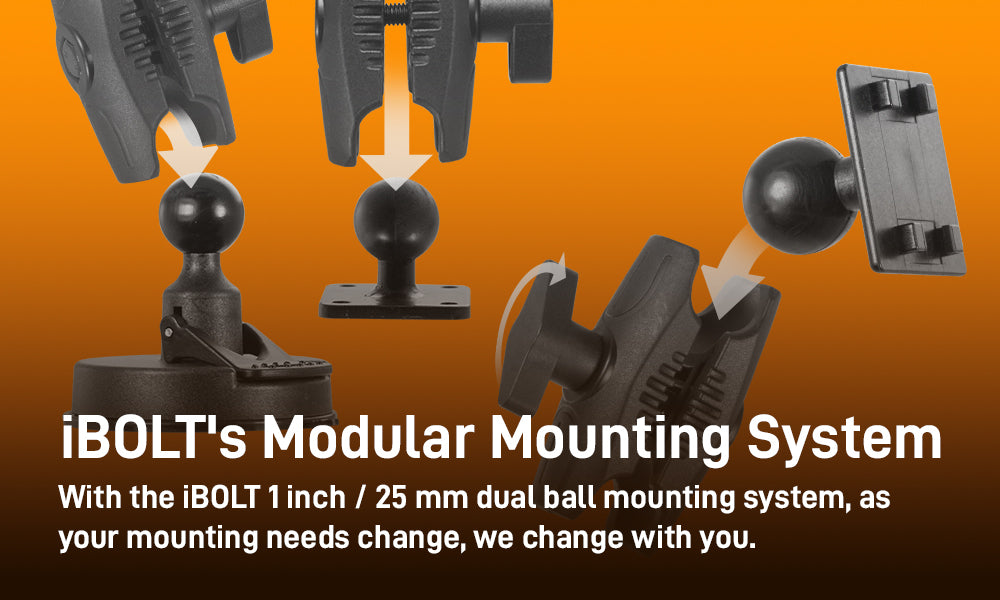
iBOLT's approach is built around a 1-inch ball interface and a modular parts system, so the holder, arm, and base are separate components you choose independently. That means the same base mounting hardware can carry a different tablet holder later, and the same holder can move to a different base or arm if you relocate a station.
Build Your Own Mount: Configure the Exact Setup Your Counter Needs

|
Our 1-inch ball mount line is built around the Mount Configurator, which lets you pick the device holder, base, and arm separately rather than buying a fixed bundle. For a restaurant, this matters in practical terms. You can choose a countertop base for a host stand, a wall or cabinet plate for a fixed POS terminal, or a pole mount for a bar rail, then pair it with a holder sized to your actual tablet, whether that's a compact 8-inch order tablet or a larger 12-inch kitchen display. Because the ball size and mounting pattern stay consistent across the line, you can also order a second holder later for a different tablet model and attach it to the same base already installed at the counter, instead of drilling new holes or replacing hardware. |
One Mounting System Across Multiple Stations

A single restaurant often needs several different mounting setups: a fixed terminal at the register, a mobile tablet for tableside ordering that gets docked and undocked constantly, and a kitchen display that needs to survive heat and grease near the line. Rather than sourcing three unrelated mount brands, the same 1-inch ball architecture lets you match the base to each location's surface, floor, wall, counter, or pole, while keeping the same family of holders available if tablet models change.
This also simplifies staff training and spare parts. If a holder cracks or a tablet is replaced, your team only needs to know one mounting system, not three different bracket types with different screws and adapters.
What to Verify Before You Mount a POS or Order Tablet

Before ordering hardware, confirm these details so the mount actually fits your station:
- Mounting surface: counter, wall, cabinet face, pole, or under-shelf all require different base hardware and screw patterns. Measure the surface thickness if you're using a clamp base.
- Tablet size and case: holders are sized to a device width and thickness range. If staff use a protective case, measure with the case on.
- Charging and cable routing: decide whether the tablet needs to stay powered while mounted, and plan where the charging cable exits the holder so it doesn't dangle across a walkway or prep area.
- Removal frequency: a host stand tablet that never moves can use a fixed arm, while a tableside ordering tablet that's picked up and set down constantly benefits from a quick-release holder.
- Security: high-traffic counters and customer-facing stations may need a locking holder or security screws to deter theft or accidental removal.
- Ball and arm size: confirm the 1-inch ball components you select are compatible across the base, arm, and holder you're combining, especially if you're adding a second holder to existing hardware later.
iBOLT's configurator lists compatible combinations directly, but if you're unsure whether a specific tablet model or case fits a given holder, verify the listed dimensions against your device before ordering.
Built for Demanding Environments

The same modular hardware used in restaurants is used by public safety, broadcasting, and transportation professionals who need mounts that hold up to constant handling, vibration, and temperature swings. That crossover matters for restaurant operators because it means the components are built for daily commercial use, not light home office duty. A base or arm that can handle a patrol vehicle's vibration or a news van's setup and teardown routine is well suited to a kitchen line or a busy counter.
Explore the full configurator here to match a base, arm, and holder to your specific station.
Related iBOLT Mounting Options

iBOLT™ TabDock™ Bizmount™ Wedge
A related iBOLT option that matches the mounting needs covered in this article.

iBOLT TabDock BizMount dualMag Low-Profile Strong Magnetic Mount for 7 to 10 inch Tablets
A related iBOLT option that matches the mounting needs covered in this article.

iBOLT TabDock ExtendiBOLT Dual Suction Cup Mount
A related iBOLT option that matches the mounting needs covered in this article.

iBOLT TabDock ExtendiBOLT Triple Suction Cup Mount
A related iBOLT option that matches the mounting needs covered in this article.
FAQ
Can I use the same iBOLT mount for different tablet models over time?
Yes, as long as you keep the 1-inch ball base and arm and swap only the holder when you change tablet models. Confirm the new tablet's dimensions match an available holder before ordering.
What's the best mounting option for a host stand versus a kitchen display?
A host stand typically works well with a countertop base and fixed arm since the tablet rarely moves. A kitchen display near heat or moisture should use a wall or under-shelf mount positioned away from direct grease exposure, with cable routing planned so cords don't cross prep surfaces.
Do iBOLT mounts support charging while the tablet is docked?
Holder design varies by model, so check whether the specific holder you're selecting leaves the charging port accessible or includes a pass-through opening, and plan your cable routing accordingly.
How do I prevent tablets from being removed by customers or unauthorized staff?
Choose a holder with a locking mechanism or security screws if the station is customer facing or in a high-traffic area. Quick-release holders are better suited to staff-only, frequently handled tablets.
What should I measure before ordering a holder?
Measure your tablet's width, height, and thickness with any case installed, and confirm the mounting surface type, counter, wall, cabinet, or pole, so you choose a compatible base.
Are these mounts durable enough for a busy restaurant environment?
The same components are used in public safety, broadcasting, and transportation settings that involve regular handling and vibration, which makes them a reasonable fit for daily restaurant use, though you should still verify the specific holder and base match your station's conditions.


Leave a comment
This site is protected by hCaptcha and the hCaptcha Privacy Policy and Terms of Service apply.