Forklift Tablet & Scanner Mounts That Survive the Shift
Problem proposition: Warehouse operators lose productivity every shift when tablets and barcode scanners bounce loose, block sightlines, or have to be repositioned at every shift change, and this article shows how the right forklift-rated mount eliminates each of those failure points.
Featured product links: iBOLT XL Forklift Barcode Scanner Holder 38mm Mount, iBOLT TabDock MagDock 360 Magnetic Tablet Mount , Heavy-Duty Forklift & Warehouse Holder
Forklift Tablet and Scanner Mounts That Actually Survive the Shift
A tablet zip-tied to a forklift cage is not a mounting solution. Neither is a consumer phone holder clamped to a pillar that vibrates loose by 10 a.m. If your operators are constantly repositioning devices, chasing dropped scanners, or squinting at a screen that has rotated sideways, the mount is the problem, not the operator. Here is how to fix it with hardware built for the environment.
Why Warehouse Mounts Fail Faster Than You Expect
Forklifts generate constant vibration. Add cold storage temperature swings, dust, the occasional rack impact, and three different operators per shift, and you have a set of conditions that will destroy any mount not rated for industrial use. Consumer-grade mounts use plastic ball joints and light-duty clamps sized for a car dashboard. A forklift pillar is a different world entirely.
The failure modes are predictable: the ball joint loosens under vibration, the device tilts into the operator's sightline, or the holder opens and drops a Zebra or Honeywell scanner onto a concrete floor mid-shift. Each failure costs time, and in a high-throughput DC, time is the metric that matters.
OSHA 1910.178 is also worth keeping in mind. Powered industrial truck regulations require that mounted screens and scanners do not reduce the operator's clear view, obstruct controls, or encourage use while the truck is moving. Mount placement is a safety decision, not just a convenience one.
Clamp Mounts vs. Magnetic Mounts: Choosing the Right Base
The base attachment method is the most important decision in any forklift mount setup. Two categories cover most warehouse installs.
Pillar and clamp mounts are the standard choice for fixed, high-vibration forklift installs. A clamp that wraps around the upright or cage bar stays put regardless of surface texture or vibration frequency. This is the right call for any device that needs to be in the same position every shift, on every truck in the fleet.
Magnetic mounts work well on flat steel surfaces where the load is within the magnet system's rated capacity and site EHS policy allows it. They are faster to reposition and require no tools, which makes them useful for shared equipment or facilities where operators move between trucks. The key is matching the magnet rating to the device weight and confirming the surface is clean, flat, and ferrous.
For most forklift applications, a 38mm C-size or larger ball system is the right spec. Consumer phone mount ball sizes are not engineered for the weight of a 10-inch tablet or an industrial scanner, and the difference shows up quickly under vibration.
Mounting a Barcode Scanner So It Stays Put All Shift
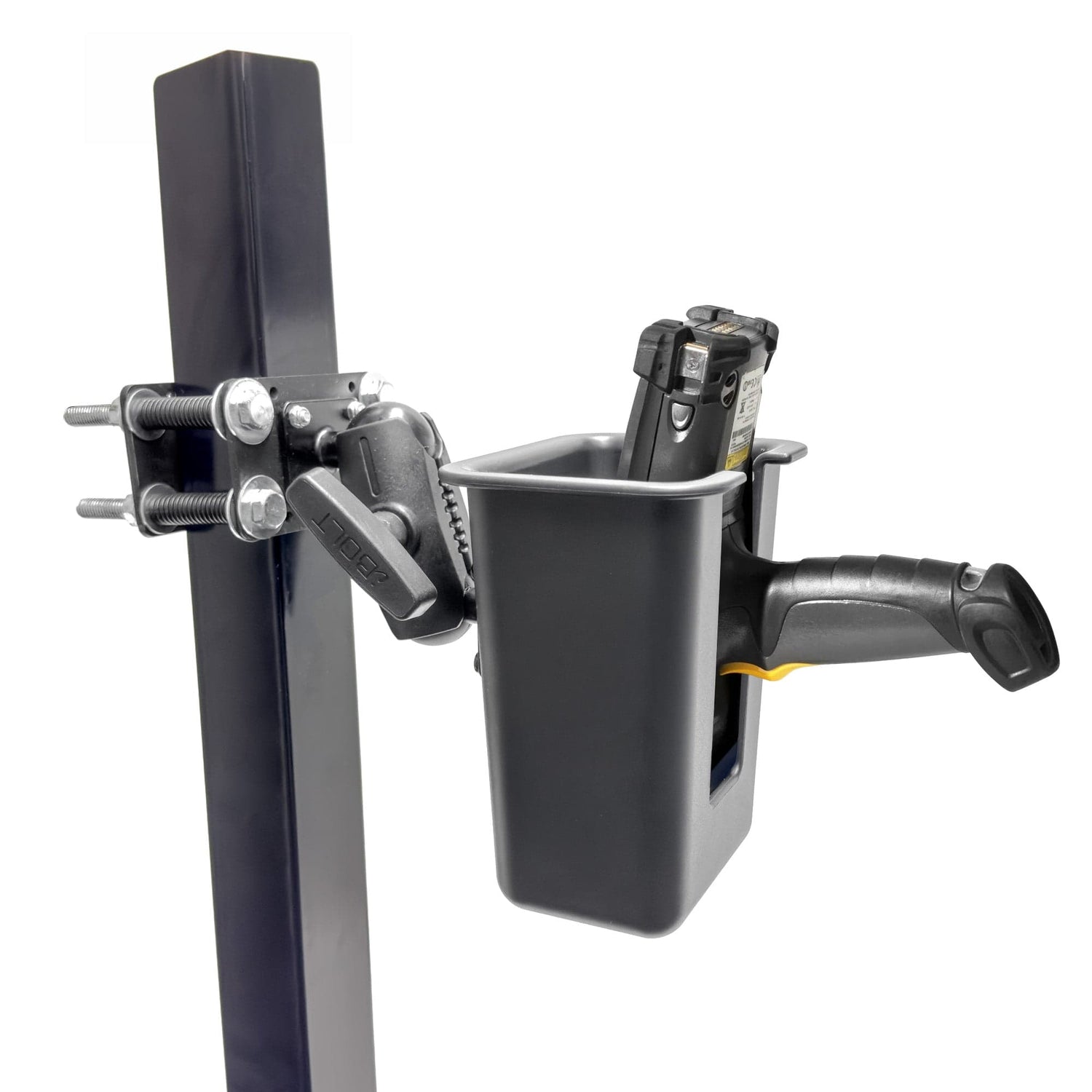
The most common complaint from forklift operators running pallet verification or live WMS updates is that the scanner is either in the way or out of reach. A dedicated holder solves both problems by giving the scanner a fixed home that the operator can grab and return without looking.
The iBOLT XL Forklift Barcode Scanner Holder 38mm Mount is built specifically for this use case. The pillar clamp fits uprights up to 3.75 inches wide, which covers most forklift mast and cage configurations. The holder opening measures 4.35 by 5.5 inches with a 6.75-inch depth, so it accommodates a wide range of handheld scanners including common Zebra, Honeywell, Symbol, and Datalogic models. The 38mm C-size ball mount paired with a 3.75-inch dual ball adjustable arm gives you the positioning range to keep the scanner accessible without putting it in the operator's sightline to the forks, pallet corners, or pedestrians.

iBOLT XL Forklift Barcode Scanner Holder 38mm Mount - $79.95
For facilities running pallet verification, misload reduction programs, or live ERP updates from the truck, having the scanner in a fixed, repeatable location is not a convenience feature. It is a workflow requirement. Operators should not be hunting for a scanner or setting it on the floor while they move a load.
Mounting a Tablet for WMS Access Without Blocking the Operator
A forklift mounted tablet is a different challenge from a scanner holder. Tablets are heavier, larger, and need to be readable at a glance without requiring the operator to lean or turn. The mount has to hold the device steady through vibration while keeping it out of the critical sightlines to the mast, mirrors, and controls.
The iBOLT TabDock MagDock 360 Magnetic Tablet Mount is designed for exactly this environment. The 88mm base uses six strong magnets to attach to flat steel surfaces, holding devices up to 2 lbs securely. Dual 25mm metal ball joints and a 2.75-inch arm provide full adjustability and 360-degree rotation, so the operator can dial in the viewing angle once and leave it there. The universal holder fits 7 to 10-inch tablets, and the AMPS-compatible interface means it integrates with other iBOLT components if you need to expand the setup later.

iBOLT TabDock MagDock 360 Magnetic Tablet Mount , Heavy-Duty Forklift & Warehouse Holder - $76.95
The magnetic base is the right call here when the mounting surface is a flat steel overhead guard or cab panel. For pillar or cage bar installs where a clamp base is preferred, the AMPS interface on the TabDock MagDock 360 allows it to pair with clamp-style bases from the iBOLT forklift lineup, giving you the same adjustable arm and holder with a different attachment method.
Shift Changes and Fleet Standardization
One underrated problem in multi-shift warehouses is that every operator adjusts the mount to their preference, and by the third shift the device is in a completely different position than the site intended. Standardizing on mounts with defined adjustment ranges and locking ball joints means the position can be set once per truck and held there across shifts.
Fleet standardization also matters for maintenance. When every truck in the facility uses the same mount model, replacement parts are interchangeable, training is consistent, and the facilities team is not sourcing six different clamp sizes. Both the iBOLT XL Forklift Barcode Scanner Holder and the TabDock MagDock 360 are built on standardized ball and AMPS interfaces, so components can be mixed across a fleet without compatibility issues.
Frequently Asked Questions
Can one forklift hold both a WMS tablet and a barcode scanner without blocking visibility?
Yes, with separate mounts positioned on different attachment points. A scanner holder on the upright and a tablet mount on the overhead guard or cab panel keeps both devices accessible while preserving the operator's sightlines. Always confirm placement meets your site's EHS requirements and OSHA 1910.178 guidelines.
Is a magnetic tablet mount safe for forklift use?
Magnetic mounts are appropriate when the surface is flat, clean, and ferrous, and when the magnet system is rated for the device weight. The TabDock MagDock 360 holds devices up to 2 lbs with a six-magnet 88mm base. Confirm your site EHS policy allows magnetic attachment before installing.
What pillar sizes do iBOLT forklift clamp mounts fit?
The iBOLT XL Forklift Barcode Scanner Holder clamp fits pillars up to 3.75 inches wide, covering most standard forklift upright and cage bar dimensions.
Will these mounts hold up in cold storage environments?
iBOLT forklift mounts use metal ball joints and steel construction rather than plastic components, which perform better through temperature swings. Check the specific product page for environmental ratings before deploying in extreme cold storage applications.
Do iBOLT forklift mounts work with Zebra and Honeywell scanners?
The XL Forklift Barcode Scanner Holder's 4.35 by 5.5-inch opening and 6.75-inch depth accommodates a wide range of handheld industrial scanners. Verify your specific scanner model dimensions against the holder specs before ordering.

Leave a comment
This site is protected by hCaptcha and the hCaptcha Privacy Policy and Terms of Service apply.