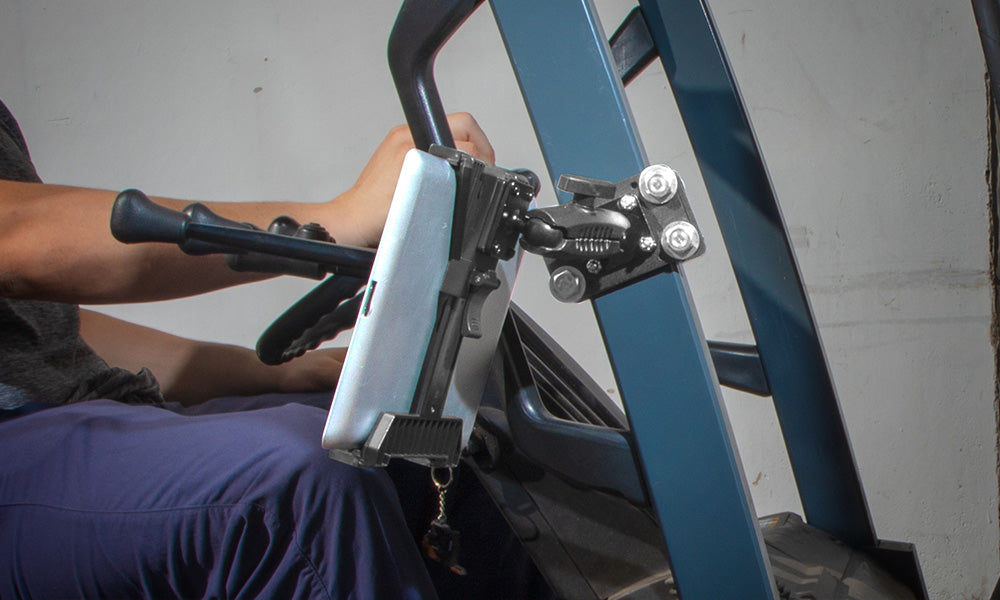
WHY MOUNT A TABLET TO A FORKLIFT PILLAR
Forklift operators need software in front of them, not in a shirt pocket or wedged against the dash. Mounting a tablet to the pillar puts inventory management, WMS, or picking software at eye level so the operator can see it without turning away from the load or the aisle. That is the safety case. The productivity case is just as real: a securely mounted tablet stays connected and stays put through starts, stops, and rough warehouse floors, so operators are not re-grabbing a loose device between picks.
iBOLT forklift pillar mounts clamp directly to the vertical or horizontal pillar bar found on most sit-down and stand-up forklifts. No drilling, no cutting into the cage, and no permanent modification to the vehicle. Installation is typically a 10 to 15 minute job with a hex key.
Two things drive the decision to add a pillar mount to a forklift fleet:
Safety: Keeping the tablet within an operator's normal sightline reduces the need to look down or reach across the cab while moving.
Productivity: Hands-free access to inventory, routing, or scanning software while the forklift is in motion keeps pick and put-away cycles moving without extra stops.
WHAT TO VERIFY BEFORE BUYING A FORKLIFT PILLAR TABLET MOUNT
Not every forklift pillar is the same shape or size, and not every tablet setup needs the same holder. Before ordering, check these details against your actual fleet and hardware:
- Pillar shape and dimensions. Measure the diameter or width of the vertical or horizontal bar you plan to clamp to. iBOLT pillar mounts use an adjustable clamp, but confirm it fits your forklift model's pillar before installing on the whole fleet.
- Tablet size and case. A rugged case adds thickness that can push a tablet outside a snug-fit cradle's range. Confirm the holder's stated size range accommodates your tablet with its case installed, not just the bare device.
- VESA vs. proprietary holder. If your operation already standardizes on VESA 75x75mm or 100x100mm plates, an iBOLT VESA-compatible pillar mount lets you swap in whatever tablet holder or enclosure you already use, instead of locking into one cradle style.
- Vibration and lock-down. Forklifts vibrate more than a passenger vehicle, especially on uneven concrete or when lifting. Look for a mount with a locking arm or tightening knob, not just friction, so the tablet does not creep or drop during operation.
- Charging and cable routing. If the tablet needs to stay powered for a full shift, plan where the charging cable will run from the mount to a power source, and make sure the cradle has a cutout or gap for the charging port so you are not unplugging the tablet to remove it.
- Accessory compatibility. Many forklift operations also carry a barcode scanner. Decide up front whether you need a mount that holds the scanner alongside the tablet or a separate holster, since retrofitting later means drilling a second mounting point.
- Removal frequency and security. If tablets are shared across shifts or removed at end of day, a quick-release cradle saves time. If devices stay mounted long-term, a simpler locking mechanism may be enough.
Takeaway: a forklift pillar mount that fits your pillar, holds your tablet with its case on, and gives you a clean charging path will hold up for years. Get any one of those wrong and you will be replacing hardware within a season.
FORKLIFT PILLAR MOUNT OPTIONS FROM iBOLT
iBOLT builds its forklift pillar mounts around a clamp base plus an interchangeable head, so you can match the mounting head to how your fleet actually uses tablets and scanners.
The IBFL-34546 IncrediBolt Forklift Mount uses a VESA 75x75mm/100x100mm pattern on the pillar clamp, which means it works with any VESA-compatible tablet enclosure you already own or plan to standardize on. This is the option to check first if your fleet already runs VESA hardware in vehicles or on desks.
If your operators carry a barcode scanner as well as a tablet, the IBFL-34544 TabDock Dual XL Barcode Scanner Forklift Pillar Mount and the IBFL-34545 VESA Dual XL Barcode Scanner Forklift Pillar Mount both hold the tablet and scanner from a single pillar clamp point, which keeps you from adding a second bracket to the cage. The 34545 version uses the VESA pattern; the 34544 uses iBOLT's TabDock cradle system.


INSTALLING THE MOUNT AND ROUTING CABLES
Installation follows the same basic sequence across iBOLT's forklift pillar line:
- Position the clamp base around the pillar bar at a height that keeps the screen at or near eye level for a seated or standing operator.
- Tighten the clamp hardware until the base is fully secure and does not rotate or slide on the pillar.
- Attach the VESA plate or TabDock cradle to the clamp arm and set the viewing angle.
- Seat the tablet in the cradle and confirm the charging port is accessible before running the power cable.
- Route the charging cable along the pillar or existing cab wiring so it is not hanging loose across the operator's reach path.
Plan the charging cable route before you tighten the final bolt. A tablet that loses charge mid-shift because the cable was routed as an afterthought defeats the point of mounting it in the first place.
DO YOU NEED A BARCODE SCANNER HOLSTER TOO?
If your operators scan barcodes as part of picking, put-away, or receiving, a dedicated scanner holster next to the tablet mount keeps both devices within reach and off the forklift floor or seat. A dropped scanner on a warehouse floor is a common source of damage and downtime, and a holster mounted at the pillar solves that with no added footprint in the cab.
The iBOLT XL Barcode Scanner Magnetic Forklift Mount uses a magnetic base to hold the scanner securely while still allowing a quick one-hand release. iBOLT's scanner holsters are built with multiple points of contact around the scanner body, which matters more than it sounds like it should: a single-point grip lets the scanner rock loose over time, while a four-point cradle holds it steady through repeated pickups and drop-ins over a shift.
Before adding a scanner holster, confirm the model and size of your scanner against the holster's listed compatibility, since scanner housings vary in shape even within the same brand. Mounting hardware is included with iBOLT purchases, so there is no separate hardware order to plan for.

A forklift operator whose job depends on a tablet for warehouse operation benefits from a mounting system that keeps the device stable, charged, and visible without occupying a hand. Floor plans, inventory counts, and communication with other operators or a manager are all easier to manage when the tablet is fixed in place rather than balanced on a dash or held while driving. Beyond convenience, a securely mounted, hands-free tablet setup is a straightforward way to keep operators focused on the load and the aisle rather than the device.
FAQ: FORKLIFT PILLAR TABLET MOUNTS
Will an iBOLT pillar mount fit any forklift?
Most sit-down and stand-up forklifts have a pillar bar the clamp base can attach to, but pillar shape and diameter vary by manufacturer and model. Measure your pillar and check it against the mount's clamp range before ordering for a full fleet.
Do I need to drill into the forklift to install it?
No. iBOLT pillar mounts use an adjustable clamp that tightens around the existing pillar bar, so there is no drilling or cutting into the vehicle.
Can I use a VESA tablet enclosure I already own?
Yes, if you choose a VESA-compatible pillar mount such as the IBFL-34546 or IBFL-34545. These use a 75x75mm/100x100mm pattern that matches standard VESA tablet holders and enclosures.
Can I mount a tablet and a barcode scanner on the same pillar clamp?
Yes. The Dual XL Barcode Scanner Forklift Pillar Mounts (IBFL-34544 and IBFL-34545) hold both from a single pillar clamp point, which avoids adding a second bracket to the cage.
How do I keep the tablet charged during a shift?
Plan the cable route from the mount to a power source before final installation, and choose a cradle with a cutout at the charging port so you are not unplugging the tablet each time you remove it.
Will the tablet stay steady on rough warehouse floors?
A locking arm or tightening knob, rather than friction alone, is what keeps a tablet from creeping or dropping during normal forklift vibration. Confirm this feature before purchasing for vibration-heavy environments.
Related iBOLT Mounting Options

iBOLT Dock’n Lock Bizmount™- Forklift Locking Tablet 38mm Mount
Built for work environments where tablets and handheld devices need a stable mounting point.

iBOLT XL Barcode Scanner Magnetic Forklift Mount
Built for work environments where tablets and handheld devices need a stable mounting point.

iBOLT™ TabDock™ Bizmount™ AMPs
Built for work environments where tablets and handheld devices need a stable mounting point.
Watch: iBOLT TabDock BizMount AMPS (IBBZ-33921)
See the standard TabDock holder, four-prong adapter, 25 mm BizMount arm, and AMPS drill base being assembled and adjusted.
Watch the short vertical demo (20 seconds)

iBOLT XL Forklift Barcode Scanner Holder 38mm Mount
Built for work environments where tablets and handheld devices need a stable mounting point.



Leave a comment
This site is protected by hCaptcha and the hCaptcha Privacy Policy and Terms of Service apply.