
Why Tablet Security and Mounting Matter This School Year
Classroom technology has come a long way since the first bulky all-in-one desktops showed up in schools decades ago. Tablets replaced those machines, and mobile charging carts solved the power problem. The next hurdle is not charge level, it is stability and security. A tablet propped against a stack of books or laid flat on a desk gets bumped, dropped, or walked off with. That is where a proper mount changes the daily routine for students, teachers, and IT staff who are responsible for the hardware.
iBOLT Mounts builds tablet mounting hardware for classrooms, shared workspaces, and mobile carts, not just vehicle dashboards. The right mount keeps a tablet at a usable angle, frees up hands for note-taking, and in shared environments, keeps the device from disappearing between class periods.
What to Verify Before You Buy a Classroom Tablet Mount
Before ordering a stand for a classroom, library, or shared study area, confirm these details against the actual devices and furniture you have on hand:
- Mounting surface: Is it a desk edge, a cart shelf, a countertop, or a wheelchair rail? Clamp mounts need a surface edge up to a specific thickness (commonly around 2.5 inches). Drill-base mounts need a flat surface you are allowed to put screws into.
- Tablet size and case: Measure the tablet with its case on. Most classroom mounts are built for 7 to 10 inch tablets, but a bulky protective case can push a device outside that range.
- Height and viewing angle: A stand that only sits flat on a table will not work for every student's posture. Adjustable-height stands help with ergonomics during long study sessions or video calls.
- Security needs: Shared carts, libraries, and public-facing kiosks need a locking mount, not just a friction grip. If the device is unattended between classes, budget for a locking stand.
- Portability vs. permanence: A clamp mount can move from desk to desk in seconds. A drill-mounted stand is meant to stay in one spot and is a better fit for shared or public tablets.
- Cable routing and charging: If the tablet needs to stay plugged in during class or a video call, check that the mount leaves the charging port accessible and does not pinch the cable when adjusted.
Clamp and Desk Mounts for Individual Study Spaces
Tabdock™ Clamp

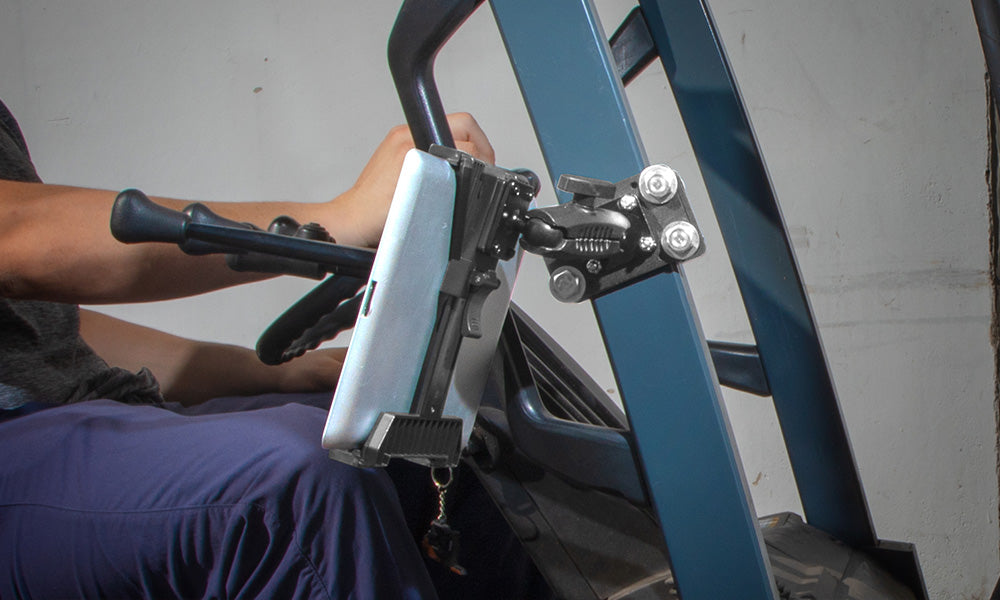
The Tabdock™ Clamp is a C-clamp pedestal mount that attaches directly to desks, tables, carts, or wheelchair rails. It is built for repeated daily use rather than a single semester, and it works with most tablets in a case, including LifeProof and OtterBox.
What to check before buying: confirm the mounting surface is 2.5 inches thick or less, and measure the tablet with its case to make sure it fits the clamp's holder range. The head rotates a full 360 degrees, so the tablet can sit in portrait or landscape depending on the assignment.
Tabdock™ FlexPro Clamp


The FlexPro Clamp uses the same heavy-duty C-clamp base as the standard Tabdock Clamp, but adds a flexible gooseneck arm for finer angle adjustment. It fits tablets from 7 to 10 inches and installs on tables, desks, carts, or wheelchairs without tools beyond the clamp itself.
This is the better pick when a student needs to fine-tune the viewing angle for reading versus typing, or when the mounting surface sits at an awkward height relative to the chair.
iBOLT TabStand Pro™

Not every desk has an edge to clamp onto, and not every classroom allows drilling into furniture. The TabStand Pro is a freestanding, weighted tabletop mount that rests on any flat surface without hardware. It adjusts between roughly 7.5 and 9.75 inches in height and weighs 3.4 lbs, which keeps it from tipping during normal use.
This is a solid option for individual desks, group tables, or a teacher's demo station where the mount needs to move around the room. Because it has no clamp, verify the desk or table surface is stable and level before relying on it for a tablet you cannot afford to drop.
Mounts for Video Calls, Streaming, and Content Creation
Distance learning, recorded lectures, and student video projects put different demands on a stand than a desk-bound tablet. Height range, phone compatibility, and a stable base for a longer arm all matter more here.
iBOLT Stream-Cast sPro2™ Phone Stand

The Stream-Cast sPro2 is built for smartphones and small tablets rather than full-size tablets, holding devices from 4.5 to 6.7 inches tall and up to 6.7 inches wide. The pole extends from 17 to 28 inches, and the 3.4 lb weighted base keeps it upright during a video call or recording session.
Verify your device's width and height against the holder range before ordering, especially if it stays in a protective case during video calls.
iBOLT Stream-Cast TabStand Pro™

This version pairs the TabStand Pro tablet holder with the taller Stream-Cast pole, adjustable from 17 to 28 inches, and the same 3.4 lb weighted base. It rests on any flat surface, which makes it useful for a shared study table, a teacher's desk, or a home workspace where the tablet doubles as a monitor during a video call.
iBOLT Stream-Cast Creator Custom Mount Kit

For students or teachers running multiple devices at once, the Creator Custom Mount Kit offers more than 60 configuration options across three adjustable arms with 360-degree rotation. The pole expands from 17 to 28 inches on a 3 lb weighted base, and the kit includes a tablet holder (7 to 10 inches), two smartphone holders (2.2 to 3.8 inches wide with a case), and a standard 1/4-20 camera screw adapter for a webcam or ring light.
This is the right pick when a single stand needs to hold a tablet for reference material plus a phone for recording, rather than a single-device desk mount.
Shared and Multi-Device Classroom Setups
iBOLT Quad Tablet Tower TabDock™ Stand

Group projects and rotating tablet carts benefit from a stand that holds more than one device in a fixed footprint. The Quad Tablet Tower holds four tablets at once, which frees up desk and floor space compared to spreading tablets across a table individually.
It is built for repeated use rather than a single class period, and the consolidated footprint helps IT staff account for devices at a glance instead of hunting across a classroom. Confirm your tablets fit the holder dimensions before assigning it to a specific device model.
Anti-Theft Mounting for Shared or Public Tablets
Shared devices in libraries, computer labs, or common areas need more than a friction grip. A locking mount deters casual removal and keeps a tablet tied to a fixed point when staff are not standing next to it.
iBOLT Dock'n Lock Drill Base Locking Tablet Stand

This stand mounts permanently to a flat surface using self-tapping screws, then locks a single 7 to 10 inch tablet in place with an included key and security hex bolt. The 360-degree rotation still allows for individual or group viewing angles once the tablet is secured.
Because installation is permanent, confirm the mounting location before drilling, and check school or facility policy on attaching hardware to furniture.
iBOLT Dock'n Lock Drill Base Locking Dual Tablet Stand

The dual version secures two tablets at once using the same locking hardware and drill-base installation as the single stand, with a pole that extends from 17 to 28 inches for group visibility. This is a practical option for paired study stations, shared teacher and student devices, or two-tablet lab setups where both devices need to stay put.

FAQ: Tablet Mounts for Classrooms and Shared Study Spaces
What tablet sizes do these mounts fit?
Most iBOLT classroom stands are built for 7 to 10 inch tablets. Always measure the tablet with its case on, since a protective case can add enough width or thickness to affect fit.
Do I need a locking mount for every classroom tablet?
Not necessarily. A locking mount matters most for shared or unattended devices, such as tablets in a library, common area, or rotating cart. A single student's own tablet at their assigned desk usually does fine with a clamp or freestanding stand.
Can these stands be moved between rooms or desks?
Clamp mounts like the Tabdock Clamp and FlexPro Clamp move easily between desks or carts. Drill-base Dock'n Lock stands are meant to stay installed in one location once mounted.
What is the difference between a clamp mount and a weighted base stand?
A clamp mount attaches to a desk or cart edge and stays fixed to that surface. A weighted base stand like the TabStand Pro rests freely on any flat surface with no hardware, which makes it easier to relocate but dependent on a stable, level surface.
Are these mounts suitable for video calls and distance learning, not just in-person classes?
Yes. The Stream-Cast sPro2, Stream-Cast TabStand Pro, and Creator Custom Mount Kit are built with taller adjustable poles and weighted bases specifically for video call height and stability, and the Creator Kit supports mounting a phone and tablet together.
How do I mount multiple tablets without cluttering a desk?
The Quad Tablet Tower TabDock Stand consolidates four tablets into a single footprint, which works well for group work stations or classrooms with limited desk space.
Choosing the Right Mount for Your Classroom or Study Space
No matter what device is in use, iBOLT has a mounting option built for it. Whether the need is a single locking stand for a shared lab tablet, a clamp mount for an individual desk, or a multi-arm rig for recording lectures, matching the mount to the surface, device size, and security requirement up front saves a return trip to the supply closet later in the semester.
Related iBOLT Mounting Options

iBOLT™ LockPro™ Metal Locking Tablet Drill Base Mount
Useful for keeping tablets positioned for study, classroom, and shared-device setups.

iBOLT Dock’n Lock Drill Base Locking Tablet Stand
Useful for keeping tablets positioned for study, classroom, and shared-device setups.

iBOLT™ TabStand Pro
Useful for keeping tablets positioned for study, classroom, and shared-device setups.

iBOLT Dock’n Lock Drill Base Locking Dual Tablet Stand
Useful for keeping tablets positioned for study, classroom, and shared-device setups.

Leave a comment
This site is protected by hCaptcha and the hCaptcha Privacy Policy and Terms of Service apply.