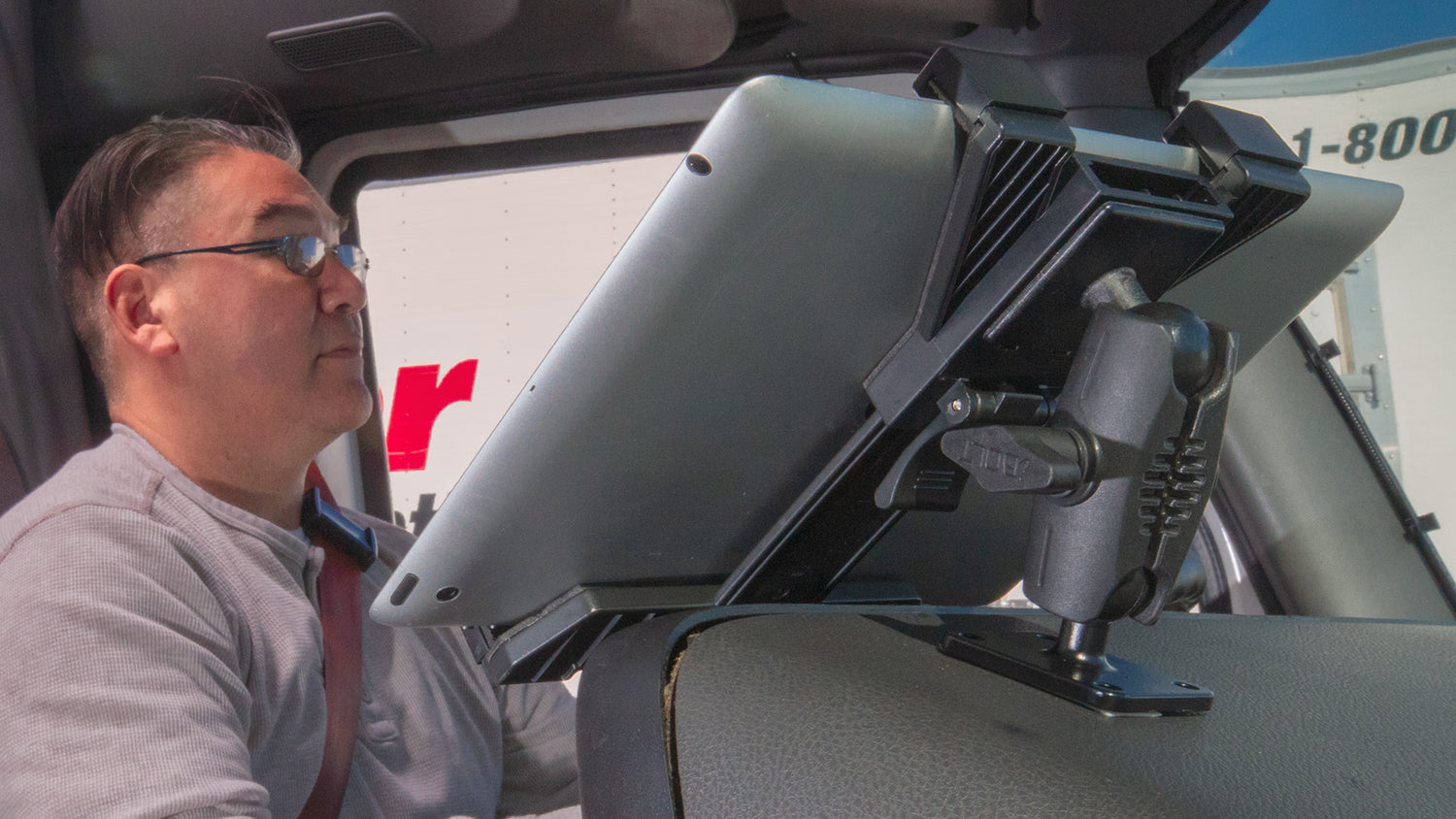
Why the Galaxy Tab A7 Lite Needs a Purpose-Built Mount
The Samsung Galaxy Tab A7 Lite has become a common choice for businesses and drivers who want a larger screen than a phone without the cost or bulk of a full-size tablet. That popularity is exactly why mounting it correctly matters. A tablet left loose on a dash, counter, or prep station is a liability. It slides during braking, gets knocked off a POS stand during a rush, or walks off a counter when nobody is watching.
Restaurants and quick-service counters use the A7 Lite for order entry, kitchen display, and payment. Trucking and field service teams use it for ELD compliance, dispatch, and navigation. Schools and clinics use it for check-in and scheduling. Each of these environments has different mounting needs, and the right base, arm, and holder combination depends on the surface you are attaching to, how often the tablet needs to come off, and whether theft is a real concern.
Below are five iBOLT TabDock mounting options that fit different combinations of those needs, followed by guidance on how to pick the right one for your setup.
What to Verify Before You Buy
Before ordering a mount for a Galaxy Tab A7 Lite, confirm the following so the mount you receive actually fits your case, your surface, and your workflow:
- Tablet size with case: Confirm the holder's adjustable width range covers your tablet with the case you actually use, not the bare tablet.
- Mounting surface: Drill-base mounts need a flat panel you can screw into (dash, counter, wall panel, gooseneck plate). Suction mounts need a smooth, non-porous surface like glass, painted metal, or laminate.
- Vibration exposure: Vehicles and forklifts see constant micro-vibration. A drill-base or bolt-down mount holds up better long term than an adhesive-only solution in these settings.
- Charging and cable routing: If the tablet stays powered at a POS station or in a cab, check that the enclosure gives clean access to the charging port and any cable channel built into the arm.
- Removal frequency: If staff pull the tablet in and out all shift, a cradle with a quick-release cam action saves time. If it stays mounted for weeks, a locking enclosure is worth the extra step.
- Security needs: Front counters, unattended kiosks, and vehicles parked overnight are theft risk points. A keyed lock on the cradle is cheap insurance compared to replacing a $150 to $300 tablet.
- Base compatibility: Most iBOLT TabDock arms use an AMPS hole pattern, which is a standard 4-hole layout used across mounting brands. Confirm AMPS compatibility if you plan to swap arms or use an existing base you already own.
The Top 5 Mounts for the Samsung Galaxy Tab A7 Lite
These five TabDock mounts cover the most common mounting scenarios for the A7 Lite, from permanent drill-base installs to portable suction setups.
1. TabDock BizMount AMPS - Heavy-Duty Drill Base Mount

This mount fits the Galaxy Tab A7 Lite and any tablet from 7 to 10.2 inches. The AMPS base bolts directly to a flat surface, which makes it a solid choice for delivery vans, trucks, forklifts, or a fixed counter position where the tablet will not be removed often. The holder rotates a full 360 degrees so you can switch between portrait and landscape without remounting. Because it is drill-based rather than adhesive, it holds up to constant vibration better than suction alternatives, which matters for route planning, telematics, and ELD logging.
Watch: iBOLT TabDock BizMount AMPS (IBBZ-33921)
See the standard TabDock holder, four-prong adapter, 25 mm BizMount arm, and AMPS drill base being assembled and adjusted.
Watch the short vertical demo (20 seconds)

2. TabDock FixedPro 360 - Heavy-Duty Multi-Angle Drill Base Mount
The FixedPro 360 uses an all-metal construction and a multi-angle joint that locks the tablet at nearly any viewing position, not just portrait or landscape. This makes it a good fit for kitchen display screens mounted overhead or at an angle, wall-mounted check-in tablets, and any install where the viewing angle needs to be dialed in once and left alone. Like the BizMount AMPS, it is a drill-in install, so plan for a flat panel and basic hardware access before mounting.

3. Dock'n Lock BizMount AMPS - Heavy-Duty Locking Tablet Mount

If the tablet will sit unattended for extended stretches, whether that is overnight in a vehicle, on a front counter, or at an unmanned kiosk, a locking cradle is worth the investment. This mount uses heavy-duty composite construction with security hardware on the adjustable joints and a physical key and lock on the tablet cradle itself. It is built to hold up under regular use while giving you a real theft deterrent, not just a snug fit.
Watch: iBOLT Dock'n Lock BizMount AMPS (IBBZ-33993)
See the cradle adjustment, keyed tablet retention, and assembly of the 25 mm BizMount arm and AMPS drill base.
Watch the short vertical demo (35 seconds)

4. TabDock LockPro BizMount AMPS - Heavy-Duty Metal Locking Tablet Mount

The LockPro steps up the security and build quality with an aluminum enclosure and a keyed lock, while keeping the same adjustable, swivel-friendly design as the rest of the TabDock line. The cradle still gives full access to the charging port, so the tablet can stay plugged in and powered while locked in place. This is a strong option for POS stations, kitchen order screens, and vehicle installs where both durability and theft protection matter.

5. TabDock BizMount - Heavy-Duty Suction Cup Mount

Not every install should be permanent. If you need to reposition or remove the mount regularly, or you are not able to drill into the surface, the suction cup version of the BizMount is the practical choice. The large suction base grips smooth surfaces like glass, painted dash panels, and laminate counters, and an adhesive dash disk is included for textured or uneven surfaces. Dual ball joints give you full 360 degree positioning, so you can angle the screen for the driver, the customer-facing counter, or whoever needs to see it.

Matching the Mount to Your Setting
For quick-service and full-service restaurant counters, a drill-base or locking mount is usually the right call since these tablets tend to stay in one position and get bumped often during a rush. For trucking and field service vehicles running ELD software, dispatch, or navigation, a drill-base AMPS mount holds up to constant vibration far better than adhesive options, and a locking cradle is worth adding if the vehicle sits unattended. For warehouse and forklift installs, prioritize a metal drill-base mount that can handle vibration and impact. For schools, clinics, and front-desk check-in stations, a locking BizMount protects the tablet from walking off during busy hours while still giving staff quick access for charging and use.
If you are not sure which base or arm your current setup already uses, check for an AMPS 4-hole pattern before ordering, since most TabDock arms are built to that standard and can often be swapped without replacing the entire mount.
FAQ: Mounting the Samsung Galaxy Tab A7 Lite
Will these mounts fit the Galaxy Tab A7 Lite in a case?
Most TabDock cradles adjust to fit tablets from roughly 7 to 10.2 inches, which typically covers the A7 Lite with a slim to mid-thickness case. Measure your tablet with the case installed and compare it to the listed adjustable range before ordering.
Do I need a locking mount, or is a standard cradle enough?
If the tablet is attended most of the time, a standard adjustable cradle is usually fine. If it sits unattended overnight, in a public-facing counter, or in a parked vehicle, a locking cradle like the Dock'n Lock or LockPro is a reasonable step up.
Can I charge the tablet while it is mounted?
Yes, the TabDock cradles are designed to give access to the charging port while the tablet is secured in the enclosure. Confirm cable routing works with your specific charger and case before final installation.
What surface do I need for a suction cup mount versus a drill-base mount?
Suction mounts need a smooth, non-porous surface like glass, painted metal, or laminate. Drill-base mounts need a flat panel you can screw into, such as a dash, counter, or wall bracket, and are the better choice for high-vibration environments.
Are these mounts specific to the Galaxy Tab A7 Lite only?
No. The TabDock line is built around an adjustable tablet size range rather than a single device, so the same mount typically works across several tablet models within that size window.
Which mount is best for a delivery or trucking vehicle using ELD software?
A drill-base AMPS mount, such as the BizMount AMPS or FixedPro 360, holds up best to constant vehicle vibration. Add a locking cradle if the vehicle is left unattended for long periods.
Related iBOLT Mounting Options

iBOLT™ TabDock™ Bizmount™ Suction Cup Mount
A related iBOLT option that matches the mounting needs covered in this article.

iBOLT™ TabDock™ Bizmount™ Wedge
A related iBOLT option that matches the mounting needs covered in this article.

iBOLT TabDock ExtendiBOLT Dual Suction Cup Mount
A related iBOLT option that matches the mounting needs covered in this article.

iBOLT TabDock ExtendiBOLT Triple Suction Cup Mount
A related iBOLT option that matches the mounting needs covered in this article.



Leave a comment
This site is protected by hCaptcha and the hCaptcha Privacy Policy and Terms of Service apply.