
The Benefits of Going Paperless in Schools
Classrooms have changed faster in the last several years than in the previous several decades combined. Tablets and iPads now sit alongside, and often replace, textbooks, workbooks, and printed handouts. For teachers and IT staff planning a rollout, the real question is not whether paperless learning works. It is how to make it durable, safe, and easy for students to use every single day without turning a $300 tablet into a dropped, cracked, or lost device by October.
This article covers the practical benefits of going paperless, plus what to look for when you add mounting hardware to protect devices in classrooms, labs, and shared learning spaces.
Less Paper, Fewer Logistics Problems
The most obvious win is weight and clutter. Instead of carrying a stack of textbooks and workbooks, students carry one device loaded with everything they need for the day. Textbook editions that go out of date can be updated or replaced digitally instead of reprinted and redistributed, which cuts down on both cost and paper waste over time.
For administrators, paperless classrooms also simplify version control. When a curriculum update happens mid-year, every student gets the same updated material at the same time instead of waiting on a print and distribution cycle.
Engagement, Accessibility, and How Students Actually Learn
Worksheets and static pages can lose a student's attention quickly, especially with younger age groups. Educational apps turn repetitive practice into something closer to a game, with progress tracking, rewards, and instant feedback that keeps students motivated to finish an assignment instead of stalling halfway through it.
Tablets also open the door to more creative assignment formats. A written book report can become a short video presentation. A science project can include recorded narration or animation. Students are not limited to a single format for showing what they know.
Accessibility is one of the more understated benefits. Many tablets and iPads include built in accessibility features that are ADA relevant, such as adjustable text size, screen readers, and simplified touch navigation. For students who struggle with handwriting, fine motor tasks, or traditional keyboard and mouse setups, a touchscreen interface can lower the barrier to participating fully in a lesson.

None of these benefits matter much if the device is not actually staying on the desk. A tablet that slides, tips, or gets knocked to the floor during a busy class period is a liability, both for the school's equipment budget and for the lesson itself. This is where mounting comes in.
Why Mounting Matters in a Paperless Classroom
A secure, adjustable stand solves several problems at once. It keeps the device upright and stable on a desk or table so students are not catching it mid-slide. It sets the screen at a consistent viewing height, which reduces the hunching and neck strain that comes from looking down at a flat tablet for an hour at a time. It also frees up hands for note-taking, typing, or working with lab materials while the tablet stays in view.
For group work, a mounted tablet at eye level is easier for two or three students to share and view together than one lying flat on a desk. For recorded assignments, such as a video presentation or a demonstration for a flipped classroom, a stable mount means the footage does not shake or need multiple retakes because someone bumped the device.
What to Verify Before Buying Classroom Tablet Mounts
Not every mount is a good fit for a school environment. Before purchasing for a classroom, lab, or library, check the following:
- Device size and case compatibility. Confirm the mount's adjustable range covers both your smallest and largest devices in use, including cases. Many schools use protective cases on shared devices, and a mount that only clamps bare tablets will not work.
- Desk attachment method. Some mounts clamp to a desk edge, others use adhesive or a flat base. Clamp style mounts are usually better for shared or rotating classrooms since they do not leave residue and can move between rooms.
- Adjustability and viewing angle. Look for mounts that adjust height and tilt so students of different heights, and different seating arrangements, can get a comfortable eye-level view without hunching.
- Portability. If students carry their own device and mount between classes, weight and folded size matter. A mount that fits in a backpack pocket gets used consistently. A bulky one tends to get left behind.
- Durability under daily handling. Classroom mounts get picked up, adjusted, and occasionally dropped by students. A mount built with solid hinges and a firm locking mechanism will hold up better over a school year than a lightweight consumer stand.
- Removal frequency. If the tablet needs to come in and out of the mount multiple times a day, a quick-release cradle saves time compared to a mount that requires re-threading or re-clamping each time.
iBOLT Mounts for Schools
iBOLT Mounts offers desk and clamp mounted stands built for the realities of a classroom, from single tablet holders to dual stands like the iBOLT Stream-Cast Dual Phone and Tablet Stand for students working across two devices at once. The mounts are designed to be lightweight enough to travel in a backpack alongside a tablet, with adjustable arms so each student can set their own height and viewing angle.
Setup is straightforward: take the mount out, secure the tablet in the cradle, clamp it to the desk, and the device is stable and upright for the rest of the class period. The cradles are built to work with most tablets and iPads, including many with a protective case still on, so schools do not need to standardize on a single bare device to make a mount work across a classroom.

The result is a classroom where students can record a video presentation without a shaky frame, watch a recorded lesson without holding the tablet the entire time, and work through assignments at a comfortable eye level instead of leaning over a flat screen on the desk.
Related iBOLT Mounting Options

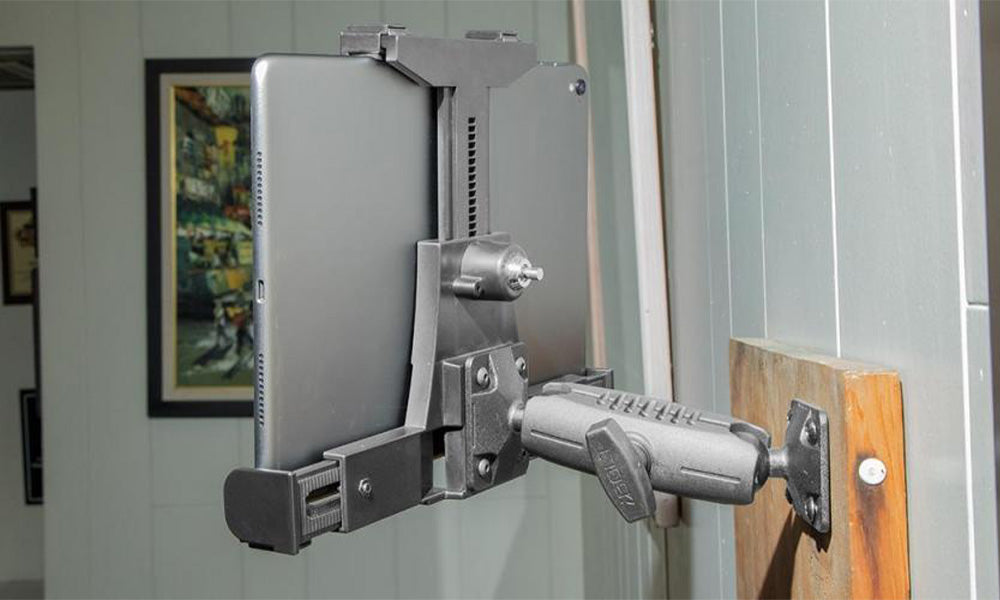
iBOLT™ LockPro™ Metal Locking Tablet Drill Base Mount
Useful for keeping tablets positioned for study, classroom, and shared-device setups.

iBOLT Dock’n Lock IncrediBOLT™ AMPS w/ 2” Single Socket Arm Locking Tablet Drill Base Mount
Useful for keeping tablets positioned for study, classroom, and shared-device setups.

iBOLT LockPro FlexPro Heavy Duty Locking Tablet Seat Rail Mount
Useful for keeping tablets positioned for study, classroom, and shared-device setups.

iBOLT Phone Dock’n Lock IncrediBOLT™ AMPS w/ 4.25” Arm Locking Drill Base Mount for Smartphones
Useful for keeping tablets positioned for study, classroom, and shared-device setups.
FAQ
Do iBOLT mounts fit tablets with protective cases on them?
Most iBOLT tablet and iPad mounts are designed with an adjustable cradle that accommodates common protective cases. Check the specific product's size range against your device and case dimensions before ordering for a full classroom set.
Can one mount work for multiple students sharing a device?
Yes, as long as the mount uses a quick-release or easy-adjust cradle. Look for a clamp style mount rather than an adhesive one if the device or mount will move between desks or students throughout the day.
Are these mounts portable enough for students to carry to and from school?
iBOLT's classroom-oriented stands are built to be lightweight and compact enough to fit in a backpack alongside a tablet, which matters if students are expected to bring their own mount daily.
What is the difference between a clamp mount and an adhesive mount for classroom desks?
A clamp mount attaches to the edge of a desk or table and can be removed without residue, making it a better fit for shared or rotating classrooms. An adhesive mount is more permanent and works best when the same device stays in the same spot long term.
Will a tablet mount help with recorded presentations and video assignments?
A stable, height-adjustable mount keeps the camera steady and framed correctly, which reduces shaky footage and the need for retakes during student presentations, demonstrations, or flipped classroom recordings.
Where can schools see iBOLT's full lineup of education mounting options?
Visit the iBOLT education products page for the current lineup of desk and clamp mounts suited to classroom and lab use.


Leave a comment
This site is protected by hCaptcha and the hCaptcha Privacy Policy and Terms of Service apply.