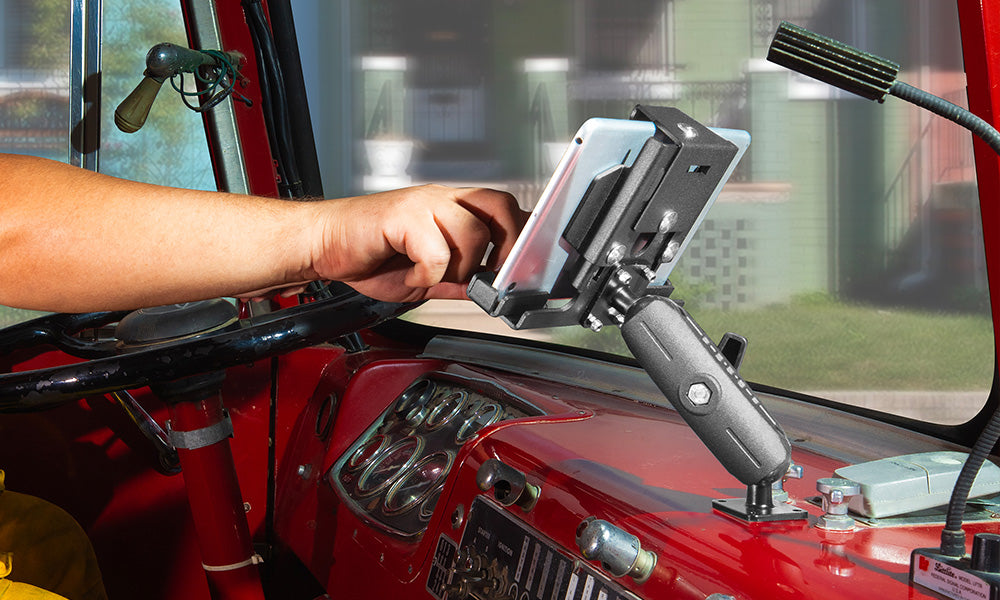
Tablets left out in the open at a host stand, drive-thru window, or self-order kiosk are an easy target for anyone walking by. A locking tablet mount does not just hold the device at the right angle, it keeps a guest or an employee from lifting the tablet off the arm and walking away with it. For restaurants and other POS environments where devices face customers directly, that extra layer of physical security is often the deciding factor between a standard cradle and a locking one.
iBOLT builds locking tablet cradles in composite and metal construction, in multiple ball sizes, so operators can match the security level to the location, whether that is a quiet back office or a busy counter facing the public all day.

How iBOLT Locking Cradles Keep a Tablet in Place
Every iBOLT locking cradle kit ships with security hardware that swaps out the standard removable knobs for a flush bolt and nut combination, adjustable only with the included hex key. That one change removes the most common way someone could pull a tablet cradle apart with their hands.
Lock and Key

| The iBOLT Lock'n Dock and LockPro holders use a physical lock and key to secure the tablet. The lock stops the top latch from opening, so the tablet cannot be removed from the cradle without the key. This is the layer that matters most in front-of-house settings where guests have direct access to the device. |
Tamper-Resistant Screw Pattern

|
The cradle attaches to the mount using a star-pattern screw, and the matching drill bit ships with the kit. Without that specific bit, the screws are difficult to remove with common tools, which discourages anyone from detaching the holder from the arm. |
Hidden Adjustment Screws

|
(Featuring iBOLT's IBBZ-33993 kit) |
 Each holder adjusts to fit tablets from 7 to 10 inches. Once the cradle is sized to the tablet and the device is seated, the adjustment screws sit behind the tablet itself, out of reach until the cradle is unlocked. That means a staff member cannot loosen the fit and slide the tablet out, and neither can a customer.
What to Verify Before You Buy a Locking Tablet Mount
Locking hardware only works if the rest of the mount fits the install. Before ordering, confirm the following:
- Mounting surface: Drill base plates work well on countertops, host stands, and POS terminal shelving where a permanent install is acceptable. If you cannot drill into the surface, look at clamp or track-mounted options instead.
- Tablet size and case: Measure the tablet's actual width, not just the screen size class, and account for any protective case. Most iBOLT locking cradles here adjust across a 7 to 10 inch range, but a thick case can push a tablet outside that window.
- Ball size and arm compatibility: iBOLT locking cradles use either a 1 inch / 25mm B-size ball or a 1.5 inch / 38mm C-size ball. Confirm which size matches any existing arms, poles, or wall plates you already have on site before mixing components.
- Charging and cable routing: If the tablet needs to stay powered all shift, check that the cradle leaves the charging port accessible with the device locked in, and plan the cable path so it is not pinched or pulled at every angle change.
- Removal frequency: A back-of-house kitchen display that never leaves its mount has different needs than a tableside ordering tablet that staff move between stations. If staff need frequent, quick access, a key-based lock adds a step, so weigh that against the security benefit.
- Vibration and impact: Mounts near a drive-thru window, on a rolling cart, or bolted to equipment that shakes during service should use the more rigid metal options rather than composite arms.
Top Locking Tablet Mounts for Restaurant and POS Use
1. iBOLT TabDock Lock'n Dock Bizmount (IBBZ-33993)

|
This is iBOLT's all-composite locking solution: a drill base mount with a dual ball arm and a locking composite cradle for tablets in the 7 to 10 inch range. It uses a 1 inch / 25mm B-size ball, which is compatible with industry-standard 25mm ball mounts and adapters, so it slots into an existing mounting system without a full rebuild. It suits counters, host stands, and other locations where a lighter composite build is enough and a metal cradle is not required. Watch: iBOLT Dock'n Lock BizMount AMPS (IBBZ-33993)See the cradle adjustment, keyed tablet retention, and assembly of the 25 mm BizMount arm and AMPS drill base. Watch the short vertical demo (35 seconds)Available here. |
2. iBOLT LockPro Bizmount, Metal Locking Cradle (IBBZ-33779)

|
This kit pairs a composite dual ball arm with an aluminum locking cradle, giving the tablet holder itself a metal shell for added protection. It is a common choice for E-Log tablets and other devices where the cradle needs to hold up to more handling than a composite-only build. Like the IBBZ-33993, it uses a 1 inch / 25mm B-size ball compatible with standard 25mm mounts and adapters. A short install and feature video is available on YouTube. Available here. |
3. iBOLT LockPro 38mm Bizmount, Full Metal Solution (IBBZ-33934)

|
This is the most heavy-duty option in the lineup. The tablet cradle, the 38mm shaft, and the AMPS plates are all machine-grade metal, and the mount uses a 1.5 inch / 38mm C-size ball compatible with standard 38mm adapters and arms. It installs onto any flat surface and is a reasonable fit for high-traffic POS stations, drive-thru counters, or any spot where the mount will see constant handling and needs to hold up without flexing. Available here. |
4. iBOLT TabDock Lock'n Dock 38mm Bizmount (IBBZ-33935)

|
This kit combines a composite locking cradle with the same heavy-duty 38mm metal arm and AMPS plates used in the all-metal option above. The 1.5 inch / 38mm C-size ball keeps it compatible with standard 38mm arms and adapters. It is a practical way to outfit multiple stations or locations with a mount built to handle regular use, while keeping the cradle itself composite rather than metal. Available here. |
Locking Cradles Beyond Tablets

iBOLT also offers a phone locking cradle built on the same lock and key approach as the Lock'n Dock line. It is compatible with AMPS pattern mounts and adapters, which makes it a straightforward addition for locations that need to secure a phone alongside, or instead of, a tablet at the same station.
Related iBOLT Mounting Options

iBOLT LockPro FlexPro Heavy Duty Locking Tablet Seat Rail Mount
Designed for applications where device security and a fixed position are important.

iBOLT™ LockPro™ Metal Locking Tablet Drill Base Mount
Designed for applications where device security and a fixed position are important.

iBOLT™ TabDock™ Bizmount™ Wedge
Designed for applications where device security and a fixed position are important.

iBOLT AccessiBOLT Dock’n Lock Wheelchair Multi-Angle Mobility Tablet Mount
Designed for applications where device security and a fixed position are important.
FAQ
Do I need a locking mount if the tablet is behind the counter, not facing customers?
Not always. If staff are the only ones with access and the area is supervised, a standard cradle may be enough. Locking cradles matter most where customers or the public can reach the device directly, such as self-order kiosks, tableside ordering tablets, or drive-thru stations.
Will a locking cradle fit my tablet with its case on?
Most iBOLT locking cradles adjust across a 7 to 10 inch tablet range, but measure the tablet with its case attached before ordering. A thick case can push the total width outside the adjustable range.
Can I use a 25mm ball mount with existing 38mm arms, or the reverse?
No. The ball size has to match the arm and adapter it connects to. Confirm whether your existing hardware uses a 1 inch / 25mm B-size ball or a 1.5 inch / 38mm C-size ball before choosing a cradle, since the two are not interchangeable without an adapter built for that purpose.
Do these mounts require drilling into the counter or POS stand?
The models covered here use a drill base plate, which is the most secure option for a permanent install. If drilling is not possible on your surface, check with iBOLT support on clamp or track-based alternatives before committing to a drill base kit.
How often will staff need to unlock the cradle during a shift?
If the tablet stays in one place all shift, the lock adds no real friction. If staff need to remove the tablet frequently, for cleaning, charging elsewhere, or moving between stations, factor in the extra step of using the key each time and decide whether that trade-off is worth the added security.
Does locking the cradle block the charging port?
It should not, but confirm this for your specific tablet model before installing. Check that the charging port lines up with the cradle's cutout and that a cable can be routed and secured without straining the connector as the mount is adjusted.

Leave a comment
This site is protected by hCaptcha and the hCaptcha Privacy Policy and Terms of Service apply.