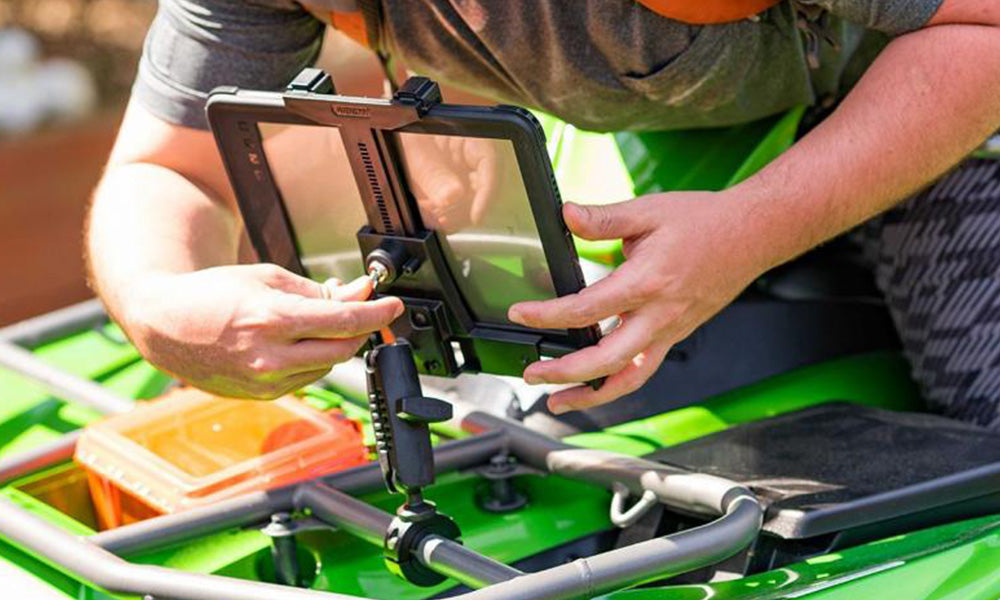
The Samsung Galaxy Tab A7 Lite has become a common sight behind counters, at host stands, and on kitchen expo lines. It is compact enough to fit tight counter space, but the screen is large enough to run order entry, menu display, or POS companion apps without staff squinting at a phone. Because it typically runs $150 to $250, most operators do not want it sitting loose on a counter where it can be bumped, spilled on, or walked off with during a shift change.
Mounting solves three problems at once: it keeps the tablet in a fixed, repeatable position for staff, it protects the screen and housing from drops, and in busier front-of-house environments, it adds a layer of theft deterrence. The right mount depends on where the tablet lives, how often it needs to come off the mount, and whether you are drilling into a fixed counter or need something removable for a rented space, pop-up, or seasonal stand.
Why the Galaxy Tab A7 Lite Works Well for Restaurant and POS Use
The Tab A7 Lite's size and price point make it a practical choice for tasks like tableside order entry, self-serve kiosks, kitchen display screens, and host stand check-in. It is light enough for staff to hand off between stations, but a mount is still worth the investment anywhere the tablet stays in one spot for most of a shift, such as a drive-thru window, a bar POS station, or a self-checkout counter.
What to Verify Before You Choose a Mount
Every mount on this list is built around a standard tablet cradle or enclosure, but fit and function still come down to a few details you should confirm before ordering:
- Case or no case: If staff use a protective case, measure the tablet with the case on. Some enclosed mounts have tight tolerances that will not close over a thick case.
- Charging and cable access: Confirm the mount leaves the charging port, and any needed side ports, accessible so you are not unplugging the tablet to remove it from the cradle.
- Mounting surface: Drill base mounts need a flat, stable surface such as a counter, wall stud, or under-cabinet panel. Suction mounts need a smooth, non-porous surface for a reliable long-term hold.
- Removal frequency: If the tablet needs to come off the mount often for charging at a back station or end-of-shift reconciliation, prioritize a quick-release cradle over a locking one.
- Security needs: Front-of-house or public-facing installs near an entrance or drive-thru window benefit from a locking cradle. Back-of-house or kitchen mounts usually do not need one.
- Viewing angle: Counter-height mounts benefit from an articulating arm so staff at different heights can adjust the screen without repositioning the whole unit.
Top 5 Mounts for the Samsung Galaxy Tab A7 Lite
1. TabDock BizMount AMPS Heavy-Duty Drill Base Mount


This mount uses an AMPS pattern base and fits tablets from 7 to 10.2 inches, which covers the Galaxy Tab A7 Lite comfortably. Because it is a drill base design, it installs permanently to a counter, wall panel, or under-cabinet surface, which suits fixed POS stations, host stands, or kitchen order screens that stay in one location. The cradle rotates a full 360 degrees, so staff can switch between portrait and landscape depending on the app in use. Verify your mounting surface is flat and at least as thick as the screw length before installing.
Watch: iBOLT TabDock BizMount AMPS (IBBZ-33921)
See the standard TabDock holder, four-prong adapter, 25 mm BizMount arm, and AMPS drill base being assembled and adjusted.
Watch the short vertical demo (20 seconds)
2. TabDock FixedPro 360 Heavy-Duty Multi-Angle Drill Base Mount


Counter and bar setups often need more reach and angle adjustment than a single-arm mount can offer, especially where staff of different heights share the same station. The FixedPro 360 uses a multi-point articulating arm with three adjustment joints, so the tablet can be pulled closer, angled down toward a counter, or swiveled between portrait and landscape without loosening hardware each time. This is a good fit for tight galley kitchens or expo lines where the tablet needs to move out of the way between uses.
3. Dock'n Lock BizMount AMPS Heavy-Duty Locking Tablet Mount


If the tablet stays mounted in a public-facing spot for the full shift, such as a self-checkout counter or an entrance kiosk, a locking cradle is worth the extra step. This mount is built from heavy-duty composite material with a keyed lock on the cradle and secured adjustable joints, so the tablet cannot be pulled free without the key. It is a solid choice anywhere staff need to walk away from the station without taking the tablet with them.
Watch: iBOLT Dock'n Lock BizMount AMPS (IBBZ-33993)
See the cradle adjustment, keyed tablet retention, and assembly of the 25 mm BizMount arm and AMPS drill base.
Watch the short vertical demo (35 seconds)
4. TabDock LockPro Metal Locking Tablet Drill Base Mount


The LockPro takes the same locking concept and builds it in aluminum for higher-traffic or higher-risk locations. The cradle keeps the charging port and other needed ports accessible while the tablet is locked in place, so staff can charge the device overnight or during slow periods without removing it. The swivel head still allows a quick switch between landscape and portrait, and the keyed lock adds a real deterrent for tablets mounted near an entrance, drive-thru window, or unattended counter.
5. TabDock BizMount Heavy-Duty Suction Cup Mount


Not every location can or should be drilled into, especially rented counters, seasonal stands, or a food truck interior. This mount uses a large suction cup base that holds on most smooth surfaces, with an adhesive dash disk included for textured or uneven counters. The dual ball joints give full 360 degree positioning, so the tablet can be angled for a host stand, a register counter, or a temporary event setup. Suction mounts are the right call when removal frequency is high or the surface is not yours to modify.
Matching the Mount to Your Counter, Kitchen, or Host Stand
A fixed drill base mount makes sense for permanent POS stations, kitchen display screens, and host stands where the tablet stays put for the life of the install. An articulating arm mount is worth the upgrade anywhere staff share the station at different heights or need to reposition the screen throughout a shift. A locking cradle earns its keep in front-of-house or public-facing spots where the tablet is unattended for stretches of time. A suction cup mount is the practical choice for rented space, temporary counters, or any surface you cannot drill into.
Whichever option you choose, measure the tablet with its case, confirm the mounting surface can support a drilled or suction install, and plan your charging cable route before the mount goes in. A clean cable path keeps cords out of the way of staff and customers and reduces wear on the charging port over time.
Related iBOLT Mounting Options

iBOLT TabDock ExtendiBOLT Triple Suction Cup Mount
A related iBOLT option that matches the mounting needs covered in this article.

iBOLT™ TabDock™ Bizmount™ Wedge
A related iBOLT option that matches the mounting needs covered in this article.

iBOLT™ TabDock™ Bizmount™ Suction Cup Mount
A related iBOLT option that matches the mounting needs covered in this article.

iBOLT TabDock ExtendiBOLT Dual Suction Cup Mount
A related iBOLT option that matches the mounting needs covered in this article.
FAQ
Will these mounts fit the Samsung Galaxy Tab A7 Lite with a protective case on?
Most of these cradles accommodate a reasonable case thickness, but tolerances vary by model. Measure the tablet with the case installed and compare it against the listed size range before ordering, especially for the locking enclosures.
Do I need a locking mount for a restaurant counter?
Only if the tablet is left unattended in a public-facing area for meaningful stretches of time, such as a self-checkout stand, entrance kiosk, or drive-thru window. Kitchen and back-of-house mounts generally do not need a lock.
Can I charge the tablet while it is in the mount?
Yes, on all five mounts listed here the cradle is designed to leave the charging port accessible. Plan your cable routing to the nearest outlet before installing so the cord does not create a trip hazard or get pulled taut when the tablet swivels.
What is the difference between AMPS and a drill base mount?
AMPS refers to the hole pattern used to attach the tablet cradle to the mounting arm. A drill base mount is the base itself, which is permanently screwed into a counter, wall, or panel. Most of the mounts above combine both, an AMPS-compatible cradle on a drill base.
What if my counter surface is uneven or textured?
For drill base mounts, confirm the surface is flat enough for full contact and screw depth. For the suction cup mount, use the included adhesive dash disk on textured or uneven surfaces to get a reliable long-term hold.
How do I decide between a fixed arm and an articulating arm?
If one person uses the station at a consistent height and angle, a fixed arm is simpler and more stable. If multiple staff members of different heights share the station, or the tablet needs to move out of the way between tasks, an articulating arm like the FixedPro 360 is worth the added flexibility.

Leave a comment
This site is protected by hCaptcha and the hCaptcha Privacy Policy and Terms of Service apply.