ELD Tablet Mounts for Trucks: Fix the Loose Device Problem
By iBOLT Mark
ELD Tablet Mounts for Trucks: Fix the Loose Device Problem
Problem proposition: Loose, poorly placed ELD tablets create compliance risk and driver frustration, and this article helps fleet managers and owner-operators choose the right iBOLT mount for readable placement, charging access, and installs that hold up across shifts.
A practical iBOLT mounting setup positions a device inside a commercial vehicle workspace.
ELD Tablet Mounts for Trucks: Fix the Loose Device Problem
If your ELD tablet is sliding around on the dash, propped against the windshield with a phone charger, or blocking a gauge, you have a mounting problem. It is also a compliance problem. The FMCSA requires that portable ELDs be fixed during commercial motor vehicle operation and visible from the driver's normal seated position. A device that moves, tilts, or falls off the dash does not meet that standard, and it creates a distraction every time the driver reaches to reposition it.
This guide covers what actually matters when choosing a tablet mount for a semi truck or commercial vehicle: placement rules, install constraints, and which iBOLT mount fits your situation.
What "Fixed and Visible" Actually Means for ELD Placement
The FMCSA's ELD FAQ clarifies that a smartphone or tablet qualifies as a compliant ELD device if it meets technical specs, stays fixed during operation, and remains visible from the driver's seated position. That last part matters more than most drivers realize. The device cannot be tucked in a cupholder where the screen faces the ceiling, and it cannot be balanced on the dash where road vibration will eventually knock it loose.
Practically speaking, the mount does the compliance work. A quality semi truck tablet mount positions the screen at eye level or just below, keeps it locked in place on rough roads, and leaves the driver's sightlines to mirrors and the road unobstructed. Getting that placement right is not a one-time decision. It needs to hold up across hundreds of hours of driving, multiple drivers, and temperature swings from a cold Minnesota morning to a Texas summer afternoon.
The No-Drill Problem: What Company Drivers Actually Need
One of the most common questions from fleet drivers is straightforward: what works when I cannot drill into the dash? Company trucks are not yours to modify. Seat rail installs and floor mounts require hardware access that most drivers do not have, and some fleets prohibit permanent modifications entirely.
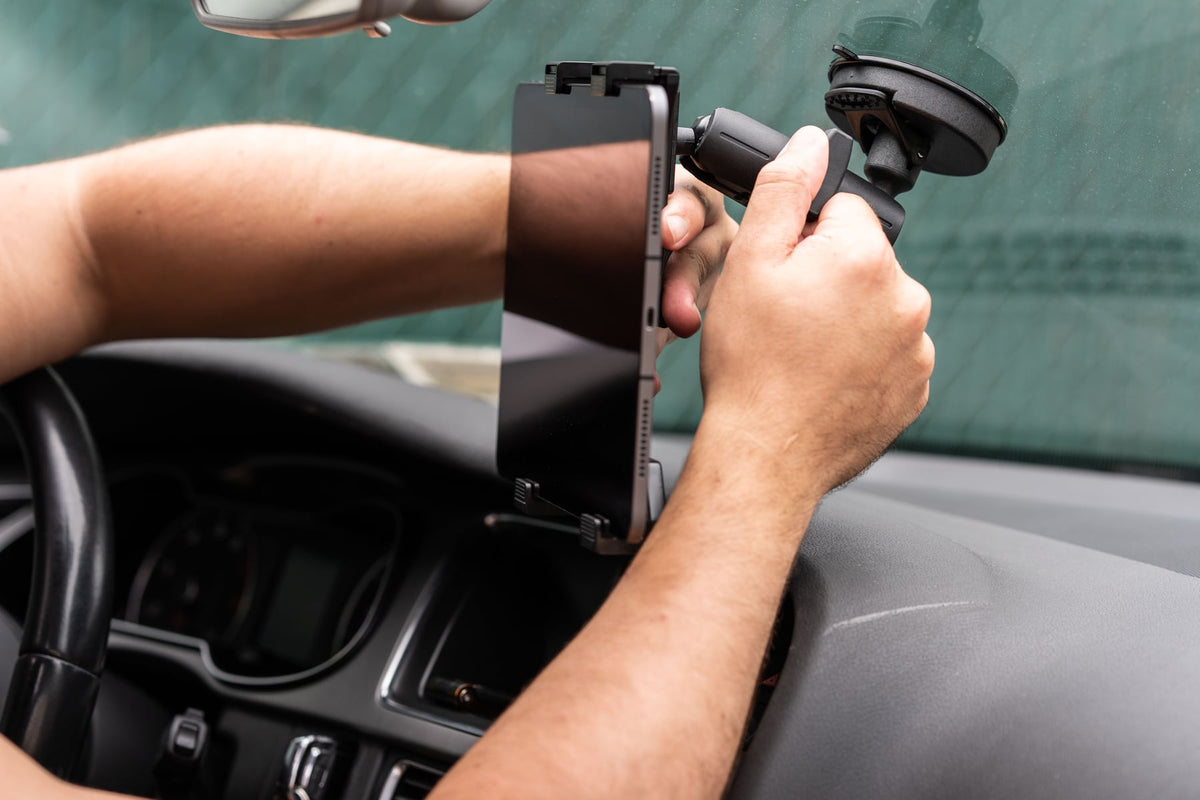
For those situations, a heavy-duty suction mount is the practical answer, provided it is built for commercial use and not a consumer-grade phone holder. The iBOLT TabDock IncrediBOLT 360 Suction Mount is built specifically for this constraint. It uses a 6-inch metal suction cup base rated for commercial vehicle environments, mounts to windshields or flat dash surfaces without any drilling, and supports tablets from 7 to 10 inches. The 360-degree multi-angle arm lets each driver dial in their preferred viewing angle without tools.
The metal construction matters here. Plastic suction mounts designed for consumer cars flex and fatigue under the constant vibration of a semi. The iBOLT TabDock IncrediBOLT 360 is rated for heavy-duty environments, which means it is built to stay put on the roads that shake consumer mounts loose within a week.
When a Permanent Install Makes More Sense
Owner-operators and fleet managers who control their own vehicles have a different calculus. If the same truck runs the same routes with the same tablet setup every day, a drill-base mount is worth the one-time install effort. It eliminates suction cup maintenance, removes any movement at the base, and gives the device a locked position that does not shift between drivers.
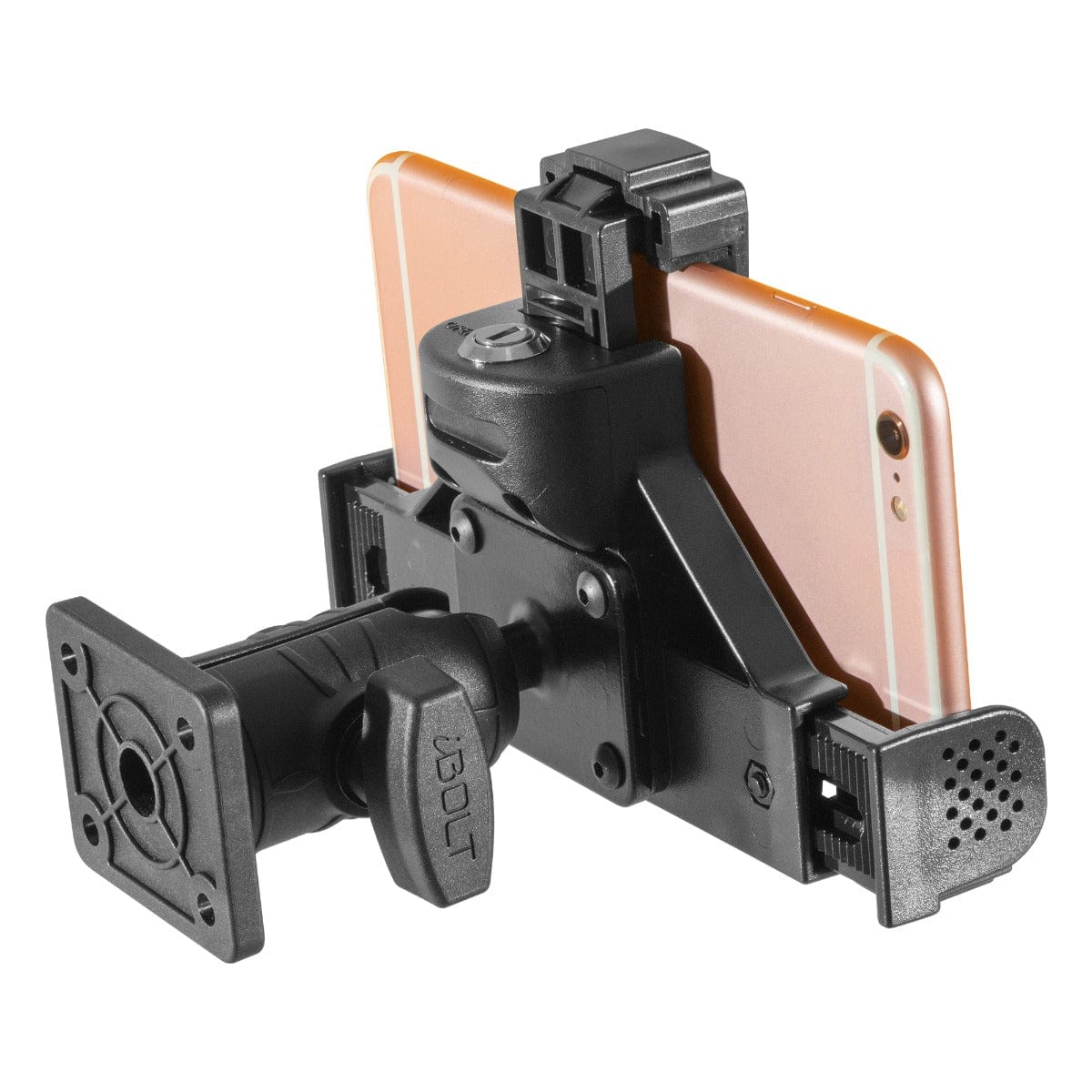
The iBOLT Dock'n Lock BizMount AMPS is the right tool for that job. It uses a drill-base AMPS plate with a tamper-resistant locking system, including keyed locks and tamper-proof hex bolts, so the tablet stays secured even in high-risk or shared-vehicle environments. The composite construction handles industrial vibration, and the dual 1-inch ball joints give 360-degree adjustability after the base is set. It fits tablets from 7 to 11 inches and is compatible with industry-standard AMPS mounting arms, so it integrates with existing fleet hardware if needed.
For fleets running dedicated ELD tablets that never leave the truck, the locking feature also addresses theft and unauthorized removal. That matters in terminal yards and overnight stops where cab security is a real concern.
Placement, Cable Routing, and the Multi-Device Cab
Most working truck cabs are not running a single device. Drivers often have an ELD tablet, a phone for personal navigation or dispatch messaging, and sometimes a dash cam or GPS unit. Choosing the right tablet mount for a truck means thinking about where everything lives, not just where the tablet goes.
A few practical rules help here. Mount the ELD tablet in the primary sightline, typically center dash or slightly right of center, where the driver can glance at it without turning their head. Keep the phone mount secondary, lower on the dash or on a vent arm, so it does not compete for the same visual space. Route charging cables along the dash edge or through a cable clip to avoid loose cords crossing the steering column.
Both iBOLT mounts above support standard USB and charging cable routing without blocking the cradle. If your tablet requires USB-C hardwire charging, confirm your cable length before finalizing mount position. A mount that puts the tablet six inches from the nearest USB port will always have a cable problem.
Choosing Between Suction and Drill-Base: A Quick Decision Framework
The right choice usually comes down to three questions. First, can you drill into the dash? If no, the iBOLT TabDock IncrediBOLT 360 Suction is your path. Second, is this a dedicated truck with a permanent tablet setup? If yes, the iBOLT Dock'n Lock BizMount AMPS gives you a more secure, lower-maintenance install. Third, does the tablet need to be locked against theft or unauthorized removal? The BizMount's keyed locking system handles that directly.
For last-mile and delivery drivers who dock and undock the tablet multiple times per shift, the suction mount's quick-release cradle is also a practical advantage. Fast one-hand docking matters when you are making forty stops a day and pulling the tablet for proof-of-delivery photos or scanning at each one.
Frequently Asked Questions
Where should an ELD be mounted in a semi truck?+-
The FMCSA requires the device to be fixed during operation and visible from the driver's normal seated position. Center dash or slightly right of center, at or just below eye level, keeps the screen readable without blocking mirrors or the road ahead.
Is a phone or tablet allowed as an ELD?+-
Yes. The FMCSA allows smartphones and tablets as ELD interfaces if the device and software meet technical specifications and the device is fixed and visible during operation. The mount is what makes a tablet legally compliant in this context.
What is the best no-drill tablet mount for a semi truck?+-
The iBOLT TabDock IncrediBOLT 360 Suction is built for commercial vehicle use with a 6-inch metal suction base, 360-degree adjustability, and support for 7 to 10-inch tablets. It is a strong choice when drilling is not an option.
What does a locking tablet mount add for fleet use?+-
A locking mount like the iBOLT Dock'n Lock BizMount AMPS prevents theft and unauthorized removal using keyed locks and tamper-proof hardware. It is useful in shared vehicles, terminal yards, and any situation where the tablet needs to stay secured when the driver is out of the cab.
Can I use the same mount across multiple drivers?+-
Yes, if the mount offers angle adjustability. Both iBOLT options above include multi-angle adjustment so each driver can set their preferred viewing position without tools or permanent changes to the mount position.



Leave a comment
This site is protected by hCaptcha and the hCaptcha Privacy Policy and Terms of Service apply.