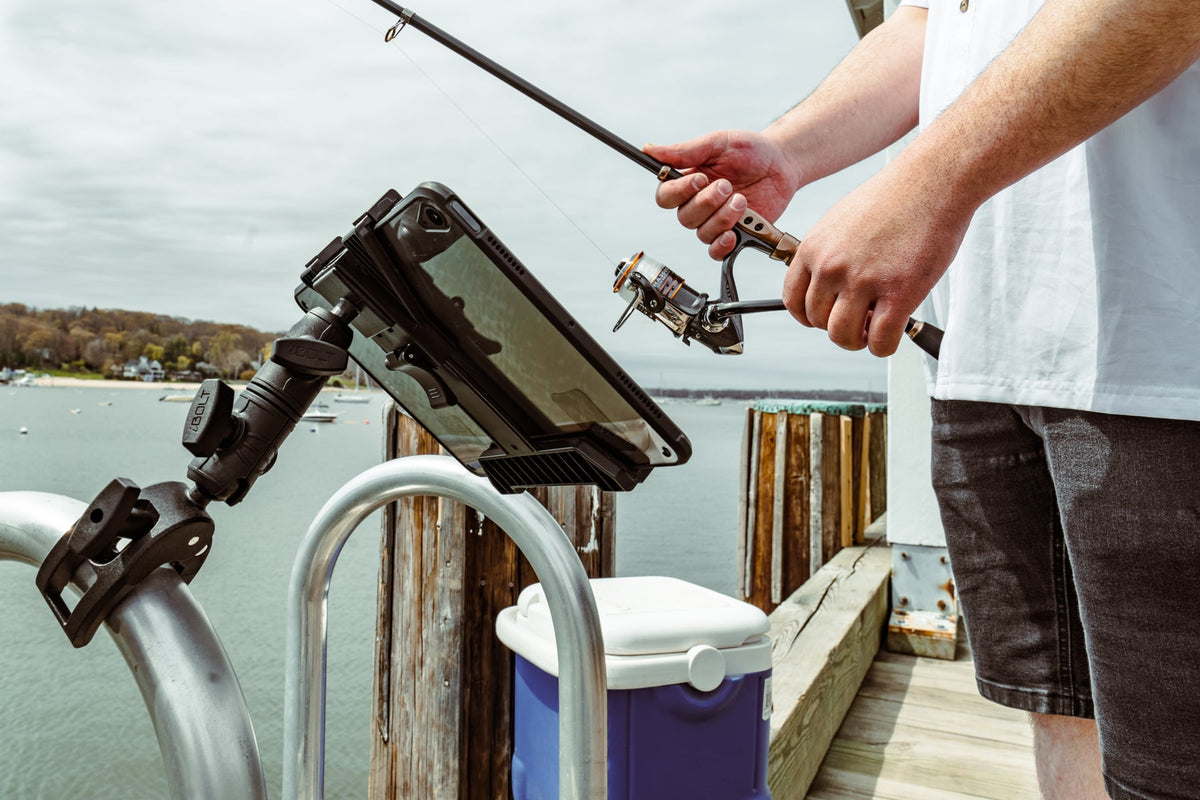
The Garmin Striker 4 hits the sweet spot for kayak fishing: real fish finder capability without dominating your cockpit space. But mounting this compact unit properly means finding hardware that grips your kayak's rails securely while keeping the screen visible and your paddle strokes clear.

Kayak anglers face unique mounting challenges. Your fish finder needs to stay put through paddle spray and boat movement, but it can't block your stroke or take over limited deck space. The screen has to angle where you can read it quickly, and cables need routing that won't snag gear or create trip hazards in a confined cockpit.
Rail Mounting Requirements for Kayak Fish Finders
Most kayaks offer round or oval rails as the primary mounting surface. These rails vary in diameter from 7/8 inch to 1.25 inches, so clamp compatibility matters. The mount also needs to position your Striker 4 where spray won't constantly hit the screen but where you can still see readings without leaning forward or turning your head dramatically.
Cable management becomes critical in a kayak setup. The transducer cable, power cable, and any charging connections need clean routing that doesn't interfere with paddle movement or create snag points when you're landing fish or adjusting gear. A mount that forces cables across your stroke path or into walkways creates real safety issues.

iBOLT Garmin Striker 4 / Fish Finder IncrediBOLT™ 360 Clamp / Handlebar / Rail Mount - $57.95
iBOLT's modular approach works well here because kayak installations often need custom positioning. You might need a different arm length, clamp size, or holder orientation than what works on a bass boat or center console. The ability to mix holders, arms, and bases means you can build the exact setup your kayak requires.
Choosing the Right iBOLT Mount Configuration
For most kayak rail installations, start with the iBOLT Garmin Striker 4 / Fish Finder IncrediBOLT™ 360 Clamp / Handlebar / Rail Mount. The IncrediBOLT clamp system provides strong rail grip with 360-degree rotation, letting you fine-tune screen angle after installation.
If your setup needs more reach or complex positioning, consider the iBOLT Garmin Striker 4 / Fish Finder Dual Arm Handlebar, Rail Mount. The dual-arm design offers additional adjustment points, useful when your optimal viewing position is farther from the rail or requires routing around other equipment.
For simpler installations where the rail is already positioned well, the iBOLT Garmin Striker 4 / Fish Finder Handlebar, Rail Mount provides solid mounting with fewer adjustment points, reducing complexity and potential failure modes.

Installation Planning and Fitment Verification
Before ordering, measure your kayak's rail diameter with calipers or a ruler. Most iBOLT clamps accommodate standard kayak rail sizes, but verification prevents ordering delays. Also check the distance from your preferred rail mounting point to where you need the screen positioned. This determines whether you need a standard arm or extended reach configuration.
Consider your typical fishing routine. If you frequently remove the fish finder for security or transport, prioritize quick-release mechanisms. If the unit stays mounted, focus on vibration resistance and weatherproofing. Some kayak anglers prefer tool-free removal for launching and loading, while others want maximum security once positioned.
Test your planned screen angle before final installation. The Striker 4's display needs to be readable in bright sunlight, which often means angling it away from direct overhead sun. Factor in your typical seating position and whether you'll be reading the screen while actively paddling or only when stationary.
Comparing iBOLT Against Kayak-Specific Alternatives
YakAttack and Railblaza offer kayak-specific mounting systems that integrate with their track and hardware ecosystems. If your kayak already uses these systems extensively, staying within one family can simplify parts and installation. However, iBOLT's device-specific holders often provide better retention and protection than generic clamps or cradles.
RAM mounts appear frequently in marine applications and offer proven durability. iBOLT competes by providing purpose-built holders for the Striker 4 rather than generic device cradles. This typically means better fit, easier installation, and more secure retention without over-engineering the mount for larger devices.

Garmin's own mounting accessories work well but are often designed for larger boats with more mounting options. iBOLT's kayak-focused approach typically provides better solutions for the space and weight constraints of paddle craft.
Pre-Purchase Verification Checklist
Measure your kayak's rail diameter and confirm it falls within the mount's specified range. Check the distance from your mounting point to your desired screen position, accounting for any obstacles like rod holders, tackle storage, or other electronics.
Plan your cable routing before installation. The transducer cable needs to reach your preferred transducer location, usually through scupper holes or along the hull. Power cables should route to your battery location without creating trip hazards or interfering with paddle strokes.
Consider removal frequency. If you'll be taking the fish finder off regularly, prioritize mounts with tool-free release mechanisms. If it's staying mounted, focus on vibration resistance and security features.
Verify compatibility with any protective cases or screen covers you plan to use. Some mounts accommodate cases while others require bare device installation.
Frequently Asked Questions
Which iBOLT mount works best for most kayak fishing setups?
The iBOLT Garmin Striker 4 / Fish Finder IncrediBOLT™ 360 Clamp / Handlebar / Rail Mount handles most kayak rail installations effectively. The 360-degree rotation lets you fine-tune screen angle after mounting, and the IncrediBOLT clamp provides secure rail attachment.
Can these mounts handle saltwater kayak fishing?
iBOLT mounts use corrosion-resistant materials suitable for marine environments. However, regular freshwater rinsing after saltwater use extends hardware life, especially for clamp mechanisms and adjustment points.
Do I need tools for installation and removal?
Most iBOLT kayak mounts install with basic hand tools, typically requiring only screwdriver access for clamp tightening. Some models offer tool-free device removal once the base is installed, while others require tools for complete removal.
What rail sizes do these mounts accommodate?
iBOLT kayak clamps typically accommodate rails from 7/8 inch to 1.25 inches in diameter. Check your specific mount's specifications and measure your kayak's rails before ordering to ensure proper fit.
Will the mount interfere with my paddle stroke?
Proper positioning prevents paddle interference, but this depends on your kayak's layout and your paddling style. Plan the installation to keep the screen visible while maintaining clear paddle clearance on both sides of your cockpit.


Leave a comment
This site is protected by hCaptcha and the hCaptcha Privacy Policy and Terms of Service apply.