Trade show booths need tablets that work under pressure. Visitors tap through product catalogs while staff handle demos three feet away. Lead capture forms get filled out by prospects who've never seen your interface before. Survey tablets collect feedback from hundreds of people over three days, then pack into cases for the next event.
The mount has to keep the device visible, stable, and accessible while surviving constant use from strangers. It also needs to look professional when your biggest prospects walk by.
What Makes Trade Show Tablet Mounting Different
Trade show tablets face challenges that office or vehicle mounts never see. The device gets handled by dozens of people daily, often while wearing conference badges or carrying bags. The mounting surface might be a custom booth counter, a portable display table, or a shared kiosk station that moves between events.
Security matters more than convenience here. A tablet that walks away during setup costs more than just replacement hardware. It contains lead data, demo content, and potentially customer information that shouldn't leave the booth.
iBOLT addresses these requirements through modular mounting systems that separate the holder from the base. This lets you match the right retention level to your security needs while choosing a base that fits your actual booth layout.

Choosing Between Stand-Alone and Multi-Device Setups
Single-tablet stations work well for lead capture or product browsing where one person uses the device at a time. The iBOLT™ LockPro™ Drill Base Locking Tablet Stand handles this scenario with a secure holder that deters casual removal while keeping the screen accessible for legitimate use.
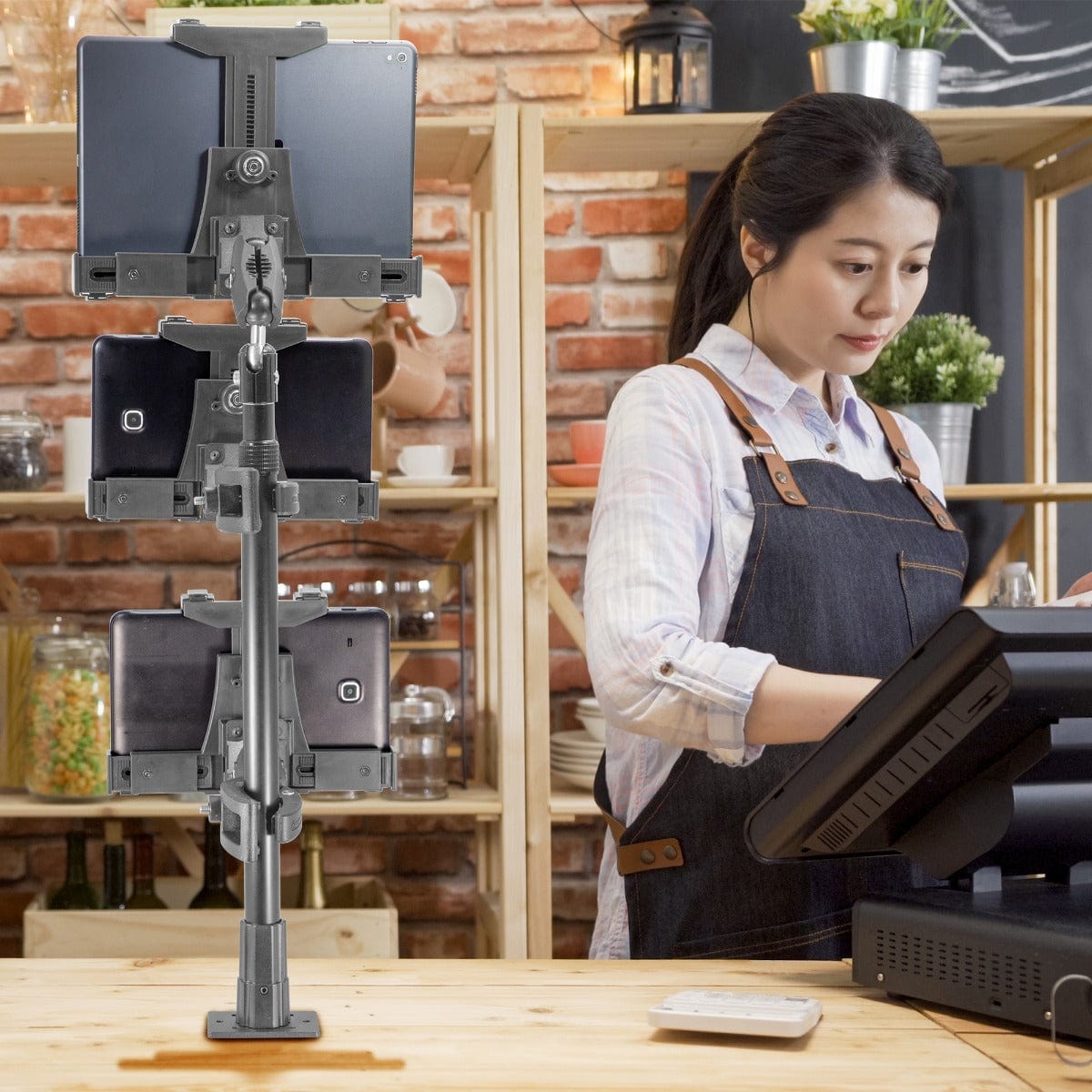
Multi-tablet towers make sense when you need several devices in one location. The iBOLT Tablet Tower with 3 Tablet Holders lets staff run different demos simultaneously or gives visitors multiple ways to engage with your content.
For maximum flexibility, the iBOLT Quad Tablet Tower TabDock™ Stand provides four mounting positions that can hold tablets at different angles or heights. This works particularly well for booths where some tablets show static content while others handle interactive demos.

iBOLT Tablet Tower- Dock’n Lock POS Locking Drill Base Mount - with 3 Tablet Holders - $199.95
Base Selection for Different Booth Configurations
Drill-base mounts work when you can modify the booth counter or table surface. These provide the strongest connection and best theft deterrence, but require planning during booth design. Most exhibit halls allow drilling into custom booth furniture, but verify this with your venue before the event.
Clamp-style bases attach to existing table edges or booth rails without permanent modification. This approach works well for rented booth space or when the same mount needs to work across multiple events with different table configurations.
Weighted bases offer portability without requiring attachment to the booth structure. These work best for tablets that need to move during the event or when the mounting surface can't support drilling or clamping.
Security and Device Management Considerations
Locking mechanisms prevent casual device removal but shouldn't make legitimate access difficult for staff. iBOLT's locking systems use keys rather than complex combinations, which matters when multiple team members need device access during busy show periods.
Cable management becomes critical in high-traffic areas. Charging cables that cross walkways create trip hazards and look unprofessional. Route power and data cables through the mount structure or under the booth counter before finalizing the installation.
Device rotation and tilt adjustment help accommodate users of different heights, which matters more in public settings than in controlled office environments. Verify that the mount allows screen positioning changes without tools, since booth staff may need to adjust viewing angles throughout the day.

Installation Planning and Event Logistics
Measure your devices with their protective cases installed. Trade show tablets typically need more protection than office devices, and thicker cases affect holder compatibility. If you're using barcode scanners, card readers, or other accessories, verify that these don't interfere with the mounting hardware.
Plan for setup and breakdown time. Mounts that require extensive assembly slow down booth installation when you're working under tight show schedules. iBOLT's modular approach lets you pre-assemble holder and arm combinations, then attach them to bases that are already installed on booth furniture.
Consider standardization across multiple events. Using the same mounting system for all your trade show tablets simplifies inventory management and reduces the chance of arriving at a show with incompatible parts.
Frequently Asked Questions
Which iBOLT mount works best for lead capture tablets?
The iBOLT™ LockPro™ Drill Base Locking Tablet Stand provides security and stability for single-device lead capture stations. The locking mechanism deters theft while keeping the screen accessible for prospect interaction.
Can these mounts work with tablets in protective cases?
Yes, but verify case compatibility before ordering. Measure your device with its case installed and check that ports remain accessible. Heavy-duty cases may require larger holders or different retention mechanisms.
How do I prevent cables from becoming trip hazards?
Route charging and data cables through the mount structure when possible, or secure them under booth counters with cable management clips. Avoid running cables across walkways or areas where visitors congregate.
What's the difference between drill-base and clamp-base mounts?
Drill-base mounts attach permanently to booth furniture and provide maximum security and stability. Clamp-base mounts attach to table edges without modification and work better for rented booth space or multi-event use.
Trade show tablet mounts need to balance accessibility with security while looking professional under constant public scrutiny. The right mounting system protects your investment while helping visitors engage with your content effectively.


Leave a comment
This site is protected by hCaptcha and the hCaptcha Privacy Policy and Terms of Service apply.