Phone Stand for Live Streaming: Build a Steady, Pro Setup
By iBOLT Mark
Phone Stand for Live Streaming: Build a Steady, Pro Setup
Problem proposition: Creators who rely on handheld phones or wobbly gooseneck arms lose consistent framing and waste time resetting shots; this guide shows how a purpose-built streaming mount solves that problem for desk setups, overhead angles, and DSLR rigs.
A practical iBOLT mounting setup keeps a device accessible in a restaurant workflow.
Phone Stand for Live Streaming: How to Build a Steady, Repeatable Setup
If you have ever finished a live session only to realize your phone slowly drifted out of frame, or your desk vibration turned a clean product demo into shaky footage, you already know the core problem. Holding your phone is not a setup. A stack of books is not a setup. What you actually need is a camera mount that locks your angle, frees your hands, and leaves room on your desk for lights, a microphone, and whatever you are demonstrating.
This guide is for creators who stream from a desk: TikTok Live sellers, YouTube cooking channels, crafters, unboxers, repair technicians, and anyone doing a product demo where the shot has to be repeatable every single session.
Why Goosenecks and Light Clamp Arms Keep Failing You
Flexible gooseneck arms are popular because they are inexpensive and easy to find. The problem is physics. A gooseneck holds its position through friction in the coiled metal, and that friction degrades over time. Touch your desk, bump the arm, or add a slightly heavier phone case, and the angle shifts. For a 30-second Reel that is tolerable. For a 45-minute live selling session, it is a constant distraction.
Light clamp arms designed for photography have the same weakness at the joint: they are built to hold a light that weighs a few ounces, not a phone or camera that needs to stay pointed at a precise spot on your cutting board or product flat lay.
Overhead video stability requires a rigid arm, a strong clamp or weighted base, and a mount that was actually designed for the job.
Matching the Mount to Your Content Type
Before you choose a streaming mount, answer three questions about your setup.
What is your shot angle? A front-facing angle works for talking-head streams, podcasts, and video calls. A top-down overhead angle is essential for cooking, drawing, crafting, unboxing, electronics repair, and live product demos where viewers need to see what your hands are doing.
What device are you mounting? A smartphone is lighter and more compact than a DSLR with a lens attached. If you plan to upgrade your camera later, choose a mount that supports the 1/4-20 screw thread standard, which is the universal compatibility thread for cameras, phone clamps, lights, microphones, ball heads, and adapter plates.
What else needs to fit on your desk? Many creators start with one phone and then add a second device, a ring light, or a USB microphone. A mount with a modular arm or cold shoe accessory slots reduces stand clutter and keeps your workspace functional.
The Overhead Phone Mount: Best for Demos and Flat Lays
For creators who need a top-down shot, the iBOLT Stream-Cast IncrediBOLT Stand Adjustable Overhead Phone Mount is built specifically for that angle. It positions your phone directly above your work surface, which is exactly what baking tutorials, cake decoration lessons, craft sessions, and product flat lays require. The arm is rigid, not a gooseneck, so the frame you set at the start of your stream is the frame you have at the end.
At $84.95, it is a purpose-built overhead phone mount, not a repurposed photography accessory. If your content lives or dies by whether viewers can clearly see what your hands are doing, this is the mount that solves that problem.
The DSLR Camera Rig: When You Are Ready to Upgrade Your Image Quality
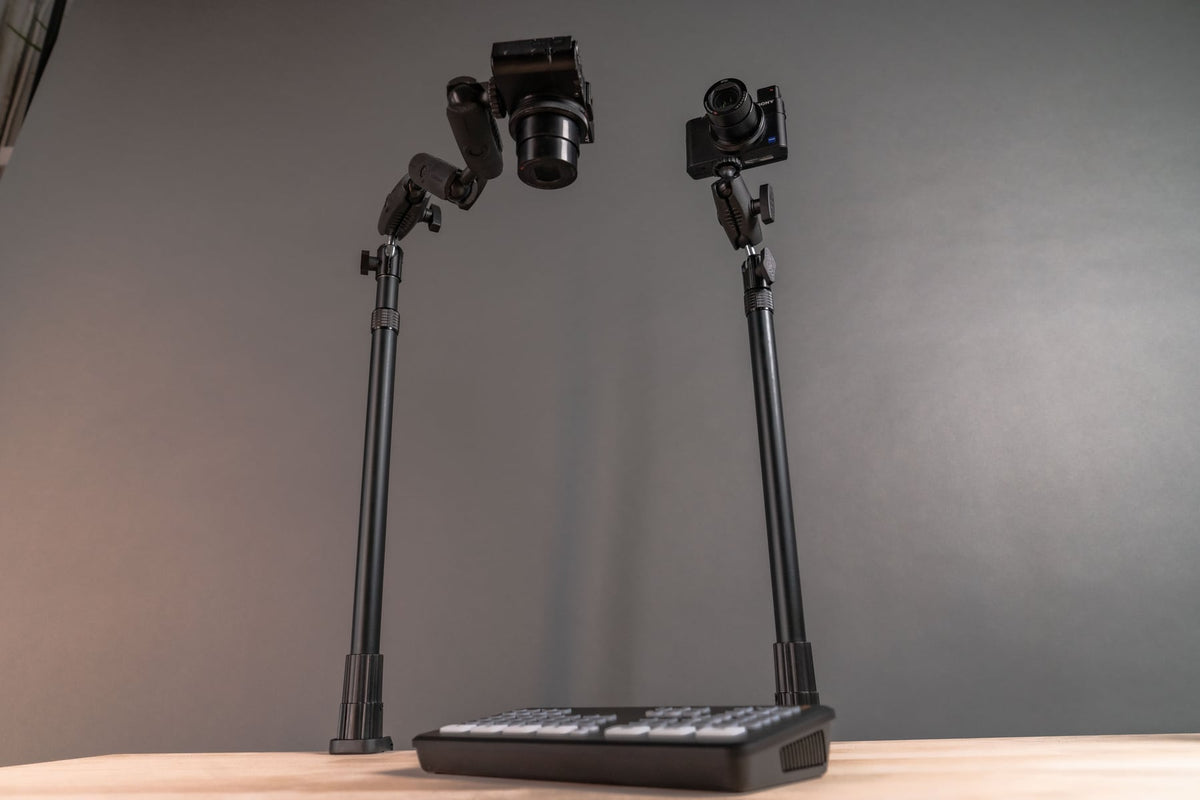
Some creators reach a point where a smartphone sensor is no longer enough. If you are shooting with a DSLR or mirrorless camera and a lens, you need a mount that can handle the weight and provide the same overhead or front-facing flexibility.
The iBOLT Stream-Cast Overhead Camera Rig Desk Mount installs directly onto your desk or any flat surface and supports cameras, lens combinations, projectors, and smartphones weighing up to 5 lbs. It handles both top-down and front-facing positions, so you are not locked into one shot type. At $179.95, it is the right tool for creators who are running a tabletop studio and need a mount that keeps up with a full camera rig.
Both mounts use the 1/4-20 thread standard, which means you can attach phone clamps, ball heads, cold shoe adapters for microphones, and small LED panels without buying a separate stand for each accessory.
Setup Planning: What to Check Before You Mount Anything
A mount is only as good as the surface it attaches to. Before you order, run through this short checklist.
Desk thickness and lip shape: Clamp-style mounts need a solid edge to grip. Glass desks, thin shelves, and desks with thick beveled lips can limit your options.
Clearance above the work surface: For overhead shots, measure the height you need to clear bowls, cutting boards, or product packaging. Kitchen creators also need to account for steam and cabinet doors that open above the counter.
Cable management: A phone or camera on an overhead arm needs a cable path that does not create strain on the charging port or pull the device off angle during a long session.
Lighting placement: Your mount arm and your light stand will compete for the same desk real estate. Plan both positions before you clamp anything down.
Drilling restrictions: If you rent your space or work in a shared studio, confirm whether wall or ceiling mounting is allowed before choosing a wall-based solution.
Repeatable Framing Is the Real Productivity Gain
The underrated benefit of a fixed streaming mount is not just stability during a single session. It is the time you save at the start of every session. When your mount holds its position, you open your streaming software, confirm the frame is where you left it, and go live. There is no repositioning, no asking your audience to wait while you adjust, and no discovering mid-stream that the angle drifted.
For live selling, that consistency matters even more. Repeatable framing means your product always appears in the same part of the frame, your lighting hits the same way, and your audience builds a visual expectation for your show. That is the difference between a setup and a production.
Browse the full iBOLT streaming mount collection to see overhead phone mounts, DSLR camera rigs, and accessory adapters that work together as a system.
Frequently Asked Questions
What is the best phone stand for TikTok Live or YouTube Shorts from a desk?+-
For front-facing streams, a desk clamp mount with a rigid arm works well. For top-down content like cooking or crafts, the iBOLT Stream-Cast IncrediBOLT Stand is designed specifically for that overhead angle.
Can I use the same mount for a phone and a DSLR camera?+-
The iBOLT Stream-Cast Overhead Camera Rig Desk Mount supports both smartphones and DSLR cameras with lenses up to a combined 5 lbs. Both iBOLT Stream-Cast mounts use the 1/4-20 thread standard for broad accessory compatibility.
Will a rigid overhead mount shake when I touch my desk?+-
A rigid arm with a strong clamp or weighted base transfers significantly less vibration than a gooseneck. For the steadiest results, clamp to a solid desk edge rather than a glass or thin surface.
Can I attach a microphone or light to the same mount?+-
Yes. Both iBOLT Stream-Cast mounts use the 1/4-20 thread standard, which is compatible with cold shoe adapters, ball heads, and accessory plates for lights and microphones.
Do I need to drill into my desk or wall?+-
No. Both iBOLT Stream-Cast mounts are designed to clamp or attach to a flat desk surface without drilling, making them suitable for home offices, rented studios, and shared workspaces.



Leave a comment
This site is protected by hCaptcha and the hCaptcha Privacy Policy and Terms of Service apply.