Phone Holders and Mounts for Live Streaming: Stop Shaky Footage
By iBOLT Mark
Phone Holders and Mounts for Live Streaming: Stop Shaky Footage
Problem proposition: Creators dealing with shaky footage, inconsistent framing, and awkward angles need a matched mounting system for overhead, desk, and accessory setups, and this article shows exactly which iBOLT mounts solve each scenario.
An iBOLT mounting setup positions a device for filming, streaming, or hands-free content work.
You can have great lighting, a fast connection, and a well-rehearsed script, and still lose viewers the moment your phone wobbles or your angle drifts. Shaky footage and awkward framing are the most common technical complaints in live streaming, and they almost always trace back to the same root cause: the wrong mount for the job. Whether you are going live on TikTok, filming a product demo for YouTube Shorts, or running a live selling session, a fixed, properly matched phone holder for streaming is what separates a watchable broadcast from a frustrating one.
Why Handheld and Gooseneck Setups Fail Creators
Flexible gooseneck arms and lightweight clamp mounts are popular because they are inexpensive and easy to find. The problem is physics. The moment you touch your desk to pick up a product, adjust a prop, or type a response to a comment, the vibration travels straight up the arm and into your shot. Creators on r/videography and r/obs report this constantly: they buy a flexible arm, get one clean take, and then spend the rest of the session fighting micro-shake every time they move.
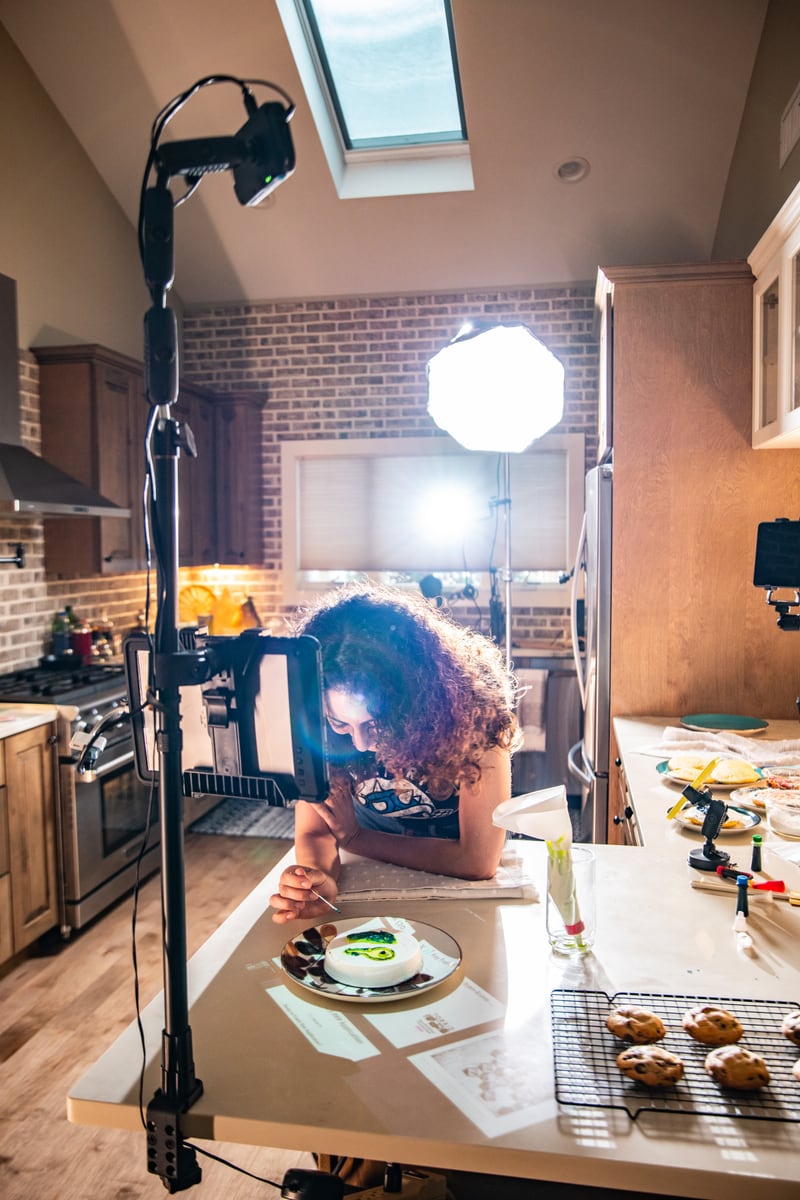
Stable overhead video, in particular, requires a rigid arm, a heavy base, or a wall or ceiling anchor. A top-down shot of a cutting board, a flat lay of products, or a live unboxing demands that the camera stays locked in place while your hands move freely below it. That is a structural problem, not a settings problem, and it requires a structural solution.
Matching the Mount to the Shot Type
Before buying any streaming mount, answer three questions: Where is the camera going relative to your subject? What surfaces are available to anchor the mount? Will you need to attach accessories like a mic, light, or second device?
For desk-level shots, a clamp or suction cup mount attached to the desk surface or a nearby monitor arm gives you a stable, repeatable frame without eating up workspace. For overhead shots, you need a dedicated overhead rig with enough arm reach to clear bowls, cutting boards, and your own hands. For travel or multi-location setups, a tripod with a phone adapter is still the most portable option, but it will not give you the rigidity of a fixed desk system.
The 1/4-20 screw thread is the compatibility standard that ties all of this together. Cameras, phone clamps, webcams, lights, microphones, mini projectors, ball heads, and adapter plates all share this thread size, which means a single well-chosen base can support an entire multi-device rig as your setup grows.
The Overhead Streaming Mount Built for Demonstrations
If your content involves cooking, baking, crafting, drawing, electronics repair, or live product demos, the top-down angle is not optional. It is the shot. The iBOLT Stream-Cast IncrediBOLT Stand Adjustable Overhead Phone Mount is designed specifically for this use case. It positions your phone directly above your work surface so viewers see exactly what your hands are doing, with no awkward side angles and no shadow from a poorly placed arm.
The stand is adjustable, which matters when you need to clear a tall mixing bowl one session and a flat sketchpad the next. Kitchen creators will appreciate that the overhead position keeps the phone out of the splash zone while still capturing every detail of the prep surface. At $84.95, it is a purpose-built overhead camera rig, not a repurposed tripod with a phone clip zip-tied to the top.
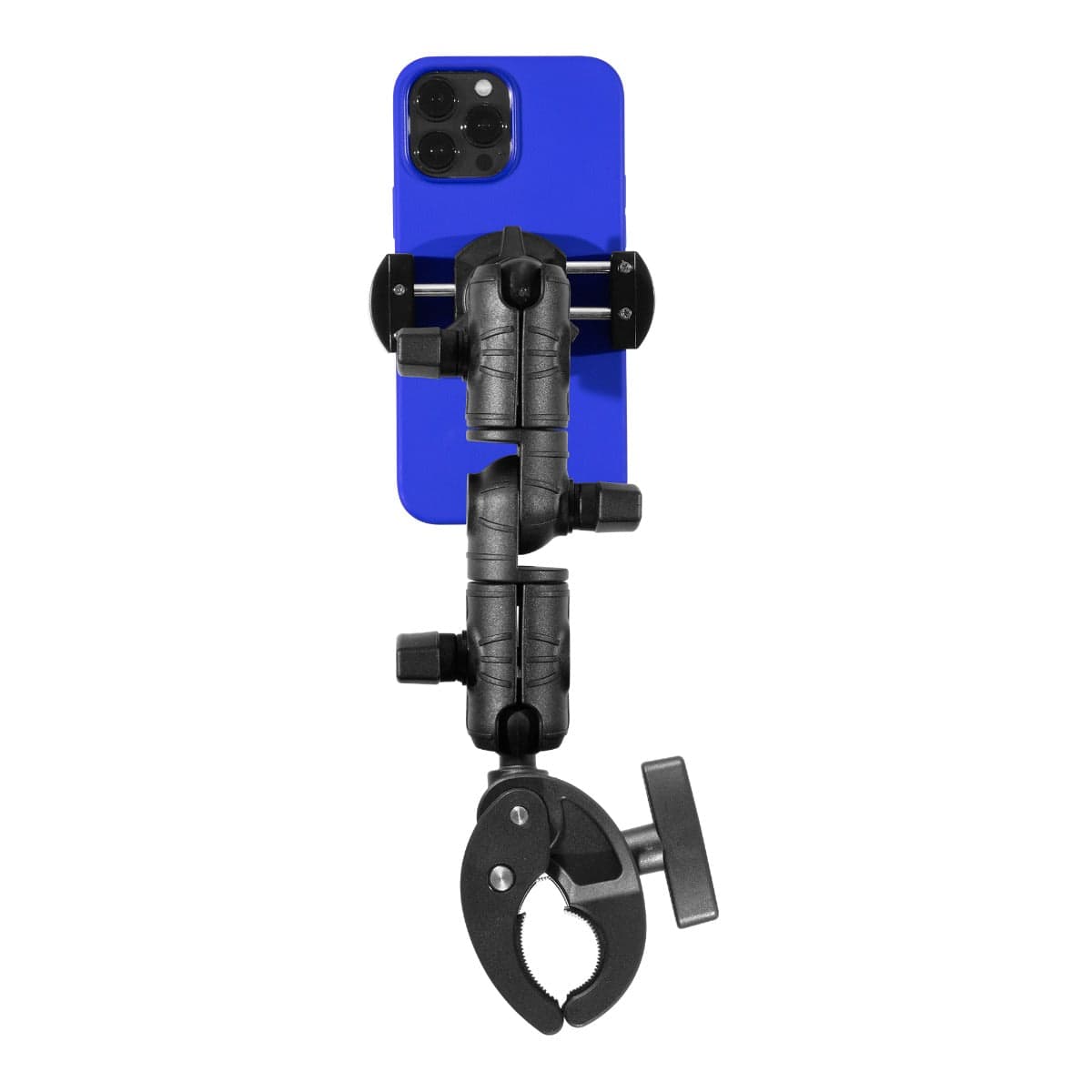
Not every streaming setup is at a fixed desk. Live selling from a retail counter, filming a product review at a workbench, or setting up a second angle on a glass surface all call for a mount that can reposition quickly and hold firmly on non-porous surfaces. The iBOLT 1/4 20 Camera Screw IncrediBOLT Suction Cup Mount handles exactly that.
The 80mm heavy-duty suction cup base locks onto windshields, desks, mirrors, and workbenches. The 6-inch IncrediBOLT arm with a center hinge joint gives you real adjustability, not just a fixed angle. The 1/4-20 camera screw adapter means you can attach a phone clamp, action camera, camera flash, microphone, or any other standard accessory. At $24.95, it is the kind of modular base that earns its place in a creator's kit by doing multiple jobs across multiple setups.
Creators who start with one phone and later add a second device, a compact light, or a mic will find that the 1/4-20 thread on this mount makes expansion straightforward. One base, multiple configurations, no extra stands cluttering the frame.
Setup Constraints Worth Thinking Through Before You Buy
A mount that works perfectly in one setup can be completely wrong for another. Before ordering, consider your tabletop thickness if you plan to use a clamp, the edge profile of your desk, how close your monitor or shelving sits behind the camera position, and whether your landlord or workspace rules out drilling. Cable strain is also worth planning for: a phone mounted overhead needs a charging cable route that does not pull the arm off-angle mid-stream.
Lighting placement interacts with mount position more than most creators expect. An overhead phone mount that sits directly under a ring light will wash out the shot. Positioning the mount slightly forward or to the side of the light source usually solves this, but it requires an arm with enough reach and articulation to make that adjustment without losing the top-down angle.
Building a Consistent, Repeatable Frame
The real advantage of a fixed streaming mount over a handheld phone or a repositioned tripod is repeatability. When your camera mount is locked in place, every session starts with the same frame. That consistency matters for product demos and live selling especially, where viewers return expecting the same professional presentation. It also matters for editing: if you record supplemental footage to cut into a live replay, a consistent camera position makes the edit invisible.
Start by identifying your primary shot type, overhead or desk-level, then choose the mount that anchors correctly for your surface. Add accessories through the 1/4-20 thread as your setup grows. The goal is a rig that holds its position while you focus on the content, not on the camera.
Frequently Asked Questions
What is the best phone stand for TikTok Live or YouTube Shorts from a desk?+-
A clamp or suction cup mount anchored to your desk surface gives you the most stable desk-level frame. The iBOLT 1/4 20 Camera Screw IncrediBOLT Suction Cup Mount works well on flat desk surfaces and repositions without tools.
Can one mount hold a phone, light, and mic together?+-
Yes, if the base uses a 1/4-20 thread. That standard connects phones, action cameras, lights, mics, and adapter plates. The iBOLT suction cup mount uses a 1/4-20 screw adapter, making it compatible with a wide range of accessories.
Why does my overhead phone mount shake when I touch the desk?+-
Lightweight arms and flexible goosenecks transfer vibration directly to the camera. A rigid arm with a heavy base, like the iBOLT Stream-Cast Stand, isolates the phone from desk movement far more effectively.
Do I need a special mount for cooking or kitchen streaming?+-
Yes. Kitchen setups need an overhead mount with enough arm clearance to stay above bowls, cutting boards, and steam while keeping the phone reachable for controls. The iBOLT Stream-Cast IncrediBOLT Stand is designed for exactly this type of demonstration content.
What does 1/4-20 mean on a camera mount?+-
It refers to a screw thread size, 1/4 inch diameter with 20 threads per inch, that is the industry standard for cameras, phone clamps, lights, mics, and most mounting accessories. A mount with a 1/4-20 adapter is compatible with the vast majority of creator gear.



Leave a comment
This site is protected by hCaptcha and the hCaptcha Privacy Policy and Terms of Service apply.