

Forklift information work evolved in overlapping stages, from paper and radio dispatch to fixed RF terminals and modular tablet systems. Editorial B-roll.
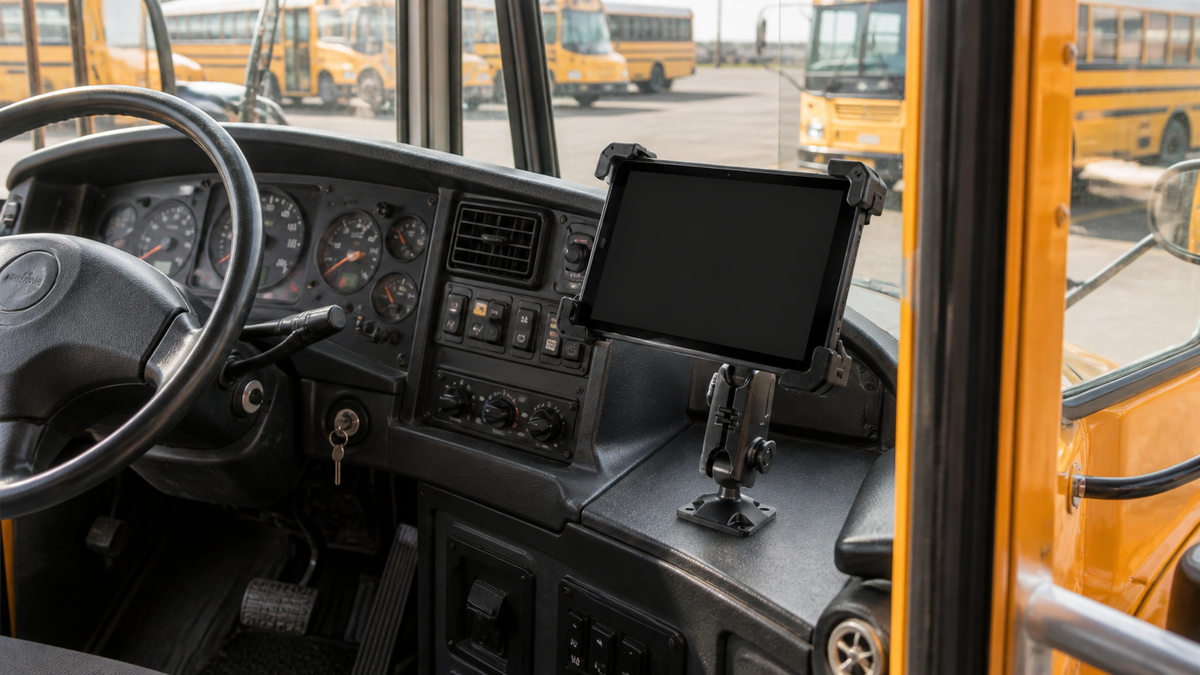
A forklift operator once waited for a written assignment or a radio call. A current operator may receive a WMS task, scan a pallet, complete an inspection, and report an exception through one mounted screen. The bracket beside the steering wheel looks simple, but the history of forklift-mounted computers is really a story about data, power, vibration, ergonomics, and the changing relationship between a worker and the warehouse system.
That history did not follow a tidy path from clipboard to computer to tablet. Paper orders, two-way radio, handheld scanners, fixed terminals, and mobile tablets overlapped for decades. The useful timeline begins when live electronic data reached the truck.
The Forklift Came First, the Data Mount Came Later
CLARK traces its early industrial truck to 1917, and Yale dates its first electric lift truck to 1920. Those milestones explain why operator stations existed long before electronic displays, but they do not establish when device mounts appeared.
A 1989-priority Norand patent offers a better starting point. It describes lift-truck work directed by written instructions or two-way radio, then explains an onboard system that could hold a removable RF terminal, power it from the vehicle, communicate with a host, and keep a barcode scanner in a dedicated holster. The terminal could leave the truck when the operator needed to walk around a pallet and scan a label.
A retrospective automatic-identification industry chronology credits LXE with a vehicle-mounted RF and data-collection terminal in 1978. That is best treated as an attributed industry claim, not a universal first. Intermec later told investors that it had installed communications between mobile computers and warehouse host systems beginning in the early 1980s, as recorded in its 2004 Form 10-K.
The 1990s Mount Became a Working Dock
Early electronic mounting had to solve more than retention. A terminal needed electrical contact, vehicle power, scanner access, and a way to survive repeated shock. Designers also had to let an operator remove and replace a device without turning every scan into a two-handed procedure.
Patents from the period document that change. A 1994-priority industrial-truck terminal holder names receiving, replenishment, paperless picking, and forklift control as use cases. A later one-handed terminal dock used positive latching and electrical contact pressure so vibration would not interrupt the connection. An Intermec adjustable bracket added isolation bushings and a pivot for display readability.
Secure no longer meant only that a device would not fall. It meant stable power and data, predictable removal, scanner storage, vibration control, and a viewing angle an operator could actually use.
Tablets Separated the Base, Arm, and Holder
By the 2010s, the computing device no longer had to be a permanent part of the truck. A rugged tablet dock documented in 2013 combined latching, power, data, peripheral ports, a lock, and a VESA mounting interface for vehicle use. At the same time, common ball systems and the widely used 30 by 38 mm AMPS hole pattern let buyers combine a truck attachment, positioning arm, and device holder.
That modular architecture changed replacement economics. A warehouse could keep a suitable base and arm while changing the tablet holder, scanner holster, or display plate. It also created more choices, which made qualification more important. Ball diameter, device weight, case thickness, cable clearance, arm length, and the approved truck attachment still have to match.
Dedicated vehicle-mounted computers did not disappear. The current Zebra VC8300 specification shows why fixed systems remain relevant in freezers and multi-shift fleets: sealed construction, isolated vehicle power, protected ports, heaters, a UPS, and peripheral support. Tablets win when portability and app flexibility matter. Fixed computers win when the whole environment demands a purpose-built workstation.
Today's Mount Is Part of the Warehouse System
A mounted screen can now connect WMS tasks, barcode and RFID input, electronic inspections, operator authorization, impact alerts, and equipment data. Crown InfoLink is one example of the display becoming a fleet-management node rather than a simple order screen.
The mechanical fundamentals still matter. OSHA requires operators to keep a clear view of the path of travel. A screen should not block forks, pallet corners, mirrors, controls, restraint access, or egress. Before drilling, welding, or adding a system that may affect safe operation, follow the truck manufacturer's instructions and approval process. A clamp can avoid drilling, but it is not automatic approval for every guard or pillar.
Where iBOLT Fits in the Current Chapter
The iBOLT TabDock Bizmount Pillar Mount applies the modern modular formula directly: powder-coated steel pillar plates, a short adjustable 25 mm ball arm, AMPS interfaces, and a holder for many 7 to 10 inch tablets. At $74.95, it is a smart commercial-value choice when a warehouse needs a complete unpowered tablet kit and does not need a proprietary charging dock.

iBOLT TabDock Bizmount Pillar Mount - $74.95
For a tablet and scanner at one work point, the iBOLT TabDock Dual XL Barcode Scanner Forklift Pillar Mount adds two arms, a tablet cradle, and a deep scanner holster to one pillar base. That $119.95 configuration captures the historical shift in one product: the mount is now a modular workstation built around the task.

iBOLT TabDock Dual XL Barcode Scanner Forklift Pillar Mount - $119.95
Frequently Asked Questions
When did forklifts first get mounted computers?
An industry chronology credits LXE with a vehicle-mounted RF terminal in 1978, while patents and company records provide stronger detail from the 1980s onward. Early systems overlapped with written orders, radio dispatch, and handheld scanners.
Did tablets replace vehicle-mounted computers?
No. Rugged or protected tablets expanded device choice, but fixed vehicle computers remain useful for freezer operation, protected power and ports, keyboards, long service life, and continuous multi-shift work.
Is AMPS a forklift safety standard?
No. AMPS is a widely used de facto mounting pattern, commonly around 30 by 38 mm. It helps parts connect, but it does not certify the truck attachment, sightline, load, or installation.
What should a modern forklift mount be checked for?
Verify the truck-approved attachment point, device and case dimensions, weight, holder retention, arm size, viewing angle, control clearance, power, cable routing, and operator sightlines. Test the complete setup on each truck type before fleet rollout.
Continue with forklift tablet mount trends from 2016 to 2026, then explore the iBOLT material-handling collection for current tablet, scanner, and display options.


Leave a comment
This site is protected by hCaptcha and the hCaptcha Privacy Policy and Terms of Service apply.