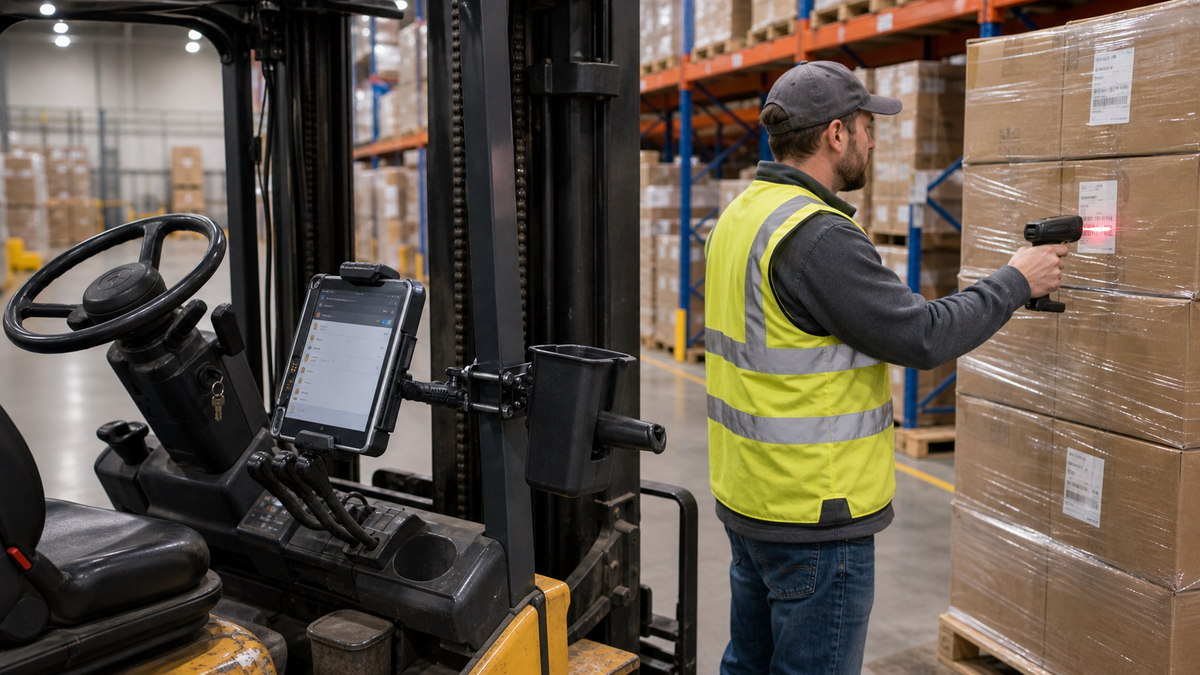

A modern forklift workflow separates the mounted tablet, handheld scanner, and return holster while keeping them at one work point. Editorial B-roll.
In 2016, plenty of warehouse teams were still supporting fixed terminals built around older Windows platforms and terminal-emulation sessions. By 2026, the same job may run on a managed Android tablet, a detachable scanner, a universal holder, and a modular pillar base. The forklift tablet mount trends of the last decade are not just about thinner screens. They mark a change from one proprietary box to a set of replaceable system layers.
To understand what changed in practice, we reviewed 19 dated Reddit discussions from 2019 to 2026 across warehouse, IT, maintenance, safety, and industrial communities, then checked the themes against official platform, safety, and manufacturer sources. Reddit is qualitative and self-selected, so it reveals recurring problems, not market share or failure rates. We found little indexed evidence from 2016 to 2018, which is a search limitation rather than proof that nothing was changing.
1. The Monolithic Terminal Became a Modular Stack
A 2019 warehouse IT discussion about replacing forklift PCs described aging Teklogix and Psion computers running Windows CE while maintaining IBM iSeries sessions through Wi-Fi interruptions. That problem became urgent as Windows Embedded Handheld 6.5 support ended in 2020 and Windows Embedded Compact 7 support ended in 2021.
The replacement question was no longer just, "Which forklift computer?" It became: which tablet, case, holder, base, power converter, scanner, WMS client, Wi-Fi design, and management policy work together?
A 2021 rugged-tablet discussion captures the split that still exists. Some teams preferred purpose-built vehicle computers with support contracts. Others used mainstream tablets in protective cases and strong mounts, kept spares, and planned for replacement. Neither approach wins automatically. The environment and total supported cost decide.
2. Compatibility Moved Beyond Screen Size
Ten years ago, compatibility often centered on ports and terminal software. In 2026 it also includes supported Android or Windows versions, browser behavior, WMS certification, kiosk policy, MDM, case dimensions, charging, camera and button clearance, scanner pairing, and whether the interface remains usable on a smaller screen.
Android Enterprise now documents dedicated devices for industrial, kiosk, and inventory work, including managed applications and policy controls. That makes device management part of durability. A tablet can be physically intact and still reach the end of its useful warehouse life if its OS, browser, security updates, or WMS client are no longer supported.
Modular hardware helps when it lets the fleet change the holder without replacing the approved base and arm. It only helps if the new tablet, case, holder, ball size, device weight, and power cable are checked as one assembly.
3. The Scanner Became a Separate Workflow Decision
A tablet is useful for WMS screens, exceptions, images, and forms. It is not always the best scanning tool. Operators may need a pistol-grip scanner for rapid close-range work, an extended-range scanner for pallet labels, or a handheld device they can carry away from the truck.
A 2024 forklift system discussion described rugged tablets paired with extended-range scanners and remote desktop software. A separate inventory-management discussion raised the opposite risk: an operator can walk away from a fixed screen, scan, and discover that focus moved to the wrong field.
That is why current setups should be chosen by task. A fixed tablet plus holstered scanner can work well when the screen stays at the truck and the scanner needs to leave it. A handheld all-in-one may be better when the operator spends more time walking than driving.
The iBOLT TabDock Dual XL Barcode Scanner Forklift Pillar Mount addresses the hybrid case with one pillar bracket, two positioning arms, a 7 to 10 inch tablet holder, and a 6.75 by 5.5 by 4.25 inch scanner holster. At $119.95, it is the clearest iBOLT example of task-specific commercial value.

iBOLT TabDock Dual XL Barcode Scanner Forklift Pillar Mount - $119.95
4. Placement Became a Human-Factors Decision
The last decade made a large screen easier to install, but size can work against visibility. A 2023 safety-practitioner discussion repeatedly returned to sightlines, stopped interaction, and foreseeable misuse.
A 2025 forklift HMI study treats position as a trade among viewing angle, reach, glare, line of sight, and perceived distraction. It does not provide one universal mounting height. OSHA's clear-view rule also does not name a preferred side or angle.
The right review uses the actual truck, mast, load, aisle, controls, restraint, operator position, and direction of travel. Configure the workflow so typing and confirmation happen while the truck is safely stopped under site procedure.
5. Security and Serviceability Joined the Specification
Shared equipment adds theft, shift-change, and custody questions. The iBOLT Dock'n Lock Bizmount Forklift 38mm Mount combines powder-coated pillar plates, a short all-metal 38 mm arm, AMPS interfaces, and a keyed composite holder for many 7 to 10 inch tablets. Published holder dimensions make it easier to check a tablet with its case before ordering.

iBOLT Dock'n Lock Bizmount Forklift 38mm Mount - $110.00
The $110 kit is a smart choice when the goal is an unpowered, locking, broadly compatible holder rather than a device-specific dock. A powered enterprise dock may be the better fit when the fleet needs protected charging contacts, data ports, a keyboard, printer, or exact-device support.
Frequently Asked Questions
What changed most in forklift mounts from 2016 to 2026?
The device and mount became separate purchasing decisions. Warehouses can now combine a tablet, holder, arm, truck attachment, scanner, power plan, and management policy instead of buying one fixed computer for every workflow.
Are consumer tablets suitable for forklifts?
Sometimes, with a measured case, holder, power plan, service process, and approved installation. Freezer work, constant vibration, protected ports, long-range scanners, or continuous multi-shift duty may justify a purpose-built rugged tablet or vehicle computer.
Is a larger screen always better?
No. A larger screen may improve WMS readability but can block more of the operator's view or require an awkward mounting point. Test visibility and reach on the actual truck with representative loads.
What belongs in the total installed cost?
Include the device, case, base, arm, holder or dock, power conversion, scanner, cabling, installation labor, spares, MDM, repair turnaround, and downtime. Comparing only the holder price hides the larger decision.
Read the full history of forklift-mounted computers, use the forklift mount engineering guide to qualify the truck and attachment, then compare the best forklift tablet mounts by cab and workflow.

Leave a comment
This site is protected by hCaptcha and the hCaptcha Privacy Policy and Terms of Service apply.