

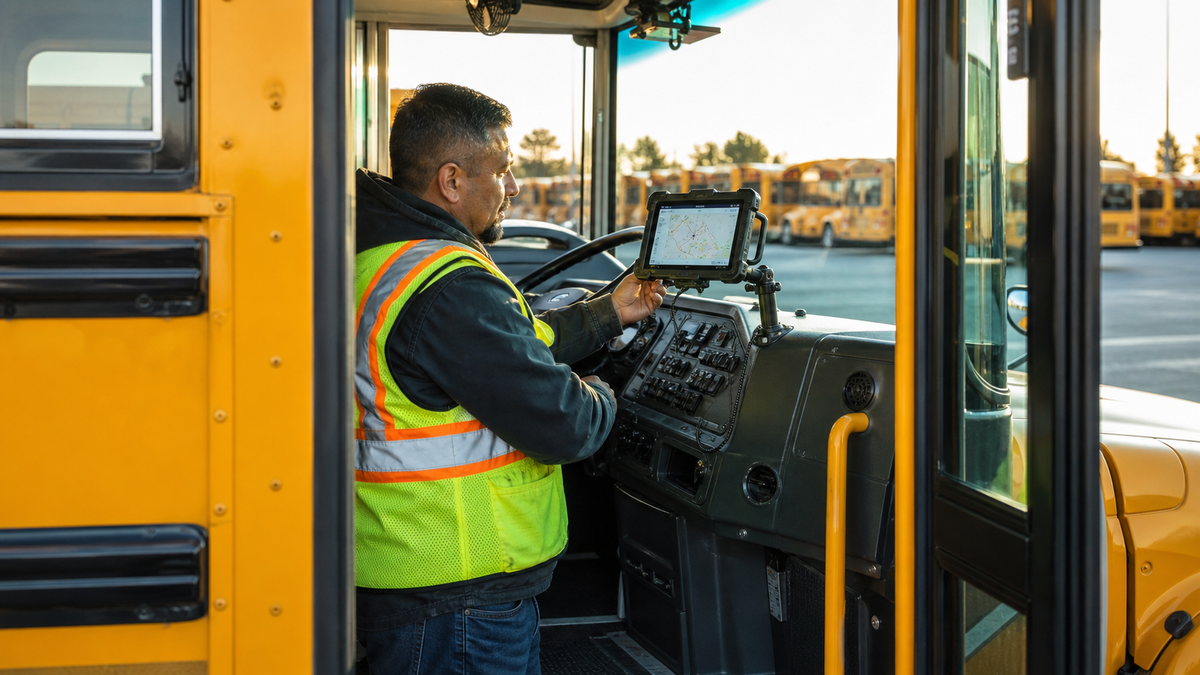
A compact fixed tablet mount installed low in a parked school bus driver area. Editorial B-roll. Use official product photos below for definitive product details.
Two buses can park side by side and still need different tablet hardware. One has a wide flat dash panel. Another has no approved drill location near the driver. A third is a spare bus that only carries a routing tablet a few days each month. The right answer is not the mount with the longest arm or the strongest sales claim. It is the assembly that meets the district's school bus tablet mount requirements on that specific vehicle.
Start with placement and operating rules. Then compare the base, arm, holder, security, removal process, and cable path. That order keeps the hardware decision tied to the job instead of forcing one installation onto every bus.
Six Requirements Come Before Base Type
First, the tablet must stay outside the driver's critical sightlines. The road, mirrors, gauges, switches, warning lights, door controls, and passenger view cannot be compromised. Second, the mount and tablet must remain secure under the district's operating conditions. Third, the assembly cannot create a snag point, sharp edge, head impact concern, or obstacle in the entrance and movement path.
Fourth, the selected surface must support the hardware. Fifth, power and data cables need strain relief, protected routing, and enough service loop for maintenance without crossing controls or foot traffic. Sixth, the district must define when the display can be on and when the driver can interact with it.
Zonar's state and province installation guide is a useful planning reference because it addresses low placement, mirror and gauge clearance, entry access, strong mounting surfaces, airbag areas, heat, moisture, and cable routing. It also shows why a fleet needs local review. Some jurisdictions describe permanent mounting, while others allow a securely mounted removable device with specific operating restrictions.
Fixed, Seat-Rail, Suction, and Locking Options
| Mount option | Strong fit | Main questions to review |
|---|---|---|
| Fixed AMPS drill base | Fleet-owned buses with an approved flat attachment point and a consistent tablet location | Surface strength, backing hardware, dash access, serviceability, sightlines |
| Seat-rail or approved floor base | Vehicles without an approved dash point, when the structure and clearances support the base | Bus-specific attachment geometry, floor structure, gooseneck movement, driver entry |
| Suction base | Short pilot, spare bus, or removable workflow where policy and surface allow it | Local permission, nonporous surface, daily inspection, temperature, mechanical load, removal process |
| Locking holder | Tablet remains on the bus, parked security matters, or device custody requires a key | Who holds keys, emergency removal, case fit, charging access, cleaning |
A fixed four-hole AMPS base offers a repeatable mechanical interface. It can also let a fleet change the arm or holder without changing the approved hole pattern. A seat-rail or floor setup moves the attachment away from the dash, but an automotive seat-rail design is not automatically suitable for a school bus. The district must evaluate the exact bus structure and installation instructions.
Suction can be useful during a controlled pilot, but a long arm increases force on the attachment point. A locking cradle protects the device during parked periods, yet security adds a daily key and removal process. These are operating tradeoffs, not a universal ranking.
Three iBOLT Configurations to Evaluate
The iBOLT TabDock Bizmount AMPS is the compact fixed option in this comparison. It fits 7 to 11 inch tablets, uses a 30 by 38 mm four-hole AMPS pattern, and includes a 3.75 inch composite arm with dual 25 mm ball joints. The holder uses four contact points and can rotate after the arm is secured.
Watch: iBOLT TabDock BizMount AMPS (IBBZ-33921)
See the standard TabDock holder, four-prong adapter, 25 mm BizMount arm, and AMPS drill base being assembled and adjusted.
Watch the short vertical demo (20 seconds)

iBOLT TabDock Bizmount AMPS - $29.95
Use that short fixed assembly only after maintenance staff document the proposed surface, backing method, cable route, service access, and approved orientation for the exact bus type.
The iBOLT LockPro FlexPro Heavy Duty Locking Tablet Seat Rail Mount combines a key-locking metal holder for 7 to 10 inch tablets with an 18 inch aluminum gooseneck. It is the security-focused option, but it also has the greatest reach in this group. That makes clearance and movement testing essential. Treat its seat-rail or professionally installed floor path as a component to evaluate, not a school bus installation instruction.

The locking option changes the device custody process. Assign key ownership, define parked-bus security, and verify that authorized staff can remove the tablet without entering an awkward position.
The iBOLT TabDock ExtendiBOLT Dual Suction Cup Mount is the removable option. Two 80 mm suction cups support a 13.5 to 17.5 inch arm with a 25 mm ball connection and 360 degree positioning for 7 to 11 inch tablets. The fleet must approve the surface and placement, inspect suction condition, and confirm that the extended arm remains stable and clear throughout its range.

Use a Fleet Test, Not a Desk Test
Measure the tablet with its case and charging connector installed. Lay out the complete base, arm, holder, cable, and backing hardware before drilling. Place the driver in the normal seated position, then check the windshield, every required mirror, gauges, switches, handrails, door operation, and entry path. Repeat the review with the tablet in portrait and landscape orientations if both are permitted.
Next, operate the bus under the district's controlled test procedure. Watch for vibration, arm movement, reflections, cable pull, and contact with knees, elbows, bags, or cleaning equipment. Confirm that the driver can dock and remove the device while parked without leaning into an unsafe position. Maintenance staff should verify fastener access and record the approved bill of materials for that bus type.
iBOLT has more than 300 modular parts across industry-standard sizes, including 25 mm B size and 38 mm C size systems. That can help a mixed fleet keep a familiar holder or AMPS interface while changing the base and arm for different approved layouts. For a broader selection discussion, use the existing School Bus Tablet Mounts fleet guide as the cluster hub.
Frequently Asked Questions
Does a school bus tablet mount need to be permanent? +-
Not everywhere, but some jurisdictions or district specifications may require permanent mounting. Check current state rules and local approval before choosing a suction or other removable base.
Is an AMPS drill base always the safest choice? +-
No base type is automatically safe on every bus. A fixed AMPS base still needs a suitable surface, backing method, clear placement, correct hardware, and an approved installation process.
Can an automotive seat-rail mount be installed in a school bus? +-
Only after a vehicle-specific review confirms an approved structural attachment point and clear operating envelope. Conventional school bus driver seats and floors can differ from passenger vehicles.
When does a locking tablet holder make sense? +-
It fits fleets that leave tablets in parked buses or require key-controlled device custody. The district also needs a key, charging, cleaning, and emergency removal procedure.
What should a school bus mount pilot document? +-
Record the bus make and configuration, attachment point, hardware, tablet and case dimensions, cable path, driver review, movement test, inspection interval, and final approval. Explore the iBOLT Buses collection to compare fixed, locking, seat-rail, and suction components for your fleet's controlled evaluation.


Leave a comment
This site is protected by hCaptcha and the hCaptcha Privacy Policy and Terms of Service apply.