

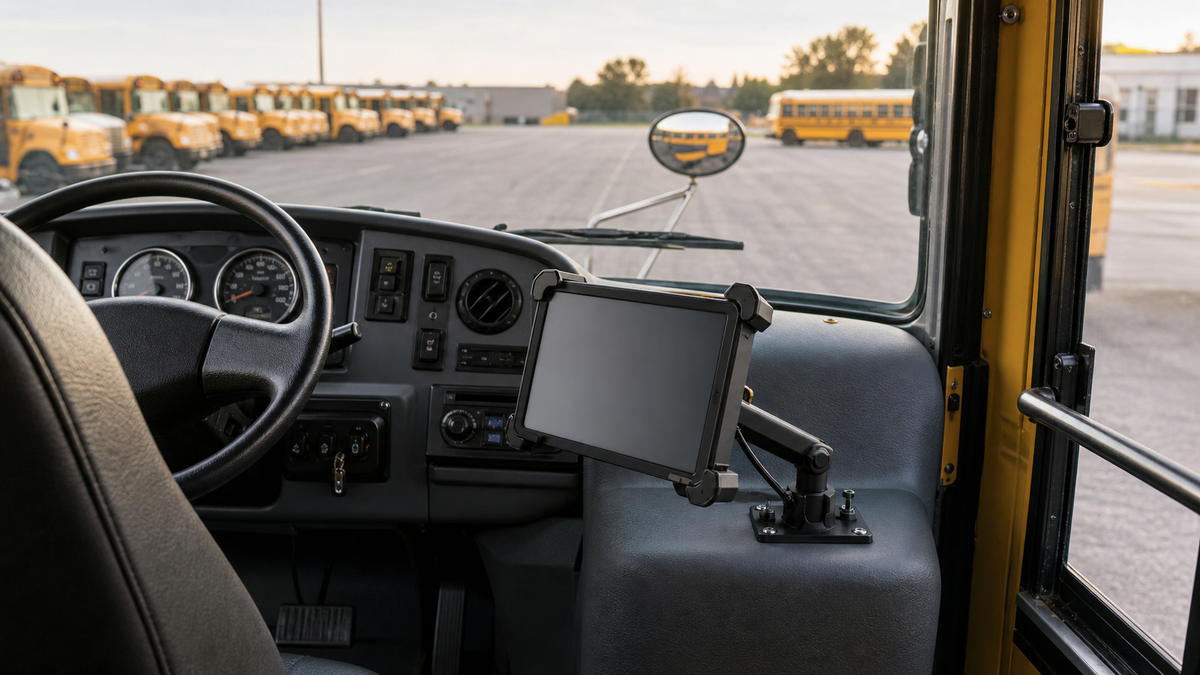
A school transportation coordinator checks tablet placement before the route begins. Editorial B-roll.
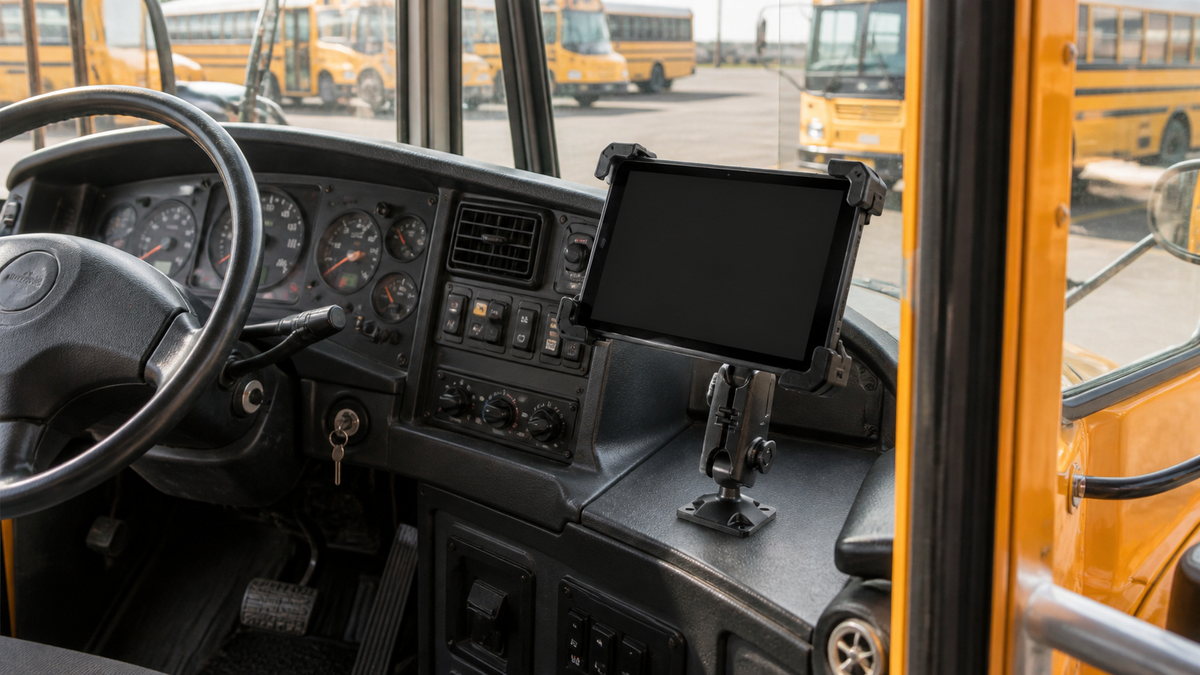
A school bus tablet mount gives the driver's tablet the same approved position on every bus that uses it. Software may change over the years, but mounting holes and brackets often stay with the bus, so plan installation and maintenance from the start.
TL;DR: For a bus with an approved flat spot, choose the TabDock BizMount AMPS (IBBZ-33921) for tablets removed after each route or the LockPro metal locking drill-base kit (IBBZ-33779) for tablets that stay on the bus. Without a flat spot, review the LockPro FlexPro seat-rail kit (IBBZ-33971) with your installer. Measure the tablet in its case and pilot one bus first.
What Does a School Bus Tablet Mount Need to Do?
A school bus tablet mount holds the driver's tablet in one approved, repeatable spot that keeps the road view, mirrors, controls, door and entry clear. Maintenance should be able to inspect and service it on every bus that uses it.
ReaXium's public description of its school bus tracking app describes a driver device that guides the trip and shows the right stop and student roster. The question for your district is whether a specific kit suits your buses, tablets and written policy.
Which Holder Suits Your Routes, TabDock or LockPro?
Choose the TabDock BizMount AMPS (IBBZ-33921) when drivers or staff remove the tablet routinely. Choose the LockPro Metal Locking Tablet Drill Base Mount (IBBZ-33779) when the tablet should stay with the bus and unauthorized removal should be deterred. Both are drill-base kits for an approved flat surface.
The iBOLT TabDock BizMount AMPS pairs a TabDock holder, sold in standard and XL variants, with a 3.75 inch composite arm, dual 25mm ball joints and the four-hole AMPS pattern. Its listing includes no lock or keys. A filmed demo follows.
Watch: TabDock BizMount AMPS setup (IBBZ-33921)
See the standard TabDock BizMount AMPS unboxing, 4-prong connection, arm and cradle adjustments. Full demo, short version, captions and transcript.
Explore TabDock BizMount AMPS · Full video guide and transcript
This is the standard IBBZ-33921 TabDock, not the XL variant. The narration’s “7 to 11 inches” is not a universal fit guarantee: compare device and case dimensions with the current product listing. Tablet is not included.
Read the video transcript
Narration, with product spellings and punctuation normalized.
0:00 Let's unbox the iBOLT TabDock BizMount AMPS heavy-duty tablet mount.
0:05 Inside, everything comes wrapped up securely,
0:08 including an instruction guide, mounting hardware, and extra support feet.
0:12 First up is the spring-loaded TabDock cradle,
0:15 paired with the heavy-duty BizMount arm.
0:18 The side adjustment knob gives you a full 360-degree rotation,
0:22 so you can lock in the exact viewing angle.
0:26 The four-prong pattern on the back
0:28 makes it super easy to detach or swap out components on the fly,
0:32 while the drill base plate gives you a rock-solid foundation
0:36 for vehicle consoles or dashboards.
0:40 The cradle features top and bottom spring expansion,
0:43 with customizable support feet to fit tablets
0:46 7 to 11 inches, even with the heavy-duty cases attached.
0:50 That completes the setup.
0:51 For more information and mounting accessories, check out iBOLT online.
0:54 Thanks for watching.
Watch the short vertical demo
On-screen text transcript
On-screen text in this music-backed short; no spoken narration detected.
0:00 [Music] iBOLT TabDock BizMount Tablet Drill Base Mount
0:03 Unscrew the knob
0:05 Attach ball mount
0:07 Tighten knob
0:08 Lock in plate
0:09 Adjust tablet mount
0:16 iBOLT Mounts

iBOLT TabDock Bizmount AMPS
The iBOLT LockPro Metal Locking Tablet Drill Base Mount combines the metal LockPro holder with a composite BizMount arm, dual 25mm ball joints, metal AMPS plates, a backing plate and tamper-resistant hardware with keys. It suits districts that assign a tablet to one bus and want to deter unauthorized removal.

| Kit | Holder | Best for | Confirm before ordering |
|---|---|---|---|
| TabDock BizMount AMPS, IBBZ-33921 | TabDock or TabDock XL variant, no lock listed | Tablets removed after each route | Holder variant, cased size, surface |
| LockPro Metal Locking Drill Base, IBBZ-33779 | Metal LockPro, keys included | Tablets assigned to one bus | Cased depth and grip, key procedure, backing |
| LockPro FlexPro Seat Rail, IBBZ-33971 | Metal locking LockPro cradle, keys included | Buses with an approved seat-rail or floor plan | Holder dimensions, connection, arm movement |
Which Base Works When There Is No Flat Mounting Spot?
When a bus has no approved flat surface for a drill base, review the iBOLT LockPro FlexPro Seat Rail Mount (IBBZ-33971) with your installer, who must approve the exact connection for that bus. Its listing describes a metal locking LockPro cradle with keys, an 18 inch aluminum gooseneck arm, and seat-rail or floor installation.
Other iBOLT options include the TabDock FixedPro 360 (IBBZ-33768), a metal multi-angle mount, and the TabDock BizMount Suction Cup Mount (IBBZ-33754) for smooth surfaces where district policy allows suction. Both come in TabDock and TabDockXL variants.

TabDock FixedPro 360

iBOLT TabDock Bizmount Suction Cup Mount
How Do You Check Tablet and Case Fit Before Ordering?
Measure the tablet in the case your drivers use, then compare it with the exact holder you plan to order. Screen size alone does not establish fit, especially with a rugged case, hand strap or charging cable.
Record the tablet model, its cased width, height and depth, and where the port, buttons and camera sit so the grip points leave them usable. Then compare with these holder openings, which are not screen diagonals.
- TabDock, IBBZ-33921. Opening of 4 to 8 inches.
- TabDock XL, IBBZ-33921-XL. Opening of 4 to 10.5 inches, sold as a separate variant.
- LockPro, IBBZ-33779. 7.85 to 10.25 inches wide by 4.25 to 7.75 inches high, so check each cased edge in the orientation it will sit.
- FlexPro IBBZ-33971, FixedPro 360 IBBZ-33768 and Suction Cup IBBZ-33754. Confirm the selected holder's dimensions with iBOLT for that exact kit.
The TabDock, TabDock XL and LockPro holders above each take a device plus case up to 0.75 inch deep.
Run a One-Bus Pilot, Then Write the Standard
Start with one bus type and one tablet setup. Fit the kit with the real tablet, case and charging lead, then check from the driver's seat that the view of the road, mirrors, gauges, warning lights and door controls is unobstructed and that entry, handrails and the stepwell stay clear.
Also check arm movement, glare, cable strain, cleaning access and how the tablet comes out for service. For a locking holder, decide who holds the keys and where the spare lives. None of these kit listings includes charging, so plan power and cable routing separately.
Zonar publishes school bus tablet installation guidelines by state and province, but your state rules and district policy remain the authority for the actual installation.
Once the pilot passes, record the exact SKU, holder variant, tablet, case and base as one bill of materials, with photos of the backing, fasteners and cable path. Confirm with iBOLT before mixing holders and bases across bus types.
See the product and how it goes together
The TabDock BizMount AMPS (IBBZ-33921) is a drill-base kit with the standard TabDock holder, shown here in two illustrative animations. Other mounts in this guide have different components and installation requirements.
How the TabDock kit goes together
TabDock workplace examples
Tablet not included. Check device and case size at iboltmounts.com. These animations show the standard IBBZ-33921 kit. Follow iBOLT's installation guidance and confirm a suitable mounting surface. Tablet: generic procedural prop. HDRIs and props: Poly Haven (CC0). Music: Suno, generated on a Pro plan with commercial-use rights. Sound effects: original.
Frequently Asked Questions
How do we know which holder fits our bus tablets?
Measure the tablet in its working case and compare it with the exact holder you plan to order, such as the TabDock (IBBZ-33921), TabDock XL (IBBZ-33921-XL) or LockPro (IBBZ-33779). Screen size alone does not confirm fit, so send the measurements to iBOLT if you are unsure.
Can we drill into the bus dash for a tablet mount?
That decision belongs to your maintenance team, installer and district policy. If drilling is approved, a drill-base kit such as IBBZ-33921 or IBBZ-33779 gives a repeatable position; if not, review a seat-rail or other approved base.
Who keeps the keys for a locking tablet holder?
Set that rule before installing a locking holder like the LockPro IBBZ-33779. Tie each key set to a bus number, keep the spare with a supervisor and log every service removal.
Will the tablet charge in the mount?
Not according to the current listings. None of these iBOLT kits lists charging or power, so plan the charging source and cable route during the pilot and keep the cable clear of the driver, the door and moving parts.
Explore the iBOLT Buses collection and the school transportation buying guide to compare options for your district, then share your bus layout and tablet measurements with iBOLT to find the right mount for each bus type.

Leave a comment
This site is protected by hCaptcha and the hCaptcha Privacy Policy and Terms of Service apply.