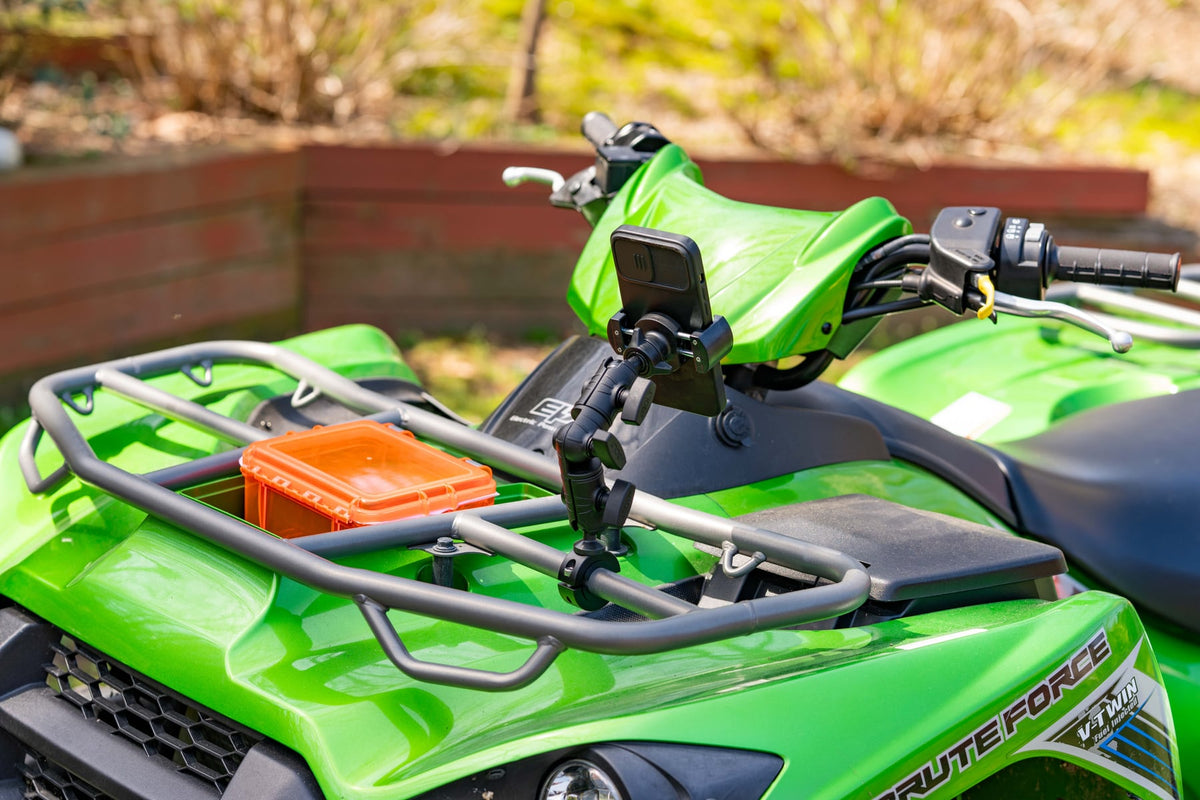
The Jeep Wrangler was not built for comfort. It was built for terrain, and that means every mount you bring on the trail has to survive vibration, sudden jolts, water crossings, and the fact that the doors and top might not even be on. If you have ever watched a phone slide off a dash mount on a rock crawl or lost a GoPro angle because a suction cup let go on washboard, you already know why mounting gear matters as much as tire choice or a winch.

TL;DR: Trail vibration, shock loads and open-top exposure put extra demands on every Wrangler mount. Consider a drilled AMPS dash mount for a tablet and a claw clamp for a phone, measure every tube and cased device against the listed limits, and confirm anything unlisted with iBOLT.
Why is mounting gear in a Jeep Wrangler different?
Mounting gear in a Jeep Wrangler faces harsher conditions than a typical car mount. The stiff suspension passes trail vibration straight into the mount, rock crawling adds sudden shock loads, and a topless or doorless setup exposes it to dust, rain and direct sun.
That combination calls for checking each mount's attachment method carefully. Recheck clamp tension and suction before each run, and inspect drilled bases for wear.
What should you check before buying a Jeep Wrangler mount?
Check the attachment point, size limits and exposure before you order a mount for a Wrangler build.
- Mounting surface: Dash, grab handle, roll bar, or rock slider. Each needs a different mount style and attachment method.
- Diameter or pattern: Measure the outside diameter of the bar, handle or slider you plan to use, and compare it with the clamp's listed range. For drilled mounts, note the AMPS hole pattern, such as the 30mm x 38mm pattern on the TabDock Bizmount AMPS.
- Vibration tolerance: iBOLT does not publish off-road shock ratings for these mounts. Check each listing's materials and attachment method, and confirm off-road use with iBOLT.
- Device size and weight: Tablets need a wider holder and a sturdier arm than a phone. Compare the cased tablet edge the holder will grip, and its depth, with the holder's listed opening.
- Exposure: If you run topless or doorless, ask whether the mount and cradle can handle rain, dust, and direct sun without the plastic becoming brittle over time.
- Removal frequency: If you are swapping the mount between the Jeep and another vehicle often, a quick-release or standard ball/AMPS interface saves time versus a permanently drilled base.
Which tablet mount suits a Jeep Wrangler dash?
A drilled AMPS dash mount gives a trail navigation tablet running AllTrails or a similar app a fixed position on rough terrain. The iBOLT TabDock Bizmount AMPS uses a 4-hole AMPS pattern with 30mm x 38mm spacing and dual 1-inch (25mm) ball joints for 360-degree adjustment.
Choose IBBZ-33921 for the TabDock holder (4 to 8 inch opening) or IBBZ-33921-XL for the TabDock XL holder (4 to 10.5 inch opening). Both take up to 0.75 inch of device-plus-case depth, so measure the cased tablet edge the holder will grip rather than the screen size.
The filmed demo below shows the TabDock Bizmount AMPS. Its current listing gives a 4 to 8 inch opening for the TabDock holder and 4 to 10.5 inches for the TabDock XL holder, both up to 0.75 inch deep, so use those figures rather than any range mentioned in the narration.
Watch: TabDock BizMount AMPS setup (IBBZ-33921)
See the standard TabDock BizMount AMPS unboxing, 4-prong connection, arm and cradle adjustments. Full demo, short version, captions and transcript.
Explore TabDock BizMount AMPS · Full video guide and transcript
This is the standard IBBZ-33921 TabDock, not the XL variant. The narration’s “7 to 11 inches” is not a universal fit guarantee: compare device and case dimensions with the current product listing. Tablet is not included.
Read the video transcript
Narration, with product spellings and punctuation normalized.
0:00 Let's unbox the iBOLT TabDock BizMount AMPS heavy-duty tablet mount.
0:05 Inside, everything comes wrapped up securely,
0:08 including an instruction guide, mounting hardware, and extra support feet.
0:12 First up is the spring-loaded TabDock cradle,
0:15 paired with the heavy-duty BizMount arm.
0:18 The side adjustment knob gives you a full 360-degree rotation,
0:22 so you can lock in the exact viewing angle.
0:26 The four-prong pattern on the back
0:28 makes it super easy to detach or swap out components on the fly,
0:32 while the drill base plate gives you a rock-solid foundation
0:36 for vehicle consoles or dashboards.
0:40 The cradle features top and bottom spring expansion,
0:43 with customizable support feet to fit tablets
0:46 7 to 11 inches, even with the heavy-duty cases attached.
0:50 That completes the setup.
0:51 For more information and mounting accessories, check out iBOLT online.
0:54 Thanks for watching.
Watch the short vertical demo
On-screen text transcript
On-screen text in this music-backed short; no spoken narration detected.
0:00 [Music] iBOLT TabDock BizMount Tablet Drill Base Mount
0:03 Unscrew the knob
0:05 Attach ball mount
0:07 Tighten knob
0:08 Lock in plate
0:09 Adjust tablet mount
0:16 iBOLT Mounts

For a locking option, the Dock'n Lock holder in IBBZ-33993 adjusts 7.75 to 11 inches wide and 4.25 to 7.75 inches high, up to 0.75 inch of device-plus-case depth.
Drilling into the dash is a commitment, so confirm placement for visibility and airbag clearance before you drill. If you would rather avoid permanent holes, the iBOLT TabDock FixedPro 360 Suction mount is a suction mount with an all-metal structure that iBOLT lists for high-vibration environments, with TabDock (IBBZ-33943, $69.95) and TabDock XL (IBBZ-33943-XL, $74.95) holders. Check any suction mount periodically on long, rough trail days.
Which phone mount suits Jeep Wrangler grab handles?
For a phone, the iBOLT Moto-Vise Bizmount Clamp (IBMC-34700, $49.95) is a heavy-duty smartphone clamp and claw mount that iBOLT lists for uses including off-roading. Its listing gives no clamp diameter range, so measure your grab handle or tube and confirm fit with iBOLT before ordering.

How do you mount an action camera on a Wrangler roll bar or rock slider?
Mounting an action camera on a roll bar or rock slider starts with the tube size. Measure the outside diameter of the bar or slider, compare it with the clamp's listed range, and confirm the camera adapter's ball size matches the clamp.
With the top off, a roll bar position can give an overhead trail angle, and a slider position can give low side or rear shots. Recheck clamp tension before every run, since a slider sits close to rocks and debris.
How do you build a complete trail mounting kit?
A complete Jeep Wrangler trail kit usually combines two or three mount types, such as a drilled dash mount for navigation, a clamp mount for a phone or action camera, and a tube clamp for exterior camera angles.
Several iBOLT mounts here use 1-inch (25mm) ball joints and AMPS plates, so confirm ball size and plate pattern before mixing parts from different kits.
For a tablet in a cup holder, the TabDock Bizmount Console cup holder mount (IBBZ-33784) expands from 2.5 to 3.5 inches to fit the cup holder and uses dual 1-inch (25mm) ball joints with a TabDock ($55.95) or TabDock XL ($59.95) holder.

TabDock Bizmount Console cup holder mount (IBBZ-33784)

iBOLT TabDock FixedPro 360 Suction Mount (IBBZ-33943)

Frequently Asked Questions About Jeep Wrangler Mounts
Wrangler owners most often ask about suction strength, clamp diameter, drilling, open-top exposure and tablet size.
Q: Will a suction mount hold up on rock crawling trails?
Suction hold on a trail depends on the surface, device weight and terrain, and iBOLT does not publish off-road test results for these mounts. Check any suction mount often during rock crawling, and consider a drilled AMPS mount such as IBBZ-33921 for a fixed position.
Q: What diameter clamp do I need for a Wrangler roll bar or rock slider?
Measure the outside diameter of your roll bar or slider, since factory and aftermarket parts vary, and compare it with the clamp's listed range. If a listing gives no range, confirm with iBOLT before ordering.
Q: Can I mount a tablet without drilling into the dash?
Yes. A suction mount such as the FixedPro 360 (IBBZ-33943) or a cup holder mount such as the TabDock Bizmount Console (IBBZ-33784) is designed to hold a tablet without drilling the dash.
Q: Does removing the doors or top affect mount choice?
Yes. Rain, dust and direct sun add wear, so ask iBOLT about outdoor use for your exact SKU and check clamp tension and cradle condition regularly.
Q: Do I need to verify tablet size before buying a cradle?
Yes. Holders are sized by opening and depth, not screen size. Measure your device with its case on and compare it with the selected holder's listed opening before ordering.
Compare options for your setup below, and measure each tube and cased device before you order.
Related iBOLT Mounting Options

iBOLT Moto-Vise™ IncrediBOLT™ Heavy Duty Phone Clamp / Handlebar / Rail Mount
Spring-loaded phone grip on a clamp for handlebars and rails, listed for off-roading, kayaking and fishing (IBWS-34752).

iBOLT Moto-Vise™ IncrediBOLT™ 360 Heavy Duty Phone Clamp / Handlebar / Rail Mount
360 version of the IncrediBOLT Moto-Vise phone clamp with a spring-loaded grip (IBWS-34753).

iBOLT Moto-Vise™ Heavy Duty Phone Dual Arm Handlebar / Rail Mount
Dual arm Moto-Vise phone handlebar and rail mount with a spring-loaded grip (IBWS-34758).

iBOLT Moto-Vise™ Heavy Duty Phone Handlebar / Rail Mount
Moto-Vise phone handlebar and rail mount with a spring-loaded grip (IBWS-34759).
The filmed demo below covers the iBOLT Dock'n Lock Bizmount AMPS (IBBZ-33993) shown earlier in this guide.
Watch: Dock’n Lock BizMount AMPS setup (IBBZ-33993)
Watch the Dock’n Lock BizMount AMPS cradle adjustment, keyed lock and 25mm arm assembly. Full demo, short version, captions and transcript. IBBZ-33993.
Explore Dock’n Lock BizMount AMPS · Full video guide and transcript
The narration uses the phrase “tamper-proof.” The keyed lock helps deter removal; it is not a guarantee against theft or tampering. Confirm device dimensions and mounting requirements on the product page. Tablet is not included.
Read the video transcript
Narration, with product spellings and punctuation normalized.
0:00 Here's a quick walkthrough on assembling and adjusting the iBOLT Dock'n Lock BizMount heavy-duty locking tablet mount.
0:07 First, adjust the cradle to fit your device.
0:09 Loosen the bracket screws on the back to expand or contract the side and top arms.
0:15 Once set for your tablet size, tighten down securely.
0:19 To secure your tablet, use the built-in key locking mechanism.
0:24 Engaging the lock prevents the arm from expanding.
0:28 To secure your tablet, use the built-in key locking mechanism.
0:32 Engaging the lock prevents the top arm from expanding,
0:35 keeping your device safe and tamper-proof in commercial or fleet setups.
0:43 Next, assemble the dual socket arm.
0:45 Place the arm halves around the 25mm ball joints.
0:49 Pass the central bolt through with the spring and tighten down the knob.
1:06 And that completes the setup.
1:07 You now have a heavy-duty, tamper-proof tablet mounting solution built for the toughest working conditions.
1:13 For more information and mounting accessories, check out iBOLT online.
1:17 Thanks for watching.
Watch the short vertical demo
On-screen text transcript
On-screen text in this music-backed short; no spoken narration detected.
0:00 [Music] iBOLT Dock'n Lock BizMount Locking Tablet Mount
0:07 Attach ball mount
0:09 Tighten all 4 screws
0:13 Check tablet size
0:14 Assemble arm size
0:16 Lock in key
0:18 Assemble arm
0:23 Tighten screw holder
0:25 Lock in tablet
0:31 iBOLT Mounts

Leave a comment
This site is protected by hCaptcha and the hCaptcha Privacy Policy and Terms of Service apply.