Restaurant Tablet Mount Setup: Complete Guide for Toast, Square & Delivery Apps
Picture this: It's Friday night dinner rush, orders are flying in through DoorDash, your Toast POS is pinging constantly, and your server just knocked over the Square tablet trying to grab plates. The tablet slides across the counter, the screen cracks on impact, and suddenly your payment system is down during your busiest hour. Sound familiar?

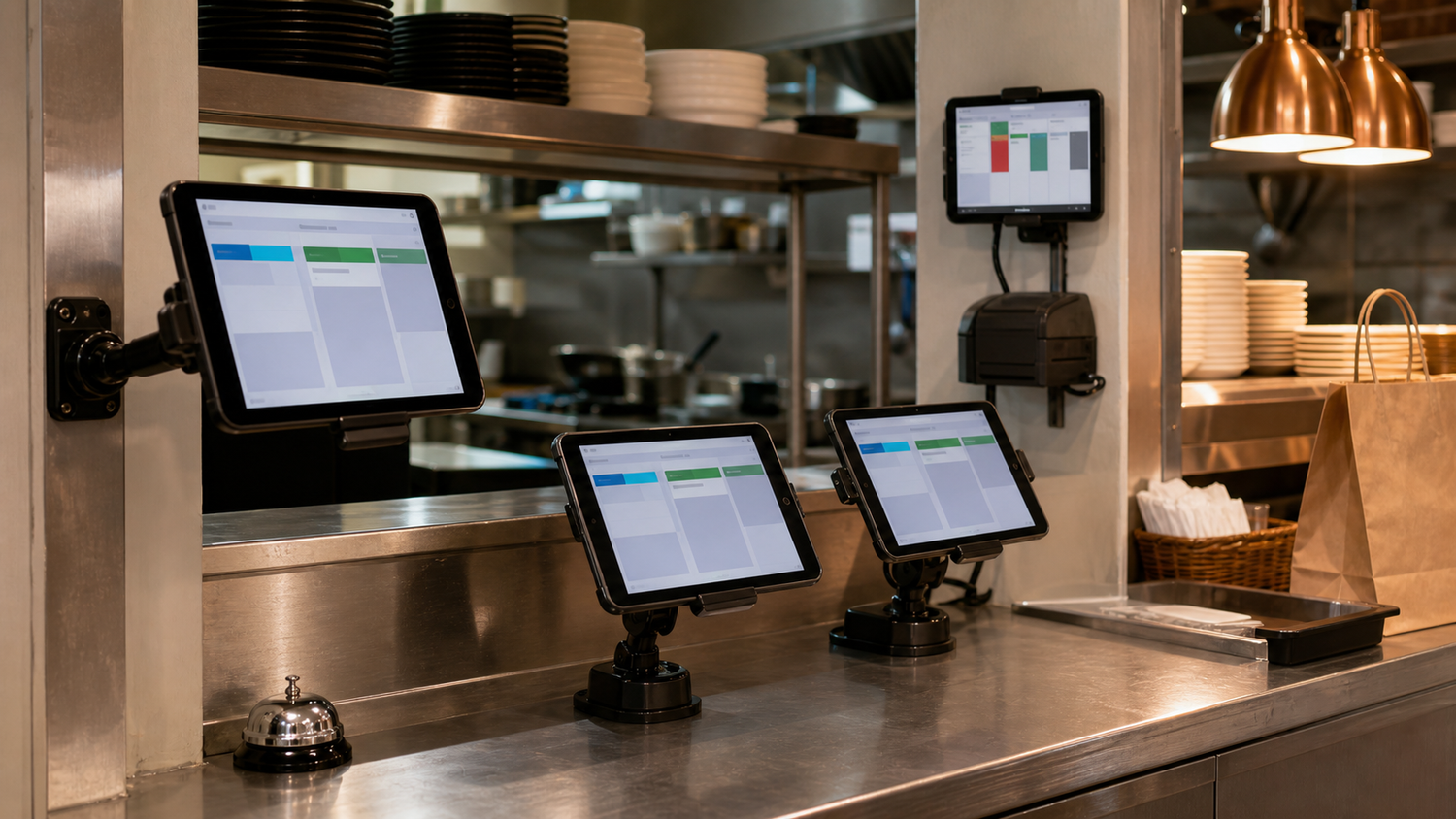
Mounted tablets keep POS and delivery workflows organized at the counter.
Walk into any busy restaurant today and you'll see tablets everywhere. One for Toast POS, another for DoorDash orders, a third for Square payments, maybe a fourth for inventory management. It's the new normal, but poorly mounted tablets create chaos that ripples through your entire operation. When tablets slide around counters, get knocked over during rush periods, or block critical workspace, your staff wastes precious seconds repositioning devices with every order.
Those seconds add up fast during dinner rush when every moment counts. Worse yet, unstable mounts lead to damaged equipment, frustrated employees, and slower service that customers notice. The good news? A proper restaurant tablet mount setup creates organized efficiency from scattered chaos, letting your team focus on what they do best: creating exceptional dining experiences.
Why Restaurant Tablet Mount Setup Matters for Operational Efficiency
Secure, well-positioned tablets mean faster order processing, reduced equipment damage, and staff who can focus on food quality instead of wrestling with wobbly devices. The right mounting approach also reclaims valuable counter space while keeping multiple systems accessible but out of the way.
Consider the difference between a tablet that needs constant readjustment versus one that stays exactly where you need it, angled perfectly for quick glances while plating. Professional-grade mounts designed for commercial kitchens handle the heat, humidity, and constant use that consumer-grade setups can't.
Whether you're running a single location or managing multiple restaurants, investing in proper tablet mounting infrastructure pays dividends through improved workflow, reduced downtime, and the kind of smooth operations that let your team deliver exceptional dining experiences consistently. With iBOLT's 300+ modular parts designed specifically for business applications, you can create custom configurations that fit your exact operational needs.
Toast Tablet Mount Requirements: What Your POS System Needs
Your Toast system is the nerve center of operations, processing orders, managing inventory, and coordinating with delivery platforms throughout busy service periods. The mounting setup needs to handle more than just holding a tablet—it needs to support your entire workflow.
Toast tablets require stable positioning that keeps the screen at optimal viewing angles for both counter staff and kitchen teams. The mounting system should accommodate frequent tapping and swiping without wobble or movement that could disrupt order processing. Kitchen environments demand mounts that can withstand heat, humidity, and the occasional splash from prep work.
Think about your workflow patterns when positioning Toast tablets. Counter-facing setups need easy access for staff while remaining secure from customer tampering. Kitchen displays require different positioning to integrate with existing prep stations and expediting areas.
The iBOLT Dock'n Lock POS Tablet Stand provides the weighted stability and adjustable viewing angles Toast systems require, with a 5-pound steel base that prevents accidental displacement during rush periods. The 25mm ball mount supports tablets up to 12.9 inches with weight capacity up to 3 pounds. For operations needing multiple devices, the iBOLT Phone Dock'n Lock Dual POS Stand accommodates both your Toast tablet and payment processing devices in one coordinated setup.
Proper mounting ensures your Toast system remains operational and accessible when service demands peak performance.
Square Tablet Mount Configuration for Counter Operations
Square's sleek interface works best when positioned at the perfect angle for both staff efficiency and customer interaction. The challenge is finding a mount that keeps your Square terminal accessible to employees while allowing customers to easily view the screen for payment confirmation and tip selection.
For counter-based Square setups, the iBOLT TabDock POS Tablet Stand offers an ideal weighted base approach. Its low-profile design won't dominate your counter space, while the adjustable viewing angles ensure your staff can quickly navigate Square's interface during busy periods. The industrial-grade aluminum construction handles the constant rotation between staff and customer viewing positions that Square transactions require, with a weight capacity of 2 pounds for tablets up to 11 inches.
When counter space is limited, the iBOLT Clamp Base for 4-Hole AMPS Mounts provides a space-saving alternative. This setup clamps securely to counter edges up to 3.375" thick, keeping your Square terminal elevated and accessible without sacrificing valuable prep space. The AMPS compatibility means you can easily adjust height and tilt for optimal ergonomics during peak service hours.
Both options feature the heavy-gauge steel construction and 25mm ball compatibility that ensure your Square configuration stays stable through hundreds of daily transactions, while remaining compatible with industry-standard mounting systems for easy upgrades or modifications.
Multi-App Delivery Station: DoorDash and Uber Eats Tablet Organization
Running DoorDash, Uber Eats, and Grubhub simultaneously means juggling multiple tablets in an already cramped kitchen. Every ping needs immediate attention, but scattered devices create chaos during rush periods. The key lies in centralized mounting that keeps all delivery apps visible and accessible from your primary prep station.
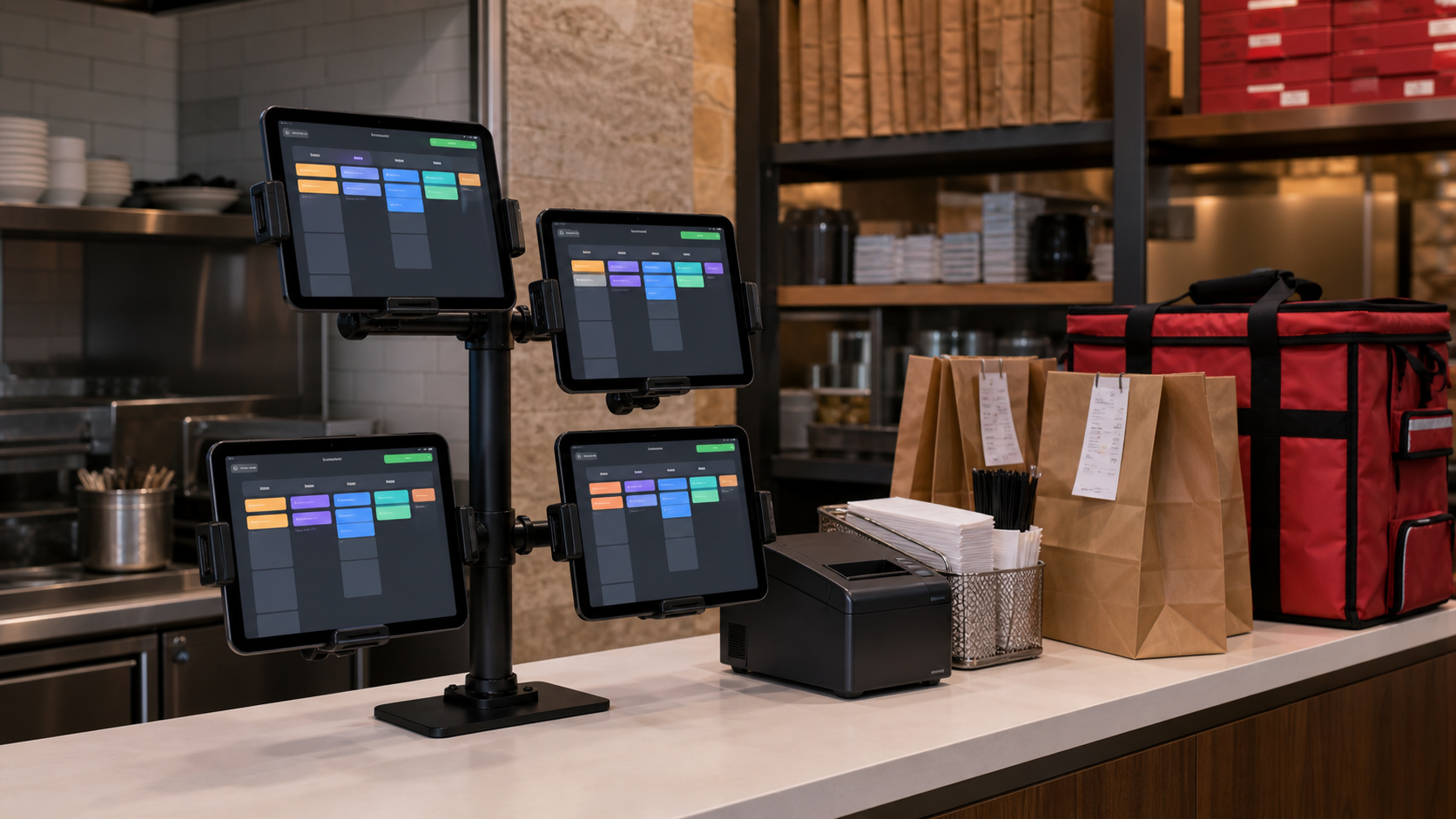
A multi-tablet tower transforms this challenge into organized efficiency. The iBOLT Tablet Tower with 3 Tablet Holders clamps securely to counters while keeping three delivery tablets at eye level. Each TabDock holder adjusts independently, so you can angle DoorDash toward the grill station while keeping Uber Eats facing the packaging area. The clamp mechanism accommodates counter edges from 0.5" to 3.375" thick.
For operations handling higher volumes, the 4-tablet tower configuration adds capacity for additional platforms or backup devices. The vertical design maximizes counter space while ensuring every delivery notification stays visible, with each holder supporting tablets up to 12.9 inches. Staff can quickly scan order statuses across all platforms without walking between stations.
The key advantage lies in workflow optimization. Instead of hunting for the right tablet when orders pour in, your team works from a centralized command center. Each app maintains its dedicated position, reducing errors and missed orders. The heavy-duty construction handles constant adjustments throughout busy periods, while the modular design adapts as your delivery partnerships expand.
This configuration particularly benefits restaurants managing both dine-in POS systems and multiple delivery platforms, creating clear separation between order types while maintaining operational flow.
Kitchen-Proof Mounting: Handling Grease, Heat, and High Traffic
Restaurant environments test mounting hardware like nowhere else. Between splashing grease, steam heat, and the constant rush of service, your restaurant tablet mount setup needs to withstand conditions that would destroy typical consumer mounts in weeks.
Grease is the biggest enemy. It creates a slippery film that weakens adhesive bonds and makes cleaning nearly impossible with standard plastic mounts. Heat from fryers and grills can warp composite materials, while constant vibration from foot traffic and equipment loosens connections over time.
The answer lies in choosing materials built for these exact challenges. Heavy-gauge steel construction with powder coating resists grease penetration and wipes clean easily. iBOLT mounts feature sealed ball joints that prevent grease infiltration into moving parts, maintaining smooth adjustment even after months of kitchen exposure.
For high-traffic areas near the pass or expo station, magnetic mounting offers unique advantages. The iBOLT TabDock MagDock uses super-strong rare earth magnets that maintain their 50-pound pull strength even when exposed to kitchen heat, and the mount detaches completely for thorough cleaning.
When permanent installation is required, drill-base options like the iBOLT Dock'n Lock BizMount provide rock-solid stability that won't budge during the dinner rush, with locking mechanisms that protect tablets from accidental removal.
Industrial-grade restaurant POS tablet stands are an investment in operational reliability, not just device protection.
Space Optimization: Counter vs Wall vs Clamp Mounting Approaches
When every square inch matters in your restaurant, choosing the right mounting method can make the difference between a cluttered counter and an efficient workspace. The key is matching your mounting technique to your specific space constraints and workflow needs.
Counter-Based Setups: For restaurants with ample counter space, weighted base stands offer maximum flexibility. The iBOLT TabDock POS Tablet Stand provides stability without permanent installation, while drill-base options deliver theft protection for high-traffic areas.
Wall Mounting Configurations: When counter space is at a premium, wall mounts free up valuable real estate. The iBOLT Tablet Tower TabDock POS Wall Mount with 3 Tablet Holders handles multiple Toast or Square tablets vertically, maximizing your wall space while keeping devices accessible.
Clamp Systems: The most versatile option for tight spaces, clamp mounts attach to counter edges, shelving, or equipment. The TabDock FlexPro Clamp accommodates tables up to 3.375" thick and features a 16-inch gooseneck for precise positioning and optimal viewing angles.
Consider your traffic flow, security needs, and future expansion when selecting your restaurant tablet mount setup. The right choice depends on balancing accessibility with space efficiency while ensuring compatibility with your existing equipment.
Security Considerations: Protecting Your Restaurant Technology Investment
When you're running a busy restaurant with multiple tablets handling everything from DoorDash orders to POS transactions, security isn't just about protecting hardware—it's about safeguarding your entire operation. A stolen tablet means lost orders, compromised customer data, and expensive replacement costs that hit your bottom line hard.
The most vulnerable configurations are standard tablet stands that rely on gravity or simple clips. These work fine for home use, but in a commercial kitchen where staff move quickly and customers have easy access, you need something more secure. This is where locking mechanisms become essential for your restaurant tablet mount setup.
For maximum security, consider the iBOLT Tablet Tower with Dock'n Lock POS mount, which features individual locking holders for each tablet and a drill-base mount that permanently secures the entire unit to your counter. Each tablet locks with a key, preventing quick theft while still allowing authorized staff to remove devices when needed.
For single-tablet installations, the iBOLT LockPro Metal Locking Tablet mount provides heavy-duty aluminum construction with a secure locking mechanism. The drill-base attachment means potential thieves can't simply walk away with the mount, while the composite pedestal withstands the daily wear of commercial use.
The investment in proper security features pays off through reduced theft, lower insurance costs, and the peace of mind that comes from knowing your critical systems stay protected during even the busiest service periods.
Installation and Setup: Getting Your Restaurant Tablet Mounts Right
Getting your restaurant tablet mount setup right the first time saves hours of adjustments and frustrated staff down the line. Start by choosing the right mounting location: counter space near your POS system for easy staff access, but away from high-splash zones like drink stations or fryer areas.
For weighted base stands like the iBOLT Dock'n Lock POS Tablet Stand, ensure your counter surface is level and stable. The 5-pound weighted base provides excellent stability, but uneven surfaces can cause wobbling during busy service periods.
When installing drill-base mounts, use the included iBOLT Universal Marine & Electronics Mounting Plate as a backing plate for added strength. This powder-coated steel plate distributes mounting stress across a wider area, preventing damage to countertops or walls.
Cable management is crucial for safety and aesthetics. Route charging cables through the mount's built-in cable management features to prevent trip hazards during rush periods. Test all mounting hardware with a fully loaded tablet before opening for service.
Remember that iBOLT mounts ship within 24 business hours and come with a 2-year warranty, so you can get your setup operational quickly with confidence in long-term reliability.
Product Options


Frequently Asked Questions
Q: Will these mounts work with my existing RAM or other brand mounting hardware?
A: Yes, iBOLT mounts use industry-standard ball sizes (17mm, 20mm, 25mm/B size, 38mm/C size) that are cross-compatible with RAM and other standard mounting systems. You can mix and match components to create custom configurations.
Q: How do I clean restaurant tablet mounts exposed to grease and food splatter?
A: iBOLT's powder-coated steel and aluminum construction wipes clean with standard commercial degreasers. The sealed ball joints prevent grease infiltration, and magnetic options like the TabDock MagDock detach completely for thorough cleaning.
Q: What's the difference between weighted base and drill-base mounts for restaurants?
A: Weighted bases offer flexibility and no permanent installation but take up more counter space. Drill-base mounts provide superior theft protection and stability but require permanent mounting. Choose based on your security needs and space constraints.
Q: Can I mount multiple tablets on one stand for different delivery apps?
A: Absolutely. iBOLT's tablet tower systems accommodate 3-4 tablets in vertical configurations, perfect for organizing DoorDash, Uber Eats, Grubhub, and other platforms in one centralized location.
Q: How quickly can I get replacement parts if something breaks?
A: iBOLT ships within 24 business hours, and the modular design means you can replace individual components without buying entirely new systems. All mounts come with a 2-year warranty for added protection.
Q: What weight capacity should I look for in restaurant tablet mounts?
A: Most restaurant tablets weigh 1-3 pounds. iBOLT mounts typically support 2-3 pounds per device, with tablet towers accommodating multiple devices simultaneously. Heavy-duty options provide additional capacity for larger displays.
Ready to create organized efficiency from your current tablet chaos? Explore our selection of restaurant tablet mounts designed specifically for commercial kitchen environments. With industrial-grade construction, industry-standard compatibility, and quick shipping, iBOLT helps you create the professional setup your operation deserves.

Leave a comment
This site is protected by hCaptcha and the hCaptcha Privacy Policy and Terms of Service apply.