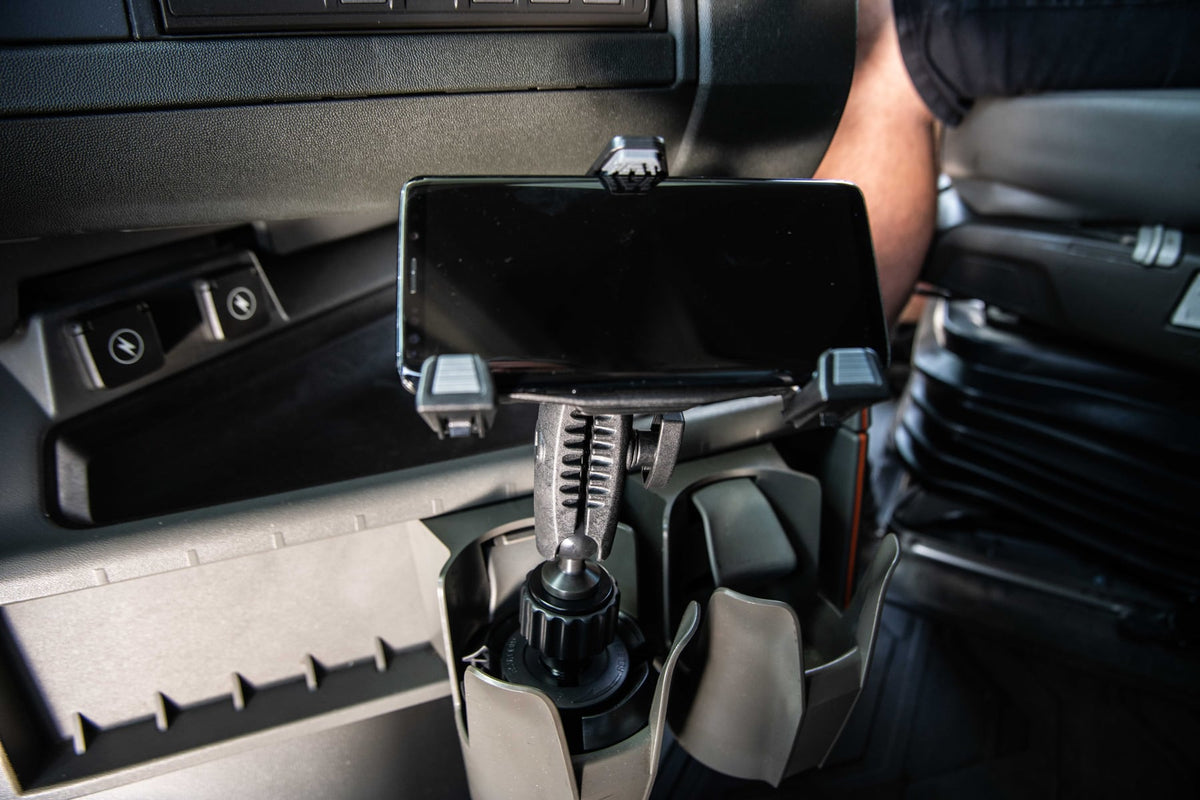
Tablets have quietly replaced paper logs, printed maps, and clipboard inspections in most commercial truck cabs. Drivers use them for ELD compliance, navigation, dispatch messaging, load documentation, and pre-trip inspections, often switching between apps dozens of times per shift. That level of daily reliance changes what "mounting a tablet" actually means. A holder that works fine on a car dashboard usually fails inside a semi truck cab, where vibration is constant, cab space is tight, and the device needs to survive months of use without loosening.

A properly chosen tablet mount for semi truck use is less about holding a device and more about supporting a workflow. This guide covers the mounting locations, features, and buying checks that actually matter for drivers and fleet managers.
Why Semi Truck Cabs Need Purpose-Built Tablet Mounts
Semi trucks run for long hours over rough pavement, gravel lots, and highway expansion joints, producing sustained low-frequency vibration that consumer phone mounts are not built to handle. Add sudden braking, tight cab layouts, and drivers who need to glance at or interact with the tablet without taking their eyes off the road for long, and the mounting requirements become clear: the device has to stay locked in place, stay visible, and stay reachable.
Without a dedicated mount, tablets end up sliding off dashboards, wedged in cup holders, or propped against the windshield, none of which hold up over a full route. A dependable semi truck tablet mount solves the stability problem while keeping the device where the driver actually needs it.
Common Mounting Locations in a Truck Cab
Dashboard Mounts
Dashboard mounting keeps the tablet in the driver's direct line of sight and is the most common choice for GPS navigation and fleet management apps. It works well when the dash has flat, stable surface area and the mount's base won't interfere with vents or existing gauges.
Seat Rail Mounts
Seat rail systems attach to the bolt pattern already used for the driver's seat, which gives a strong, factory-level attachment point without drilling into the dash. This location suits larger tablets or setups where dash space is already occupied by other electronics. Positioning is usually more adjustable since the arm extends from the side rather than a fixed dash point.
Floor Mounts
Floor mounts anchor to the cab floor and typically use a longer arm to bring the tablet into position. They're a good option when a driver needs maximum stability for a larger device, or when dash and seat rail space are unavailable.
Windshield Mounts
Windshield mounting offers strong visibility but is subject to state and provincial regulations on obstructed views. Before installing a windshield mount, check local rules and any fleet safety policy, since some jurisdictions restrict where devices can be placed relative to the driver's sightline.
What to Verify Before Buying a Truck Tablet Mount
Specs on a product page don't always match a specific cab, so confirm these details before ordering:
- Mounting surface: Measure the dash, rail, or floor area where the mount will attach, and check for curved surfaces, vents, or trim that could block the base.
- Device size and weight: Larger tablets (10 to 13 inch) need a mount rated for that weight and a case cradle wide enough to fit, especially with rugged cases attached.
- Vibration rating: Look for mounts built specifically for commercial vehicles rather than passenger car mounts repurposed for trucking; arm joints and locking mechanisms matter more than the base material alone.
- Charging and cable routing: If the tablet needs to stay powered for ELD compliance, confirm there's a clean path to route a charging cable without it crossing the driver's field of motion or dangling near pedals.
- Removal frequency: Drivers who take the tablet in and out of the cab regularly should look for quick-release cradles rather than mounts requiring tools to detach the device.
- Ball size and arm compatibility: If a fleet standardizes on a mounting system across multiple trucks, check ball size (commonly 17mm or 25mm/1-inch AMPS-style patterns) so replacement arms and cradles stay interchangeable.
- Security: For fleet vehicles, a locking cradle or theft-resistant hardware may be worth the extra step, especially in trucks parked at public lots overnight.
A Tablet mount for Truck that checks these boxes will hold up to daily use far better than a generic mount pulled from a passenger vehicle accessory aisle.
Where Tablet Mounts Get Used Most in Daily Operations
Electronic Logging Devices (ELDs)
Federal hours-of-service rules require electronic logging in most commercial trucks, and drivers need to view and interact with the ELD app throughout a shift. A mounted tablet keeps this visible without requiring the driver to search for it.
GPS Navigation
Truck-specific routing apps account for bridge heights, weight limits, and restricted roads. Mounting the tablet at eye level (or close to it) reduces the number of glances needed to check upcoming turns.
Dispatch and Load Communication
Many carriers route load assignments, delivery windows, and customer notes through tablet-based dispatch software. Quick access matters when schedules shift mid-route.
Digital Inspections
Pre-trip and post-trip inspection apps have replaced paper DVIR forms for many fleets. A stable mount makes it easier to complete these checks without balancing the tablet on a knee or the dash.
Choosing the Right Setup for Your Truck
There's no single best mounting location for every cab. A short-haul driver who checks navigation occasionally may do fine with a simple dashboard mount, while an owner-operator running ELD, dispatch, and load management simultaneously may need a seat rail or floor mount with more reach and a larger cradle. Fleet managers standardizing mounts across multiple trucks should prioritize consistent ball sizes and cradle types so parts are interchangeable and replacements are simple to source.
Whatever the configuration, confirm fitment against your specific cab layout and tablet model before installing at scale across a fleet.
Related iBOLT Mounting Options

iBOLT LockPro FlexPro Heavy Duty Locking Tablet Seat Rail Mount
A practical option for cab, fleet, and mobile work setups where visibility and reach matter.

iBOLT™ LockPro™ Metal Locking Tablet Drill Base Mount
A practical option for cab, fleet, and mobile work setups where visibility and reach matter.

iBOLT™ xProDock™ Bizmount™ Amps
A practical option for cab, fleet, and mobile work setups where visibility and reach matter.

iBOLT TabDock™ IncrediBOLT™ 360 Suction- Heavy Duty Metal 6 inch Multi-Angle Mount for All 7" - 10" Tablets for Commercial Vehicles, Trucks, and ELD Devices
A practical option for cab, fleet, and mobile work setups where visibility and reach matter.
FAQ
What is a tablet mount for semi truck applications?
It's a mounting system designed to securely hold a tablet inside a commercial truck cab, built to handle vibration and daily use better than standard consumer mounts.
Where should a tablet be mounted in a semi truck cab?
Dashboard, seat rail, and floor locations are the most common, chosen based on cab layout, tablet size, and how often the driver needs to view or touch the screen.
Are windshield tablet mounts legal for trucks?
Rules vary by state and province regarding obstructed views. Check local regulations and fleet policy before mounting a tablet to the windshield.
Can a tablet mount handle continuous highway vibration?
Mounts built specifically for commercial trucking, with reinforced arms and locking joints, are designed to resist vibration better than mounts made for passenger cars.
Do truck tablet mounts work with different tablet brands?
Many universal cradles accommodate a range of tablet sizes and brands, but always check the cradle's size range and weight rating against your specific device, including any protective case.
What matters most when choosing a mount for a fleet of trucks?
Consistency in ball size and cradle type across vehicles, along with vibration resistance and confirmed device compatibility, makes replacement and maintenance simpler at scale.


Leave a comment
This site is protected by hCaptcha and the hCaptcha Privacy Policy and Terms of Service apply.