Smartphones and small tablets have become everyday tools behind the counter, at the host stand, and on the line. Order confirmation, POS backup, delivery app dashboards, kitchen display duplicates, and manager tablets all need a home that keeps them visible, charged, and out of the way of trays and hands. Among the mounting options available, a screw in phone mount is often the right choice when a device needs to stay in one place permanently, not just for a shift.
Unlike suction cups, adhesive pads, or clamp-style holders that can loosen with heat, cleaning chemicals, or repeated handling, a screw mount phone holder attaches directly to the surface with hardware. That fixed connection matters in food service environments where devices get bumped constantly and where a dropped phone can mean a cracked screen or a lost order mid-transaction.
What Is a Screw-In Phone Mount, and Where Does It Fit in a Restaurant Setup?
A screw in phone mount is a mounting system that attaches permanently, or semi-permanently, to a surface using screws or bolts through a drilled base plate. Instead of gripping the surface with suction or adhesive, the base becomes part of the surface itself. This is why restaurants, cafes, and quick-service operations use them at:
- Host stands and order-entry counters
- Expo lines and kitchen pass-through stations
- Drive-thru order confirmation displays
- Bar and register areas
- Prep stations where staff reference recipes or tickets hands-free
- Delivery and pickup staging areas
Because the mount doesn't rely on suction hold or tape adhesion, it won't fail from grease, cleaning solvents, humidity, or temperature swings near ovens and fryers, all of which are common failure points for temporary mounts in a kitchen environment.
How These Mounts Are Built
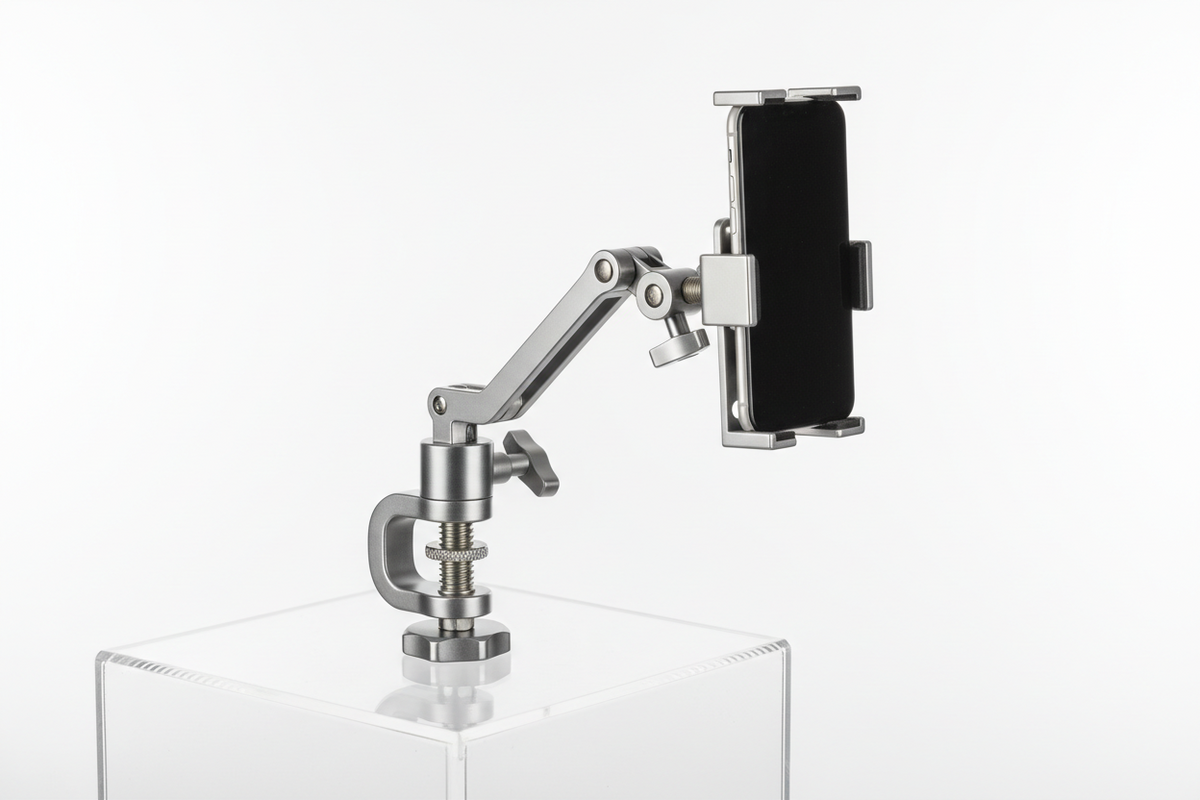
A typical screw mount phone holder has four working parts, and understanding them helps you evaluate any product against your counter or wall:
Mounting Base
The base plate screws directly into the countertop, wall, POS stand, or equipment housing. This is the component doing the structural work, so its footprint and screw pattern matter more than most buyers expect.
Mounting Arm
Some setups use a short post or gooseneck to lift the device off the counter so it doesn't sit flat where spills collect. Others mount flush for a lower profile at a host stand.
Adjustment Mechanism
Ball joints or pivot points let staff tilt the screen toward themselves or toward a customer without unmounting the device.
Device Holder
The cradle or grip holds the phone or small tablet, usually with adjustable arms or a spring-loaded clamp so it fits with or without a protective case.
Why Fixed Mounting Matters More in Food Service Than in a Car
Vibration is real in vehicles, but in a restaurant the bigger risks are collision and turnover. Counters get wiped down aggressively, trays get set down hard, and staff turnover means new people handling the same device every shift. A screw-mounted system reduces the chance that a device gets knocked loose during a rush, and it keeps the phone in the same spot so new staff aren't hunting for it or repositioning it constantly.
There's also a security angle. A device that's mechanically fastened to a counter is harder to casually pick up and walk off with than one sitting in a clip-on or magnetic holder. For POS backup phones or manager tablets that stay on-site, that's a meaningful difference over a shift or a season.
What to Verify Before You Buy
Screw-in mounts are a good long-term fit, but only if the specifics line up with your counter, device, and workflow. Check these before ordering:
- Mounting surface material. Laminate, solid wood, stainless steel, and drywall all take screws differently. Confirm the base plate hole pattern matches hardware you can actually use on that surface, and that the surface is thick enough to hold screws securely without splitting or stripping.
- Device size and case fit. Measure the phone or tablet width and thickness with its case on. A holder sized for a bare phone won't close around a rugged POS case, and a holder that's too loose won't hold securely during a busy shift.
- Charging and cable routing. If the device needs to stay powered all day, plan where the charging cable runs before you drill. Some mounts have a cutout or channel for a cable; others require you to route power separately along the counter edge or through a grommet hole.
- Removal frequency. If staff need to pull the phone off the mount often during a shift, look for a quick-release cradle rather than a fully rigid grip. If the device is meant to stay mounted permanently, a tighter, lower-profile holder is fine.
- Viewing angle needs. A host stand facing outward toward customers needs different articulation than an expo station where only staff view the screen. Decide if you need a fixed angle or a ball joint that can be adjusted per shift.
- AMPS or VESA compatibility. If you're integrating with an existing POS stand, enclosure, or third-party arm, confirm the mount's hole pattern (commonly AMPS) matches what your other hardware expects, so you're not stuck retrofitting adapters.
Screw-In vs Other Mounting Methods
Suction cup mounts work on smooth glass or laminate but can lose grip over time, especially in warmer kitchen environments or on textured counters. Adhesive mounts avoid drilling but weaken with heat, cleaning chemicals, and repeated stress, which makes them a poor fit near ovens, fryers, or dish stations. Clamp mounts are reusable and drill-free, useful for a temporary pop-up counter or a leased space where drilling isn't allowed, but they can loosen with repeated bumping and generally don't match the rigidity of a screwed-in base.
A screw in phone mount trades a bit of installation effort for a connection that doesn't degrade with heat, cleaning, or time. For a fixed POS or order station that isn't moving locations, that trade-off usually favors the screw mount.
Installation and Safety Notes
A few practical points make installation cleaner and safer:
- Confirm the mounting location doesn't block sightlines to the register, the pass window, or a required display.
- Use hardware rated for the surface thickness and material, not just whatever ships in the box if your counter is unusually thin or reinforced.
- Check that the mounted device doesn't interfere with trays, plates, or equipment swing paths.
- Tighten and test the base under load before putting the mount into daily use, then recheck it after the first week of regular use.
Related iBOLT Mounting Options

iBOLT™ xProDock™ Bizmount™ Amps
A related iBOLT option that matches the mounting needs covered in this article.

iBOLT™ xProDock™ Bizmount™ Wedge
A related iBOLT option that matches the mounting needs covered in this article.

iBOLT™ Industry Standard 17mm Amps Plate
A related iBOLT option that matches the mounting needs covered in this article.

iBOLT Clamp Base for 4-Hole AMPS Mounts
A related iBOLT option that matches the mounting needs covered in this article.
Frequently Asked Questions
What is a screw in phone mount?
It's a phone mounting system that attaches to a counter, wall, or equipment surface using screws or bolts through a base plate, rather than suction, adhesive, or a clamp.
Is a screw mount phone holder better than a suction or adhesive mount for a restaurant counter?
For a fixed station that isn't moving, yes, generally. Screw mounts hold up better against heat, grease, and cleaning chemicals that can weaken suction and adhesive over time.
Will a screw-in mount damage my counter?
Installation requires drilling holes for the base plate, so it's a permanent change to that surface. Confirm with the surface owner or your lease terms before drilling into a counter or fixture you don't own.
Can I still charge the phone while it's mounted?
Yes, most setups support this, but plan the cable route before installation. Some mounts include a channel or cutout for the cable; otherwise you'll need to route power along the counter edge or through a separate hole.
Does a screw-in mount fit both phones and small tablets?
Many holders adjust to fit a range of device widths and cases, but always check the maximum and minimum device dimensions against your actual phone or tablet, including its case, before buying.
Can staff still adjust the screen angle after it's mounted?
If the mount includes a ball joint or pivot point, yes. Fully fixed mounts hold one angle only, so decide upfront whether your station needs adjustability per shift or a single set position.


Leave a comment
This site is protected by hCaptcha and the hCaptcha Privacy Policy and Terms of Service apply.