The Complete Guide to Overhead Livestream Setup: Best Phone and Camera Mounts for Content Creators
Picture this: you're trying to film a cooking tutorial while balancing your phone in one hand and stirring with the other, or attempting to showcase your latest art project while the camera keeps slipping out of position. Sound familiar? You're not alone. Most content creators start with handheld filming, quickly discovering that shaky footage and awkward angles create viewer frustration and missed details.


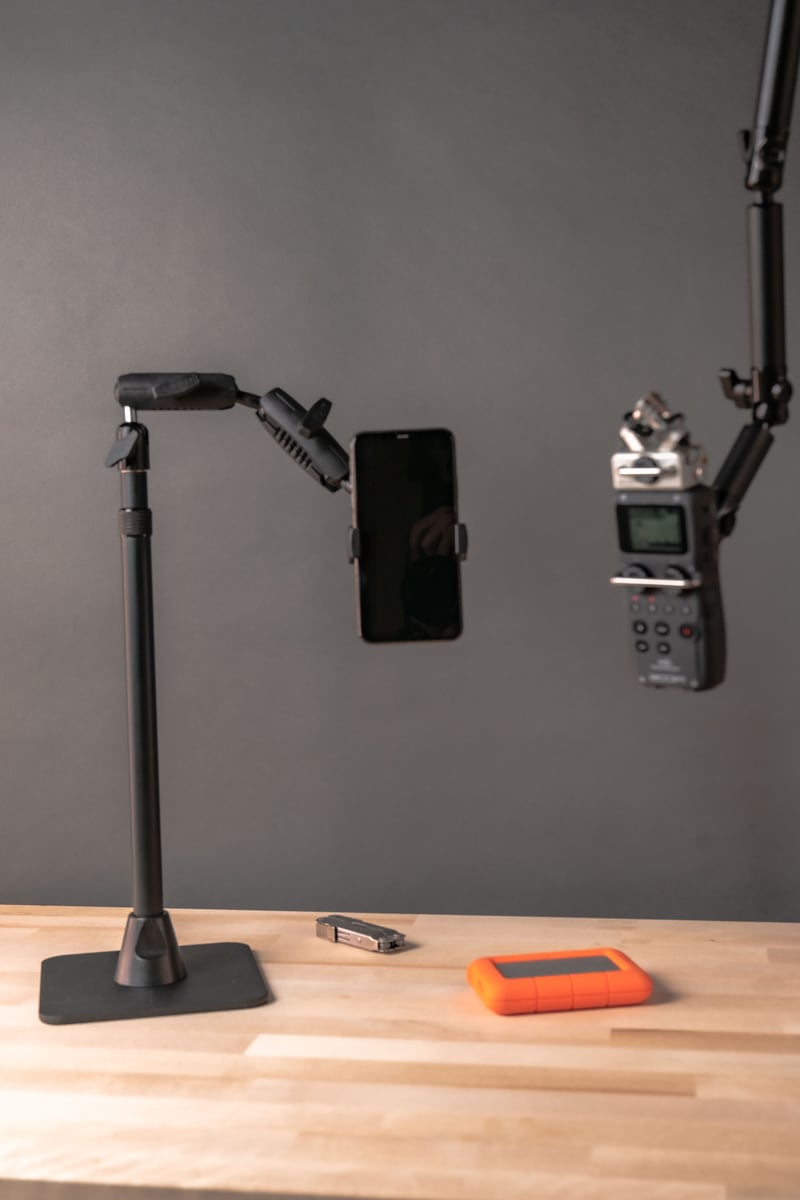
Overhead phone setup for cooking, crafting, and livestream demos.
An overhead livestream setup solves these fundamental filming challenges. Whether you're demonstrating cake decorating techniques, showing off your latest craft project, or walking viewers through a recipe, positioning your camera directly above your workspace creates that perfect bird's-eye view that keeps audiences engaged while freeing up your hands completely.
Understanding the Benefits of Overhead Positioning
The advantages of overhead mounting extend far beyond convenience. When your camera captures everything from directly above, viewers see every detail without obstruction from your hands or body. This perspective works particularly well for process-driven content where technique matters.
Food bloggers rely on overhead shots for recipe videos because they show ingredient placement, mixing techniques, and plating details that side angles miss. Artists use them for time-lapse creations where brush strokes and color blending need clear visibility. Educators find overhead positioning perfect for hands-on demonstrations where students need to follow along step by step.
Professional overhead setups also provide consistency that builds viewer trust. When your framing stays steady and your lighting remains even, audiences focus on your content rather than technical distractions. This reliability becomes especially important during live streaming where you can't edit out mistakes.
The key lies in understanding which mounting components work together to create stable, adjustable positioning that matches your specific content needs.
Essential Components of Professional Overhead Phone Mounts
Getting your overhead phone mount for livestreaming right depends on four critical components that determine both stability and creative flexibility.
Base stability forms the foundation of any reliable setup. Your mount needs sufficient weight and footprint to handle modern smartphones without wobbling during long streaming sessions. Look for mounts with heavy-duty metal bases or robust clamp systems that maintain position regardless of desk vibration or accidental bumps. The Stream-Cast Stand Adjustable Overhead Phone Mount for Live Streaming features a weighted metal base that eliminates vibration transfer from your workspace while providing rock-solid positioning.
Ball joint compatibility determines your upgrade path and parts availability. Professional mounts use industry-standard ball sizes: 17mm for lighter setups, 25mm ball systems for mid-range applications, and 38mm/C size for heavy-duty configurations. This standardization means you can mix components from different manufacturers or upgrade individual parts without replacing your entire system. iBOLT's 300+ modular parts follow these industry standards for maximum compatibility.
Adjustment range affects your creative possibilities. Quality overhead mounts offer 360-degree rotation, height adjustment from 12-36 inches, and precise angle control through multiple pivot points. This flexibility lets you frame shots exactly as needed, whether you're demonstrating intricate crafts, filming cooking processes, or unboxing products of varying sizes. The Stream-Cast Stand Adjustable Overhead Phone Mount provides multi-axis adjustment with secure locking mechanisms at each joint.
Construction materials directly impact longevity and performance under continuous use. Industrial-grade aluminum and heavy-gauge steel construction ensure your mount maintains positioning accuracy through hundreds of streaming sessions. Powder coating resists wear while providing a professional appearance that looks good when visible in your shots.
Overhead Camera Mount Options: Comparing Phone and DSLR Solutions
Choosing between phone and DSLR mounting comes down to your image quality requirements, content complexity, and setup preferences. Each approach offers distinct advantages for different streaming scenarios.
Phone mounts excel in simplicity and quick deployment. Modern smartphones deliver excellent video quality for most content types while offering built-in streaming capabilities through apps like Instagram Live, Facebook Live, or dedicated streaming software. For cooking tutorials, craft demonstrations, or educational content, phone quality often exceeds viewer expectations while keeping setup time minimal.
The Stream-Cast Stand Adjustable Overhead Phone Mount provides excellent overhead positioning with its weighted base and fully adjustable arm. When desk space becomes a premium, the Stream-Cast Clamp Adjustable Overhead Phone Mount clamps securely to tables up to 2.5 inches thick, freeing up your entire surface area.
DSLR cameras require more planning but deliver professional image quality with superior low-light performance and lens flexibility. These setups work best for content creators building professional brands or working in challenging lighting conditions. All DSLR mounts require 1/4-20 threading compatibility, which opens up extensive mounting options.
The iBOLT Stream-Cast Overhead Camera Rig Desk Mount for DSLR Cameras handles heavier camera loads while maintaining precise positioning for top-down shots. Its robust aluminum construction supports cameras up to 5 pounds with complete stability.
For versatile camera mounting across different device types, the iBOLT 1/4 20 Camera Screw IncrediBOLT Suction Cup Mount works with action cameras, smaller DSLRs, and any device with standard 1/4-20 threading. This flexibility proves valuable when you need temporary mounting on smooth surfaces like glass tables or whiteboards.
Solving Cooking Content Challenges with Proper Phone Mounting
Food content creators face unique mounting challenges that require specialized solutions. Your phone needs to capture perfect overhead angles while staying clear of steam, avoiding heat damage, and allowing quick cleanup between filming sessions.
Heat management becomes critical in cooking setups. Position your phone 20-24 inches above stovetops to prevent heat damage while maintaining clear coverage of your cooking surface. This height also minimizes shadows from your hands during food preparation and keeps the device away from steam that can fog camera lenses.
The Stream-Cast Clamp Adjustable Overhead Phone Mount (model IBSC-34605) works excellently when clamped to shelving or cabinets above cooking areas. Its adjustable aluminum arm extends up to 24 inches while maintaining stability during active cooking sessions. The industrial-grade construction handles kitchen environments better than plastic alternatives.
For kitchens without suitable clamping surfaces, the Stream-Cast Clamp Bendable Overhead Phone Mount offers flexible positioning. The bendable gooseneck arm adapts to irregular kitchen layouts and allows precise angle adjustments for different cooking techniques, from close-up ingredient prep to wide shots of complete dishes.
Kitchen cleanliness matters for food safety and professional appearance. Choose mounts with easy-to-clean aluminum construction that won't harbor bacteria or retain cooking odors. Position charging cables away from food preparation surfaces, and consider battery packs for cord-free operation during messy cooking demonstrations.
Choosing Between Clamp and Stand Solutions for Desk Streaming
Your desk configuration and streaming requirements determine whether clamp or stand mounting works better for your specific setup. Each approach offers distinct advantages depending on your workspace constraints and content style.
Clamp mounts work exceptionally well when you need maximum desk surface area. They attach directly to desk edges or shelves, keeping your entire workspace clear for props, notes, or multiple devices. This approach proves ideal for educational content where you're demonstrating techniques alongside reference materials, or for product reviews where you need space for multiple items.
However, clamp compatibility requires consideration. Glass-top desks, unusually thick surfaces, or desks without accessible edges can limit clamp mounting options. The Stream-Cast Clamp Adjustable Overhead Phone Mount accommodates desk thickness up to 2.5 inches with its adjustable clamp mechanism.
Weighted stand solutions offer superior portability and universal desk compatibility. The iBOLT Stream-Cast sPro2 Phone Stand features a heavy-duty metal weighted base that sits securely on any flat surface without requiring clamps or permanent installation. This makes it perfect for shared workspaces, glass desks, or situations where you frequently move your streaming setup between locations.
For tablet streamers who need larger screens for presentations or script reading, the iBOLT Stream-Cast TabDock Tablet Stand provides the same weighted stability for 7-10 inch tablets. The adjustable arm accommodates various tablet sizes while maintaining stability during long streaming sessions.
Building Multi-Device Overhead Mount Configurations
Advanced content creation often requires multiple devices capturing different angles or performing separate functions simultaneously. Food bloggers might show ingredient prep on one device while demonstrating cooking technique with another. Educators could present visual aids on a tablet while filming handwritten explanations with their phone.
The iBOLT Stream-Cast Dual sPro2™ Phone Stand handles dual phone configurations elegantly, positioning two devices at different heights and angles for comparison shots or multi-perspective coverage. Its heavy-duty weighted base keeps both phones stable during extended filming sessions while providing independent adjustment for each device.
For creators mixing phones with tablets, the 3 Camera Phone & Tablet Slide Bar - 10 inch offers incredible configuration flexibility. This aluminum slider bar accommodates smartphones, tablets, and cameras simultaneously through three ¼"-20 camera screw attachments. Mount it overhead for recipe demonstrations where you're displaying ingredients on tablet while filming preparation with your phone.
The most ambitious creators should consider the iBOLT Stream-Cast Creator Custom mount kit. With over 60 different mounting combinations possible, this comprehensive kit builds everything from dual overhead phone rigs to complex camera slider configurations. The modular design means you can reconfigure setups for different content types without purchasing additional components.
These multi-device configurations ensure your overhead livestream setup grows with your content ambitions, whether you're starting with dual phones or building elaborate productions that rival professional studios.
Installation Best Practices and Troubleshooting Common Issues
Proper installation determines whether your overhead mount performs reliably or becomes a source of frustration during critical streaming moments. These tested techniques will help you achieve professional results from day one.
Start by testing your framing at desk height before committing to final positioning. Most creators find that 18-24 inches above the workspace provides ideal coverage without shadows from hands or tools. Mark this position before installing permanent mounts or adjusting weighted stands.
Cable management requires special attention in overhead setups since dangling cables create distractions and safety hazards. Route charging cables along your mount's arm using zip ties or built-in cable channels. For extended streaming sessions, the xProDock NFC Holder keeps charging ports accessible while securing your phone in the mount.
Phone case compatibility often causes mounting problems that seem mysterious until identified. Remove thick cases, wallet cases, or holders with magnetic attachments before mounting, as they prevent secure contact with mounting grips. PopSockets and similar accessories usually need removal for proper mounting function.
If you experience phone drift or position creep during recording, check that all ball joints are properly tightened. The iBOLT 25mm/1 inch Ball to ¼ 20 Camera Screw Mount Adapter provides extra stability when connecting camera accessories to standard mount systems.
Lighting placement affects overhead setups differently than side-angle filming. Avoid positioning lights directly below your overhead mount, as this creates harsh shadows and glare on your workspace. Instead, use diffused lighting from multiple angles to create even illumination across your work area.
Matching Mount Selection to Your Content Creation Style
Your specific content type should drive mount selection decisions. Different creators have varying stability needs, adjustment requirements, and workspace constraints that favor particular mounting solutions.
Cooking shows and active craft tutorials benefit from the rock-solid stability of the Stream-Cast Stand Adjustable Overhead Phone Mount at $79.95. Its weighted base won't shift during vigorous mixing or detailed handwork, while 360-degree rotation captures multiple cooking stations without repositioning the entire mount. The extended reach keeps phones safely away from heat and steam while maintaining perfect overhead coverage.
Unboxing videos and product reviews often work better with permanent installations when filmed regularly in dedicated spaces. The Stream-Cast Overhead Ceiling/Wall Mount at $149.95 supports both smartphones and DSLR cameras through industry-standard ¼"-20 threading. This permanent solution eliminates setup time for creators who stream daily from the same location.
Budget-conscious streamers who need reliable positioning should explore the Stream-Cast Clamp Adjustable Overhead Phone Mount at $79.95. This mount attaches to desks or shelves without drilling while providing aluminum construction and 25mm ball joint reliability that matches more expensive solutions.
Space-constrained creators benefit from bendable gooseneck designs that adapt to tight setups, while those with dedicated studio spaces can invest in ceiling-mounted solutions for maximum flexibility. Match your mount's reach to your typical content area, your budget to streaming frequency, and mounting style to workspace limitations for optimal results.
Product Options


Frequently Asked Questions
Q: What's the ideal height for an overhead livestream setup?
A: Position your camera 18-24 inches above your workspace for optimal coverage without hand shadows. This height provides clear visibility of your entire work area while keeping the device safely away from steam or heat sources in cooking setups.
Q: Can I use my thick phone case with overhead phone mounts?
A: Remove thick cases or wallet cases before mounting, as they often prevent secure attachment. The xProDock NFC Holder accommodates slim cases while keeping charging ports accessible for long streaming sessions.
Q: What ball joint size should I choose for my overhead mount?
A: For phones and lightweight cameras, 25mm ball joints provide excellent stability and adjustment range. Heavy DSLR setups require 38mm ball systems for proper support. All iBOLT mounts use industry-standard ball sizes for cross-compatibility with other manufacturers.
Q: How do I prevent cable mess in my overhead setup?
A: Route charging cables along your mount's arm or use cable clips to secure them. Keep power cables away from your workspace, especially in cooking setups. Choose mounts with cable management features built into the design for cleaner installations.
Q: What's the difference between clamp and stand mounts for desk streaming?
A: Clamp mounts attach to desk edges, saving surface space but requiring compatible desk thickness up to 2.5 inches. Stand mounts with weighted bases work on any flat surface and offer portability but take up some desk space. Choose based on your desk type and mobility needs.
Q: Can I connect multiple devices to one overhead mount?
A: Yes, with appropriate accessories. The 3 Camera Phone & Tablet Slide Bar accommodates multiple devices, while dual phone stands like the Stream-Cast Dual sPro2 handle two phones simultaneously with independent adjustment.
Whether you're starting your content creation journey or upgrading from a basic handheld setup, investing in quality overhead mounting transforms your production value immediately. The combination of hands-free operation, consistent framing, and professional angles makes overhead setups essential tools for serious content creators who want their technique and creativity to shine through clearly.
Explore our selection of overhead mounts to find the perfect livestream setup for your content style and workspace requirements.

Leave a comment
This site is protected by hCaptcha and the hCaptcha Privacy Policy and Terms of Service apply.