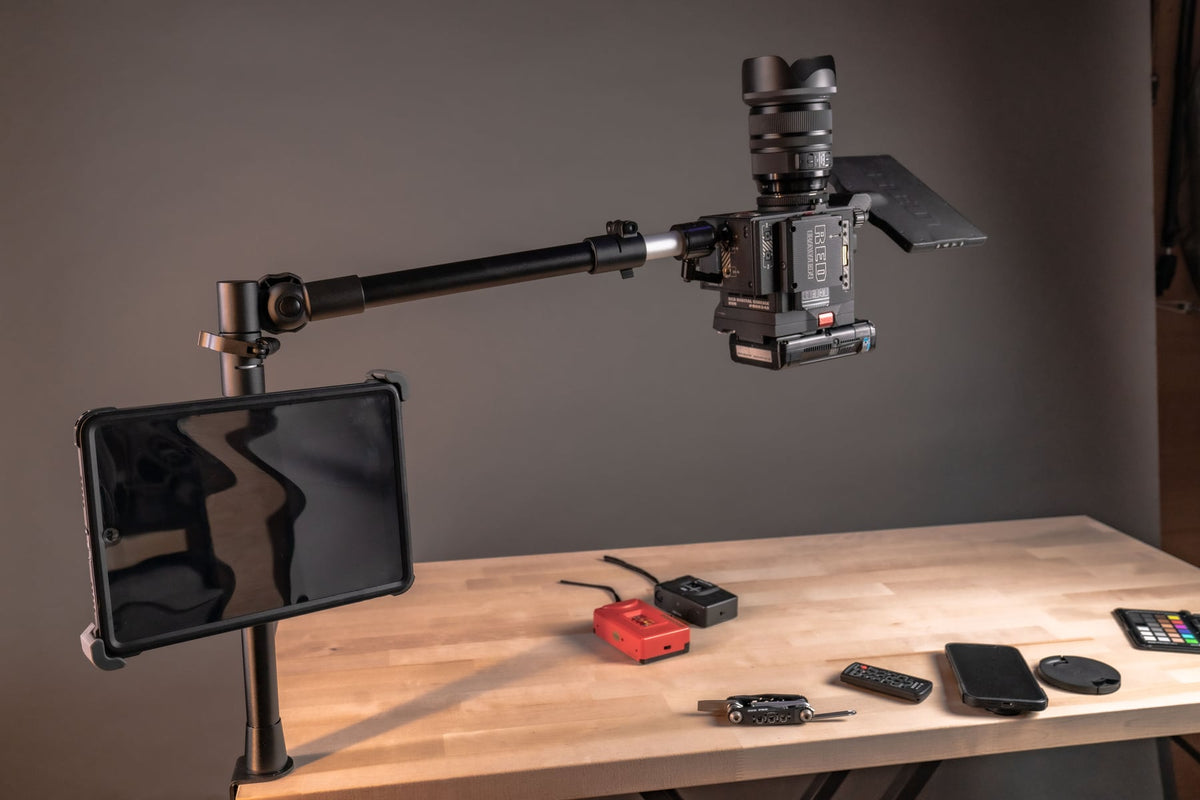
Camera position affects everything about how your content looks: framing, focus consistency, shadow control, and whether viewers can actually see what you're demonstrating. Handheld shooting introduces shake. Floor tripods take up space and rarely get a clean overhead angle. For creators working at a desk, a table camera mount solves both problems by giving the camera a fixed, repeatable position directly above or in front of the workspace.

This guide covers what a table camera mount does, where it works best, and what to check before you buy one so it actually fits your camera, your desk, and your workflow.
What a Table Camera Mount Is and How It Works
A table camera mount is a clamp-based support that attaches to the edge of a desk or table and holds a camera in a fixed position, usually on an adjustable arm or extension pole. Instead of a tripod's three legs taking up floor space, the mount's footprint stays on the desk itself.
These mounts are commonly used with:
- DSLR cameras
- Mirrorless cameras
- Webcams
- Action cameras
- Compact digital cameras
- Smartphones, with a compatible phone clamp or adapter
The iBOLT Stream Cast overhead camera rig is built specifically for this use case, with a desk clamp and an arm designed to hold a DSLR in either a top-down or front-facing position. Before ordering any table mount, confirm the clamp's opening range against your actual desk thickness and check the stated weight capacity against your camera body plus lens plus any accessories, since that combined weight is what the mount has to carry all day.
Why Stability and Repeatable Framing Matter
Camera shake and inconsistent positioning show up immediately in finished footage. A secure mount helps you:
- Maintain consistent framing shot to shot and session to session
- Reduce unwanted movement during recording
- Improve sharpness, especially in close-up or overhead shots
- Set up faster because the position is already dialed in
- Avoid mid-recording adjustments that interrupt a take
For anyone recording tutorials, product demos, or livestreams on a regular schedule, a mount that returns to the same position every time removes a variable you'd otherwise have to correct in every session.
Common Uses for a Table Camera Mount
Overhead Photography and Video
The most common use case is a true top-down angle: product photography, food content, craft and drawing tutorials, unboxing videos, and classroom demonstrations. A tripod can struggle to get directly overhead without the legs getting in the frame or the setup feeling unstable. A desk-clamped arm solves that by extending the camera out over the work surface from a fixed base.
Live Streaming
Streamers often run a face camera and a separate desk-view or product camera at the same time. A table mount keeps the secondary angle locked in place for the entire stream, which matters more than it sounds like when a shifted camera means re-framing mid-broadcast.
Online Teaching and Training
Instructors who need to show documents, books, lab materials, or physical objects during a virtual class benefit from a stable overhead or angled view that doesn't require holding a device or repositioning between segments.
Product Demonstrations
Electronics reviews, assembly instructions, and step-by-step tool demos all rely on the viewer being able to see hands and materials clearly. A fixed overhead or front-facing mount keeps that view consistent through the whole demo.
Video Conferencing
A mounted camera at the right height and distance improves eye-level alignment and frees up desk space compared to a laptop camera or a webcam propped on a stack of books.
What to Verify Before You Buy
Fitment problems are the most common complaint with camera mounts, and most of them are avoidable by checking a few things up front:
- Desk thickness and edge type: confirm the clamp's opening range fits your desk, and check whether the edge is straight, rounded, or has a lip that could interfere with the clamp.
- Camera weight with lens attached: weigh your actual setup, not just the camera body, and compare it to the mount's rated capacity with some margin left over.
- Reach and working distance: for overhead shots, measure how far the camera needs to extend from the desk edge to fully frame your work surface.
- Mounting interface: check whether the arm ends in a standard camera screw, a quick-release plate, or a proprietary connector, and whether that matches your camera or requires an adapter.
- Cable routing: plan where USB, HDMI, or power cables will run so they don't pull on the camera or create a snag hazard on a desk you're actively working at.
- Adjustment range: confirm the arm allows the height, angle, and rotation you actually need for both overhead and front-facing use if you plan to switch between them.
None of this takes long to check, but skipping it is how people end up with a mount that's rated for the weight but physically too short, or one that clamps fine but can't reach far enough over the desk for a full overhead shot.
Table Camera Mount vs. Tripod
Tripods are still the right tool for wide-room setups, outdoor shooting, or situations where the camera needs to move around a space. But for desk-based work, a table mount has real advantages:
- Saves floor space in small studios, home offices, or shared workspaces.
- Better overhead angles without fighting tripod legs for a clean top-down shot.
- Consistent setup between sessions since the clamp position doesn't change.
- Cleaner workspace since the equipment stays attached to the desk instead of standing on the floor.
Who Benefits Most
A table camera mount is useful for content creators, YouTubers, live streamers, photographers, educators, online instructors, product reviewers, artists, crafters, and remote professionals. The common thread is any workflow that needs the same camera position available repeatedly without resetting it by hand each time.
Related iBOLT Mounting Options

iBOLT Stream-Cast Overhead Camera Rig Desk Mount for DSLR Cameras for Top Down and Front Facing Photography
A good fit for phone and camera setups used in recording, streaming, and overhead shots.

iBOLT Dual Tablet- Tripod Slider Bar
A good fit for phone and camera setups used in recording, streaming, and overhead shots.

Stream-Cast Stand Adjustable Overhead Phone Mount for Live Streaming
A good fit for phone and camera setups used in recording, streaming, and overhead shots.

Stream-Cast Stand Adjustable Overhead Phone Mount
A good fit for phone and camera setups used in recording, streaming, and overhead shots.
Frequently Asked Questions
What is a table camera mount?
It's a clamp-based support that attaches to a desk or table edge and holds a camera in a fixed position for photography, video, streaming, or video calls, usually via an adjustable arm.
What cameras work with a table camera mount?
Most mounts support DSLR, mirrorless, webcam, action camera, and compact camera bodies. Smartphone use typically requires a separate phone clamp adapter. Always check the mount's rated weight capacity against your camera plus lens.
Will a table camera mount fit my desk?
That depends on your desk's thickness and edge shape. Check the clamp's stated opening range and edge compatibility before buying, since desks vary widely in construction.
Is a table camera mount better than a tripod for overhead shots?
For true top-down angles at a desk, yes, a table mount is generally easier to position cleanly than a tripod, which can struggle with true overhead framing without the legs intruding on the shot.
Can I use a table camera mount for live streaming with two cameras?
Yes. Many streamers mount a secondary desk-view or product camera on a table mount while using a separate face camera, since the fixed position keeps that second angle from shifting mid-stream.
What should I check before buying a table camera mount?
Verify desk thickness compatibility, combined camera and lens weight against the mount's rated capacity, the reach needed for overhead framing, the mounting interface for your camera, and how you'll route cables without straining the connection.

Leave a comment
This site is protected by hCaptcha and the hCaptcha Privacy Policy and Terms of Service apply.