Ball Mount Sizes Explained: How to Connect 17mm, 22mm, and 25mm Systems
Problem proposition: Buyers mixing phone holders, GPS arms, and AMPS plates often stall because they cannot identify which ball size they have or which adapter bridges the gap, so this article maps the common ball standards and shows exactly which iBOLT adapters solve the mismatch.
Featured product links: iBOLT 25mm / 1 inch to Dual 22mm Ball Adapter, iBOLT 25mm / 1 inch to Dual 17mm Metal Ball Adapter
Ball Mount Sizes Explained: How to Connect 17mm, 22mm, and 25mm Systems
You found a great mounting arm. You already own a solid phone holder. But when you try to connect them, the ball is the wrong size and nothing locks. This is one of the most common frustrations in device mounting, and it happens because the industry uses several ball standards that look similar but are not interchangeable without the right adapter.
This guide maps the most common ball sizes, explains where each one shows up, and shows you which iBOLT adapters close the gap so you can reuse the hardware you already own.
Why Ball Size Matters More Than You Think
A ball-and-socket mount works by seating a spherical ball inside a matching socket. Tighten the socket and friction locks the angle. Loosen it and you can reposition the device in seconds. The mechanism is simple, which is exactly why the ball diameter has to be right. A 17mm ball will rattle inside a 25mm socket. A 25mm ball will not seat in a 22mm socket at all. Forcing the wrong combination damages both parts.
The most common ball sizes you will encounter are:
-
17mm: Used by Garmin GPS devices and a wide range of consumer navigation accessories. If you own a Garmin dash mount, the ball on the back is almost certainly 17mm. Our full breakdown of Garmin ball mount sizing covers this in detail.
-
20mm: A mid-range standard found on many aftermarket phone and tablet holders. Less common than 17mm or 25mm but worth identifying before you buy an arm.
-
22mm: Sits between 20mm and 25mm. Several tablet holders and heavier-duty consumer mounts use this size.
-
25mm (1-inch, B-size): The most widely used standard in professional and commercial mounting. RAM Mounts calls this their B-size. Most iBOLT arms, bases, and heavy-duty holders are built around the 25mm ball.
-
38mm (1.5-inch, C-size): Found on larger industrial arms designed for heavy tablets, rugged computers, and commercial displays.
For a side-by-side comparison of ball sizes alongside AMPS, VESA, and 1/4-20 thread standards, see our complete guide to device mounting standards.
The AMPS Pattern and How It Fits In
AMPS stands for Aeroquip Mounting Pattern Standard. It is a four-hole bolt pattern, not a ball size. Many professional device holders, Garmin cradles, and rugged tablet cases use an AMPS plate on the back. To mount an AMPS device on a ball arm, you need an AMPS adapter plate that accepts the four-hole pattern on one side and presents a ball socket on the other. The ball size on that adapter determines which arm it connects to. This is where buyers often get confused: they search for an AMPS adapter without specifying the ball size, then receive a part that does not match their arm.
Before ordering any adapter, measure or confirm three things: the ball diameter on your existing arm, the socket size on your holder or cradle, and the weight of the device you are mounting. Heavier devices need metal construction throughout the load path, not just at the base.
When You Need a Dual-Ball Adapter
A dual-ball adapter solves a specific problem: your arm terminates in one ball size, but your holder or cradle expects a different size. Instead of replacing the arm or the holder, you insert an adapter that accepts the arm's ball on one end and presents the correct ball size on the other end.
iBOLT makes two versions for the most common conversion scenarios.
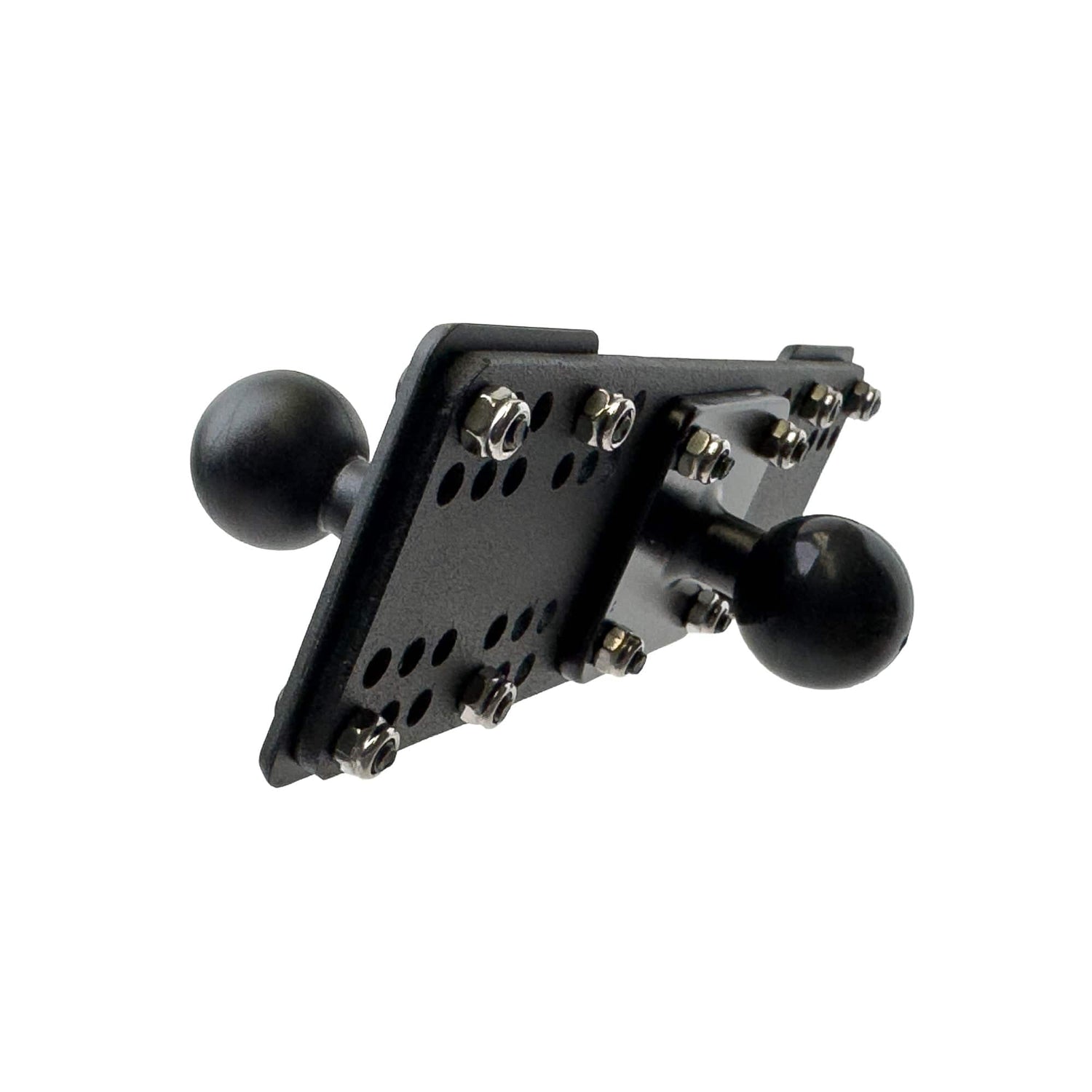
If your arm ends in a 25mm ball and your holder uses a 22mm socket, the iBOLT 25mm to Dual 22mm Ball Adapter is the direct solution. It accepts a standard 1-inch or 25mm arm ball on the equipment plate side and presents two 22mm balls, giving you a compatible connection point for 22mm holders and cradles. The equipment plate is metal and the balls are heavy-duty composite.

iBOLT 25mm / 1 inch to Dual 22mm Ball Adapter - $29.95
If your arm ends in a 25mm ball and your holder uses a 17mm socket, such as a Garmin cradle or a smaller phone holder built around the 17mm standard, the iBOLT 25mm to Dual 17mm Metal Ball Adapter handles that conversion. It is built entirely from metal and is compatible with all industry-standard 1-inch or 25mm mounting arms.

iBOLT 25mm / 1 inch to Dual 17mm Metal Ball Adapter - $34.95
Both adapters let you keep your existing arm and base rather than replacing the whole system. That matters when your base is already drilled into a dash, bolted to a forklift, or clamped to a boat rail.
Measuring Before You Order
The single most common support question we receive is from buyers who ordered the wrong adapter because they estimated the ball size by eye. Ball sizes are close enough that a 17mm and a 20mm look nearly identical without calipers. Here is a reliable process:
-
Use digital calipers to measure the ball diameter at its widest point.
-
Check the socket opening on the receiving part, not just the ball on the sending part.
-
Note the device weight, because adapters have load ratings and stacking multiple adapters reduces the effective rating.
-
Confirm arm length and reach so the adapter does not push the device out of comfortable viewing range.
-
Check whether your surface type, dash, rail, desk, or pole, affects which base you should pair with the arm.
Our ball mounts explained guide walks through each of these checkpoints with diagrams and size references.
Building a Modular System That Travels With You
One of the practical advantages of standardized ball sizes is that you can move components between vehicles, workstations, and environments without buying a new system each time. A 25mm arm base installed in your truck can accept the same holder you use at your desk if both use 25mm sockets. Add an adapter and that same arm can also accept a Garmin cradle or a 17mm-socket tablet holder.
iBOLT's modular approach is built around this idea. Bases, arms, holders, and adapter plates are designed to combine across trucks, boats, forklifts, restaurants, and office desks. Our modular mounting system guide shows how the parts stack together across more than 300 configurations.
Frequently Asked Questions
What ball size does Garmin use?
Most Garmin GPS devices use a 17mm ball on their cradle or mount base. If you want to connect a Garmin cradle to a 25mm arm, you need a 25mm-to-17mm adapter such as the iBOLT 25mm to Dual 17mm Metal Ball Adapter.
Is 25mm the same as 1-inch?
Yes. The 25mm ball is also called the 1-inch or B-size ball. These terms refer to the same standard and the parts are interchangeable.
Can I stack two adapters to go from 25mm to 17mm to a smaller size?
Technically possible, but not recommended. Each adapter junction adds play and reduces the effective load rating. Use a single adapter that bridges the two sizes you need directly.
What is an AMPS adapter?
An AMPS adapter accepts the four-hole AMPS bolt pattern used on many device cradles and presents a ball socket on the other side. The ball size on the adapter must match your arm. Always confirm ball size when ordering an AMPS adapter.
Do iBOLT adapters work with RAM Mounts arms?
iBOLT adapters are compatible with industry-standard ball sizes. A 25mm iBOLT adapter will seat on any arm that uses a standard 1-inch or B-size ball, regardless of brand.

Leave a comment
This site is protected by hCaptcha and the hCaptcha Privacy Policy and Terms of Service apply.